
Apple's smart home platform, HomeKit, has grown significantly since its 2015 launch, and there are now dozens of HomeKit products on the market that include everything from lights and smart outlets to thermostats, fans, cameras, and locks.

There are so many HomeKit products available that you can essentially outfit an entire house with smart accessories, but it can be tough to figure out the best HomeKit products if you're new to the ecosystem. In our latest YouTube video, we've rounded up several of our favorite HomeKit products.


Our video encompasses several product categories, including smart locks, connected lights, smart outlets for adding HomeKit functionality to any appliance or device, thermostats, buttons for easier control, and more. Products mentioned in the video are listed below with prices and purchase links:

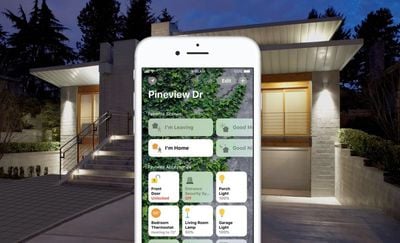
HomeKit products are designed to allow all of your devices to be controlled via the Home app and through Siri commands. The platform includes scenes, automations, triggers, and more, allowing for you to automate the smart home products you own.
homekit
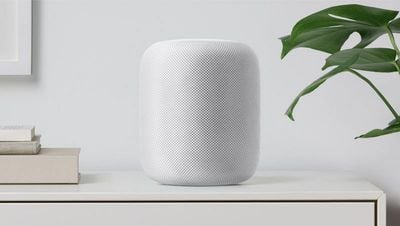
You can control HomeKit devices using an iPhone, iPad, or iPod touch, but we wanted to give a special shoutout to the HomePod, Apple's smart speaker. The $349 HomePod speaker has built-in Siri capabilities and an exceptional microphone, plus it serves as a Home hub, making it a great method of control for your HomeKit devices.
HomePod on shelf 800x451
HomeKit functionality may expand significantly in the near future, thanks to iOS 11.3, which introduces software authentication so existing products can be updated with HomeKit support. Prior to iOS 11.3, special hardware was required, with companies required to add a chip to an accessory to introduce HomeKit support. With that limitation lifted, HomeKit adoption may see rapid growth.

Do you have favorite HomeKit products we didn't mention in the video? Let us know in the comments.


Top Rated Comments

SlaunchaMan Avatar
102 months ago
I’ve been outfitting my house with Leviton Decora Smart light switches and dimmers. I think it’s a lot more convenient to do light switches instead of the lights themselves; you don’t need to use an app if you don’t want to as the physical switch still works, you can replace the light bulbs at will, and they’re easy to wire in as you replace existing light switches. The only downside is that they can be hard to fit inside the wall box; if you’re putting a new one in, do yourself a favor and get the extra-deep boxes.
Score: 7 Votes (Like | Disagree)
cdavis11 Avatar
102 months ago
('https://www.geekwebguides.com/2018/04/10/best-homekit-products/')


Do you have favorite HomeKit products we didn't mention in the video? Let us know in the comments.

Article Link: The Best HomeKit Products You Can Buy ('https://www.geekwebguides.com/2018/04/10/best-homekit-products/')
Schlage Sense deadbolt is outstanding.

Lutron Caseta switches have been rock solid for me.

The Logi Circle 2 (wired) camera is also very good.
Score: 6 Votes (Like | Disagree)
avanpelt Avatar
102 months ago
As is the case with most Apple products I own, Siri is the weakest link. Trying to control HomeKit stuff with Siri is a mediocre experience, at best; and it can be downright infuriating if I've already been having a bad day.

Trying to control HomeKit devices with Siri on my Apple Watch (Series 2) is often an exercise in futility. Usually at least once a day, I'll summon Siri only to feel my wrist vibrate while I'm in the middle of the command and the screen will say, "Sorry, I didn't get that." Last night, Siri interrupted me on the watch no fewer than three times while I was saying 'Good night' to tell me that it 'didn't get that'. Usually at least once a week, Siri on my watch will say that some or all of the HomeKit devices I've issued the command for aren't responding. Meanwhile, I'll take my iPhone out of my pocket, summon Siri on it, and it will "magically" be able to control my HomeKit devices on the first try.

The issue with Siri's seeming lack of HomeKit connectivity isn't only related to the watch, but I experience it most on the watch. I've also experienced the same issue on my iPhone, though, where it will say that my devices aren't responding the first time, but if I simply summon Siri again and repeat the same command, it works the second time. All that to say, I hope Apple improves HomeKit reliability and Siri reliability in iOS 12/watchOS 5.
Score: 5 Votes (Like | Disagree)
nyctravis Avatar
102 months ago
Schlage Sense deadbolt is outstanding.
Ditto! Love mine.
Score: 4 Votes (Like | Disagree)
green94 Avatar
102 months ago
I'm not entirely sure, honestly. I don't know the nitty gritty details of how it works, just that companies who are interested in implementing support for HomeKit no longer necessarily need to use the physical chip.
Really wish Nest would integrate although I’m not holding my breath.
Score: 3 Votes (Like | Disagree)
varunsanthanam Avatar
102 months ago
('https://www.geekwebguides.com/2018/04/10/best-homekit-products/')


Apple's smart home platform, HomeKit ('https://www.apple.com/ios/home'), has grown significantly since its 2015 launch, and there are now dozens of HomeKit products ('https://www.apple.com/ios/home/accessories/') on the market that include everything from lights and smart outlets to thermostats, fans, cameras, and locks.

There are so many HomeKit products available that you can essentially outfit an entire house with smart accessories, but it can be tough to figure out the best HomeKit products if you're new to the ecosystem. In our latest YouTube video, we've rounded up several of our favorite HomeKit products.


Subscribe to the MacRumors YouTube channel ('//www.youtube.com/user/macrumors?sub_confirmation=1') for more videos.

Our video encompasses several product categories, including smart locks, connected lights, smart outlets for adding HomeKit functionality to any appliance or device, thermostats, buttons for easier control, and more. Products mentioned in the video are listed below with prices and purchase links:

* August Smart Lock Pro ('http://august.com/products/august-smart-lock/') ($220 ('https://www.amazon.com/August-Smart-Lock-Pro-generation/dp/B0765JNS2D'))
* Yale Assure Lock with iM1 Network Module ('https://www.yalehome.com/en/yale/yalehome/residential/yale-real-living/assure-lock/im1-network-module') ($200 ('https://www.amazon.com/Yale-Assure-Lock-Free-Touchscreen/dp/B075RW167K'))
* Philips Hue Lights and Hue Tap ('https://www2.meethue.com/en-us/friends-of-hue/apple-homekit') ($134 for a Hue White Starter Kit ('https://www.amazon.com/Philips-Ambiance-Starter-HomeKit-Assistant/dp/B07353SKDD/'), $49 for Hue Tap ('https://www.amazon.com/Philips-473363-Dimmer-Switches-White/dp/B079P5H2WG'))
* LIFX ('https://www.lifx.com/products/lifx-mini-white') (Starting at $25 ('https://www.amazon.com/s/ref=nb_sb_noss_2?url=search-alias%3Daps&field-keywords=HomeKit+LIFX&rh=i%3Aaps%2Ck%3AHomeKit+LIFX') for LIFX Mini White)
* Nanoleaf Light Panels ('https://nanoleaf.me/en/consumer-led-lighting/products/smarter-series/nanoleaf-light-panels-smarter-kit/') ($230 ('https://www.bestbuy.com/site/nanoleaf-aurora-rhythm-smarter-kit/6039500.p?skuId=6039500'))
* Sensi Touch Thermostat ('https://sensicomfort.com/products/touch-thermostat') ($150 ('https://www.amazon.com/Emerson-Thermostat-Touchscreen-Display-ST75/dp/B01N3CEUDH/'))
* Ecobee4 Thermostat ('https://www.ecobee.com/ecobee4') ($250 ('https://www.amazon.com/ecobee4-Thermostat-Sensor-Amazon-Built/dp/B06W2LQY6L'))
* iDevices Switch ('https://store.idevicesinc.com/idevices-switch/') ($30 ('https://www.amazon.com/iDevices-Switch-Energy-Monitoring-Required/dp/B00U31IO3Q'))
* Logitech Pop Smart Button ('https://www.logitech.com/en-us/product/pop-smart-button') ($60 ('https://www.amazon.com/Logitech-Button-One-Touch-Control-Devices/dp/B071GR172S'))
* Elgato Eve Button ('https://www.elgato.com/en/eve/eve-button') ($50 ('https://www.amazon.com/Elgato-Eve-Button-Connected-technology/dp/B0789FGSJ9'))

HomeKit products are designed to allow all of your devices to be controlled via the Home app and through Siri commands. The platform includes scenes, automations, triggers, and more, allowing for you to automate the smart home products you own.


You can control HomeKit devices using an iPhone, iPad, or iPod touch, but we wanted to give a special shoutout to the HomePod, Apple's smart speaker. The $349 HomePod speaker has built-in Siri capabilities and an exceptional microphone, plus it serves as a Home hub, making it a great method of control for your HomeKit devices.


HomeKit functionality may expand significantly in the near future, thanks to iOS 11.3, which introduces software authentication so existing products can be updated with HomeKit support. Prior to iOS 11.3, special hardware was required, with companies required to add a chip to an accessory to introduce HomeKit support. With that limitation lifted, HomeKit adoption may see rapid growth.

Do you have favorite HomeKit products we didn't mention in the video? Let us know in the comments.

Article Link: The Best HomeKit Products You Can Buy ('https://www.geekwebguides.com/2018/04/10/best-homekit-products/')
I'm not sure how the Lutron Caseta isn't on this list -- it isn't just the best HomeKit product I own, it's also the best smart home product period that I use. My 4600 sq. ft. house is outfitted with dozens of them. Telling Siri to 'turn off the lights downstairs' is the greatest feature ever.
Score: 3 Votes (Like | Disagree)

Popular Stories

Apple Logo Zoomed

Tim Cook Teases Plans for Apple's Upcoming 50th Anniversary

Thursday February 5, 2026 12:54 pm PST by
Apple turns 50 this year, and its CEO Tim Cook has promised to celebrate the milestone. The big day falls on April 1, 2026. "I've been unusually reflective lately about Apple because we have been working on what do we do to mark this moment," Cook told employees today, according to Bloomberg's Mark Gurman. "When you really stop and pause and think about the last 50 years, it makes your heart ...
wwdc sans text feature

Apple Rumored to Announce New Product on February 19

Thursday February 5, 2026 12:22 pm PST by
Apple plans to announce the iPhone 17e on Thursday, February 19, according to Macwelt, the German equivalent of Macworld. The report, citing industry sources, is available in English on Macworld. Apple announced the iPhone 16e on Wednesday, February 19 last year, so the iPhone 17e would be unveiled exactly one year later if this rumor is accurate. It is quite uncommon for Apple to unveil...
Finder Siri Feature

Why Apple's iOS 26.4 Siri Upgrade Will Be Bigger Than Originally Promised

Friday February 6, 2026 3:06 pm PST by
In the iOS 26.4 update that's coming this spring, Apple will introduce a new version of Siri that's going to overhaul how we interact with the personal assistant and what it's able to do. The iOS 26.4 version of Siri won't work like ChatGPT or Claude, but it will rely on large language models (LLMs) and has been updated from the ground up. Upgraded Architecture The next-generation...
maxresdefault

Apple Shows Off a Key Reason to Upgrade to the iPhone 17

Saturday February 7, 2026 9:26 am PST by
Apple today shared an ad that shows how the upgraded Center Stage front camera on the latest iPhones improves the process of taking a group selfie. "Watch how the new front facing camera on iPhone 17 Pro takes group selfies that automatically expand and rotate as more people come into frame," says Apple. While the ad is focused on the iPhone 17 Pro and iPhone 17 Pro Max, the regular iPhone...
iOS 26

iOS 26.3 and iOS 26.4 Will Add These New Features to Your iPhone

Tuesday February 3, 2026 7:47 am PST by
While the iOS 26.3 Release Candidate is now available ahead of a public release, the first iOS 26.4 beta is likely still at least a week away. Following beta testing, iOS 26.4 will likely be released to the general public in March or April. Below, we have recapped known or rumored iOS 26.3 and iOS 26.4 features so far. iOS 26.3 iPhone to Android Transfer Tool iOS 26.3 makes it easier...













