
Zagg Announces New Flex Universal Keyboard for iPhone, iPad, and Apple TV - GeekWebGuides
Skip to Content

Zagg Announces New Flex Universal Keyboard for iPhone, iPad, and Apple TV

by

Zagg today announced the launch of the Zagg Flex Universal Keyboard and Stand, which is designed to work with any Bluetooth device. It can be paired to the iPhone, iPad, Apple TV, and more, along with smart TVs, other tablets, and other smartphones.

The Flex Universal Keyboard features a slim protective cover that keeps it safe when in a bag or a purse. When in use, the cover turns into a built-in stand that can hold any-sized smartphone or tablet at an ideal viewing angle.
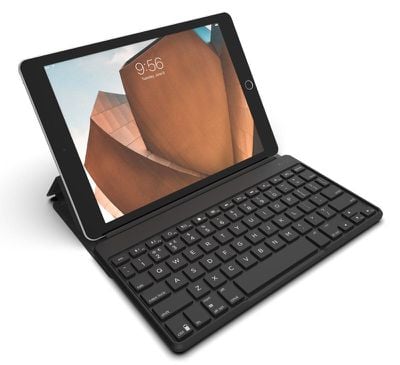
zaggflexkeyboard
Zagg has included support for multi-device pairing so the keyboard can be connected simultaneously to two devices, with a toggle available to switch between them.

Laptop-like keys offer a comfortable typing experience while on the go and backlighting for the keys allows the keyboard to be used in low-light conditions. A built-in battery lasts for up to one year before needing to be recharged.

According to Zagg, the Flex keyboard and cover have been designed to be detachable so it can also be used sans cover with devices that don't require a stand.

Zagg's Flex Universal Keyboard can be purchased from the Zagg website for $79.99. It will ship out to customers starting on September 19.


Tag: Zagg

Top Rated Comments

106 months ago
Have you ever actually spent any consistent amount of time with the MBP keyboard? It took me a little bit to get used to, but I actually really like it at this point.

I honestly wonder how many people who bitch about the butterfly keyboard have actually used it...
Yeah, I have. I spent a month with the butterfly keyboard and it sucked the whole time. I didn't even get to the part where it starts jamming two years into its life like my daughter's has started to. Not sure how long I was supposed to "get used to" the keyboard to earn the right to "bitch" (as you so eloquently put it), but a month was enough for me and I got rid of the machine. First Mac in 25 years of buying Macs that I've gotten rid of immediately after buying it. And I've typed on some mushy old PowerBook and iBook keyboards.

Sorry, but a keyboard that people spend a lot of time "getting used to" and which turns off a significant percentage of users is a design fail, period. You remember how many people had split opinions about the previous generation of MacBook keyboards, how there were tons of threads with people complaining they didn't like it, or rushing to defend it? Oh right -- you don't. Because nobody had **** to say about it. It was a normal keyboard, basically invisible to the user, because it met people's expectations of what a keyboard feels like.
Score: 3 Votes (Like | Disagree)
106 months ago
Sad day when an aftermarket iPad keyboard is probably more “laptop-like” than the one built into Apple’s currently laptops.
Have you ever actually spent any consistent amount of time with the MBP keyboard? It took me a little bit to get used to, but I actually really like it at this point.

I honestly wonder how many people who bitch about the butterfly keyboard have actually used it...
Score: 3 Votes (Like | Disagree)
106 months ago
I never thought about using the Apple keyboard. Does the keyboard also adjust brightness and sound?
It does! Very handy. The media playback buttons work as well.
[doublepost=1535951887][/doublepost]
I think it does yeah. I haven't used it with my ipad in a while but I seem to remember it doing that. Needs verification from someone else, or pop into an apple store and ask staff for a try.

I should have mentioned my broken delete key remapping to the power key for my old Apple Wireless Keyboard only works when connected to a Mac. When connected to iphone or ipad, delete doesn't work, and remapping I dont think is possible. However control-h works for delete, as does the various other command key combos.

TBH though I liked the concept, I never really liked the reality of using external keyboards with ipad / iphone - too few words on screen; too awkward to step through emails etc without a mouse or touchpad; and editing / selecting text via touch is a pain in the neck; & I always forget the key combos for selecting text. It's just never worked for me.
Agreed. I’d generally rather be using a Mac. Those keyboard shortcuts are super useful on Mac or iOS. If you get used to using them you can really fly through editing much faster. I clipped this at some point and you might find it useful:

⇧ + ← select left one letter
⇧ + → select right one letter

⌥ + ← move cursor left one word
⌥ + → move cursor right one word

⌥ + ⇧ + ← select backward one word
⌥ + ⇧ + → select forward one word

⌥ + ⌫ delete backward one word
⌥ + ⌦ delete forward one word
Score: 2 Votes (Like | Disagree)
106 months ago
Laptop-like keys offer a comfortable typing experience while on the go
Sad day when an aftermarket iPad keyboard is probably more “laptop-like” than the one built into Apple’s currently laptops.
Score: 2 Votes (Like | Disagree)
RedTomato Avatar
106 months ago
It does! Very handy. The media playback buttons work as well.
[doublepost=1535951887][/doublepost]
Agreed. I’d generally rather be using a Mac. Those keyboard shortcuts are super useful on Mac or iOS. If you get used to using them you can really fly through editing much faster. I clipped this at some point and you might find it useful:

⇧ + ← select left one letter

⇧ + → select right one letter

⌥ + ← move cursor left one word

⌥ + → move cursor right one word

⌥ + ⇧ + ← select backward one word

⌥ + ⇧ + → select forward one word

⌥ + ⌫ delete backward one word

⌥ + ⌦ delete forward one word
Awesome shortcuts - thanks!
Score: 1 Votes (Like | Disagree)
106 months ago
My bad! Sorry. I thought this was a case and keyboard combo. But as it's just the keyboard I guess it'll work with my Air 2.
[doublepost=1535632605][/doublepost]Hmmmmm! Now to decide... The Zagg Flex or Brydge 9.7??? What would you guys suggest?
I had a Brydge for my first iPad Pro, and loved it, though there were couple of annoyances with it. As much as they advertise slipping an iPad in and our of the hinges, it's really designed to be left in. It's also awkward swiping up to access control centre. As much as I liked it, though, I'm currently looking at the Zagg Flex, for the simple reason, that it'll work regardless of future upgrades.
Score: 1 Votes (Like | Disagree)

Popular Stories

M5 MacBook Pro

RIP, MacBook Ultra

Monday October 19, 2026 9:37 am PDT by
Apple today sent out invites for an experience in Los Angeles on Wednesday, October 28, and the "Pro and tell" tagline on the invitation likely means that the rumored MacBook models with touch-enabled OLED displays will stick with MacBook Pro branding instead of the once-rumored "MacBook Ultra" name. The long-rumored "iPhone Ultra" ended up being named iPhone Duo, so speculation that Apple...
iPhone Duo Trio

Here's What Apple's Apps Look Like on the iPhone Duo

Tuesday October 20, 2026 11:12 am PDT by
With just three days to go until the iPhone Duo is released, Apple is getting ready for the launch. Behind the scenes, the App Store now has screenshots of Apple's built-in apps running on the Duo. We've seen some apps in marketing materials, but images of the ones we haven't seen give us an idea of what it will be like using the iPhone Duo day to day. Many apps are shown in landscape...
apple pro tell logo

Apple Announcing New Products Next Week: 'Pro and Tell'

Monday October 19, 2026 9:05 am PDT by
Apple's Greg Joswiak today hinted at new product announcements coming next week, sharing a social media post that says "Can't wait to pro and tell next week." Rumors suggest Apple is planning to debut the new MacBook Pro with an OLED touchscreen display, an M6 entry-level MacBook Pro, an M6 iMac, an iPad mini with an OLED display. Can't wait to pro and tell next week....
Latest Stories
Apple Ordered to Open iPhone to Rival App Stores in Australia
11 minutes ago
Apple Suppliers Face Hurdles Cutting Circuit Board Emissions
37 minutes ago
Things Updated for iPhone Duo With Adaptive Layout
1 hour ago
Simplicity and Siri AI Are HomeView's Killer Features, Apple Says
1 hour ago
iPhone Duo Reviewers Really Miss Face ID
6 hours ago
Does the iPhone Duo Run Hot? Here's What Reviews Found
8 hours ago
Apple Music's New Look is Now Live on Apple's Website
8 hours ago
Anthropic Launches Claude Duet, a Proactive AI Agent
9 hours ago
What 32,000 Folds Did to the iPhone Duo's Hinge
10 hours ago
iPhone Duo's Hidden FaceTime Camera Takes 'Trash' Photos
11 hours ago
iPhone Duo Has 'Edge Light' Feature That Debuted on Macs Last Year
12 hours ago
Apple Support App Updated for iPhone Duo's Larger Display
12 hours ago
Amazon Sweetens the Deal on Entry-Level 16-Inch MacBook Pro With $570 Off
12 hours ago
iPhone Duo Tips Over on MagSafe Stands When Unfolded
12 hours ago
Apple Music's New Look Officially Announced
14 hours ago
iPhone Duo Supports Apple Pencil Starting With iOS 27.2
15 hours ago
iPhone Duo Accessories Roundup: Cases and Screen Protectors From OtterBox, ZAGG, and More
15 hours ago
Apple Stores Will Have 'Limited' Availability of iPhone Duo for Walk-In Customers
16 hours ago
iPhone Duo Reviews Explain Why Device is Both 'Fun' and 'Frustrating'
16 hours ago
Apple Says 'Reachability' Feature Coming to iPhone Duo Later This Year
17 hours ago
Loop Capital Cuts Apple Rating Over iPhone Sales Outlook
21 hours ago
Apple Stores in Bordeaux and Lille Looted During French Protests
21 hours ago
Bluesound Adds Native Apple Music Support
22 hours ago
Apple CEO John Ternus Explains What Makes Good Product Design
23 hours ago
UK Proposes New Ways to Help Apple Pay Rivals
1 day ago
WhatsApp Developing In-App Browser for All Chat Links on iPhone
1 day ago
Apple's App Store Chief Explains Its Push for Premium Games
1 day ago
Apple Could Owe Even More After $5.7 Billion Patent Verdict
1 day ago
Skyrim Comes to Apple Silicon Macs With New Unofficial Installer
1 day ago
Apple Highlights Mac and iPad Use in Paris Design Exhibition
1 day ago









































