HomePod Gaining Handoff Support, AirPods Get Audio Sharing Feature - MacRumors
Skip to Content

HomePod Gaining Handoff Support, AirPods Get Audio Sharing Feature

Apple at WWDC 2019 today announced that the HomePod is gaining Handoff support, allowing users to place an iPhone near the ‌HomePod‌ to hand over music, podcast, or a phone call.
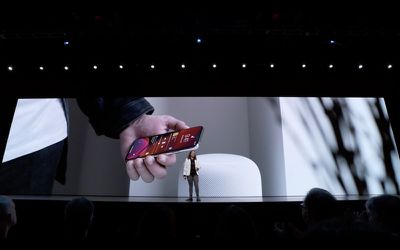
homepod handoff
Apple also announced that AirPods are getting a new Audio Sharing feature, allowing users to share a song or movie with a friend with just a tap.

Related Roundups: AirPods 4, HomePod, WWDC 2026
Tag: Handoff

Popular Stories

wwdc 2026 horizontal

WWDC 2026 Graphic Teases Major iOS 27 Feature

Sunday April 19, 2026 3:02 pm PDT by
Apple's WWDC 2026 graphic provides "a glimpse of the revamped Siri interface coming in iOS 27," according to Bloomberg's Mark Gurman. In his Power On newsletter today, Gurman said iOS 27 will include a new Siri interface in the Dynamic Island. When you trigger Siri, he said the Dynamic Island will show a "Search or Ask" prompt, and this will apparently be accompanied by a "glowing cursor"...

wwdc 2026 horizontal

WWDC 2026 is a Month Away: Apple Highlights 'Distinguished Winners'

Thursday May 7, 2026 7:35 am PDT by
Apple today highlighted four Distinguished Winners of this year's Swift Student Challenge, ahead of the WWDC 2026 developers conference next month. The annual Swift Student Challenge gives eligible student developers around the world the opportunity to showcase their coding capabilities by using the Swift Playground or Xcode apps to create an interactive "app playground." Apple said this...

MacBook Pro Low Angle Wide Lens

macOS 27: Two More Changes Leaked Ahead of WWDC Next Month

Sunday May 10, 2026 9:45 am PDT by
macOS 27 will have a "slight redesign" compared to macOS Tahoe, along with an option to automatically group tabs in Safari, according to Bloomberg's Mark Gurman. In his Power On newsletter today, Gurman said the design changes will help to address some of the criticism surrounding macOS Tahoe's new Liquid Glass interface. In particular, the changes should improve overall readability....

Top Rated Comments

ipedro Avatar
91 months ago
Fantastic! I can’t count the times I’ve been enjoying a playlist on my HomePod but have to go out and the only way to take it with me is to save the playlist, then open Music on my phone and find my place in the playlist.

Not only does handover fix this, the physical act of “picking up” or ‘dropping off” what’s playing by putting your iPhone near the HomePod is ingenious. This is pure Apple on display.
Score: 4 Votes (Like | Disagree)
ipedro Avatar
91 months ago
Now, where are all the sky is falling people who insisted that Apple was going to abandon and discontinue the HomePod just because they we’re putting Apple Music on other speakers?

As expected, Apple can strategically make Apple Music available everywhere to compete with Spotify while also offering their own premium, native solution to listening to music in an Apple type experience.

I’m fact, putting Apple Music on Amazon Echo will actually help sell HomePods. A lot of people have Echos already. Making Apple Music available there, keeps them on Apple Music rather than moving to Spotify if it were the only option. Eventually, those people will build brand loyalty to Apple Music and will want better sound and a native Apple Music experience.
Score: 1 Votes (Like | Disagree)
ipedro Avatar
91 months ago
To add on... I have a large music collection from years of ripping, collecting... just pony up the $15 MRC for a family subscription and let your music and choices curate new music into your rotation you wouldn’t have otherwise discovered.

You can’t just put one leg into this ecosystem - jump on in it’s worth it!

HomePods throughout the house to AirPods, Apple Watch out the door is amazing.
If he doesn’t care about any music other than the music he has, then Match is just $25 bucks per year. That’ll give him access to all of his own music anywhere, on all devices, including his HomePod that he’s complaining about.
Score: 1 Votes (Like | Disagree)
theNatest Avatar
91 months ago
It is a pointless battle because you don’t understand how things work. I mean, you thought that you had to go to Settings to change the speaker.

And you’ve made clear that you don’t know how iTunes Match works either. It first tries to match with a song in the existing iTunes library and if there isn’t a match, it uploads it to the cloud. I have songs that I recorded at concerts myself that I listen to on my HomePod.

What’s worse than not understanding something is being too stubborn to realize that you’re out of your depth and won’t listen to others trying to explain it to you.
To add on... I have a large music collection from years of ripping, collecting... just pony up the $15 MRC for a family subscription and let your music and choices curate new music into your rotation you wouldn’t have otherwise discovered.

You can’t just put one leg into this ecosystem - jump on in it’s worth it!

HomePods throughout the house to AirPods, Apple Watch out the door is amazing.
Score: 1 Votes (Like | Disagree)
ipedro Avatar
91 months ago
I'm coming at from the perspective of my wife who also has her phone containing all of her music. If she has to go into the settings and select the homepod as an output device for airplay and then hit the play button she'll just blow a fuse. That makes the homepod just become an expensive and more cumbersome BlueTooth speaker.
That’s not how AirPlay works. That’s not at all how it works. You don’t have to go into settings to select your HomePod as a speaker.

Whenever you’re playing music, hit the AirPlay button in the playback controls and choose your HomePod. It’s also in Control Centre.

As for playing your own music, that requires iTunes Match. It’s a service to get your music into the cloud. If you purchase Match, you can convert your own library to listen to it anywhere like Apple Music, even if it’s not downloaded to your device.
Score: 1 Votes (Like | Disagree)