
Everything New in iOS 13 Beta 4: Quick Action Updates, Share Sheet Changes and More - MacRumors
Skip to Content

Everything New in iOS 13 Beta 4: Quick Action Updates, Share Sheet Changes and More

Apple this morning released the fourth beta of iOS 13 for developers, introducing bug fixes and adding and refining iOS 13 features.

Now that we're into the fourth beta, changes and updates are getting more minor, but there are still some small but notable tweaks that are worth highlighting in today's beta.

- Quick Actions - There's a refreshed look for Quick Actions on the Home screen, which adds a new "Rearrange Apps" option that lets you quickly get to the wiggle mode that allows apps to be moved around.
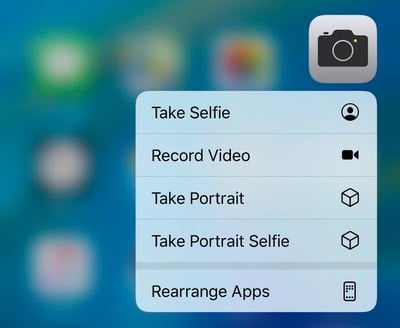
ios13rearrangeapps
- Quick Actions Menu Size - The menu that pops up when using a Quick Action is also smaller in size with less obtrusive icons that have also been relocated to the right side of the menu interface.

- 3D Touch Settings - In the Accessibility section of the Settings app, there are new options for 3D Touch in the 3D & Haptic Touch section (which was previously just ‌3D Touch‌). There's a new "Touch Duration" section alongside the sensitivity slider. The Touch Duration option changes the amount of time it takes to reveal content previews, actions, and contextual menus.
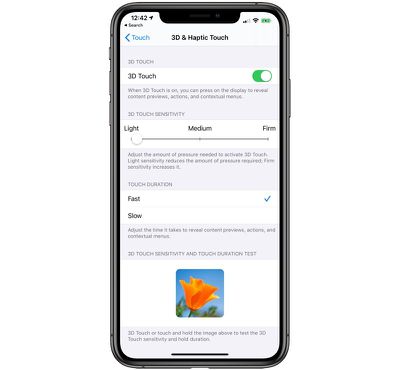
3dtouchsettings
- Share Sheet - Some minor design changes have been made to the Share Sheet in iOS 13, tweaking the colors and adding some transparency.

sharesheetchanges
- Voice Messages - When using the option in Messages to record a voice-based message, there's a new icon for the option. It's now a waveform rather than a microphone icon.

messageswaveform
- Widgets - When editing Widgets in the Today View, you'll see a new look for the edit button, which is now pill-shaped rather than circular.

widgetseditbutton
Know of a feature that's new in iOS 13 beta 4 that we left out? Make sure to let us know in the comments and we'll update this article.


Related Forum: iOS 13

Popular Stories

Apple Event Logo

Apple's Next Era Begins September 1

Thursday May 7, 2026 10:36 am PDT by
Apple recently announced that Tim Cook will be stepping down as CEO later this year, after 15 years of leading the company. Effective September 1, Apple's hardware engineering chief John Ternus will become the company's next CEO, while Cook will become executive chairman of Apple's board of directors. In his new role, Apple said Cook will assist with "certain aspects" of the company,...
Four iPhone 18 Pro Colors Mock Feature

iPhone 18 Pro Launching in September With These 10 New Features

Saturday May 9, 2026 6:03 am PDT by
While the iPhone 18 Pro and iPhone 18 Pro Max are not launching until September, there are already plenty of rumors about the devices. It was initially reported that the iPhone 18 Pro models would have fully under-screen Face ID, with only a front camera visible in the top-left corner of the screen. However, the latest rumors indicate that only one Face ID component will be moved under the...
Apple Watch Series 10 Jet Black Touch ID

Apple Watch Series 12 and watchOS 27: What to Expect Later This Year

Friday May 8, 2026 2:07 pm PDT by
While not too much has been reported about the next Apple Watch models, there are a few rumors about potential design changes and watchOS 27 features. Apple Watch Series 12 and Apple Watch Ultra 4 models are expected to be released in September, and we have outlined some of the key rumored hardware and software changes below. A new Apple Watch SE is not expected this year, as that model was...

Top Rated Comments

Frank in NL Avatar
89 months ago
I really hate the share sheet
I am a fan of the new share sheet. I find it a lot more useful.
Score: 27 Votes (Like | Disagree)
89 months ago
We need a "Touch Duration: off" option for 3D Touch enabled devices…
Score: 16 Votes (Like | Disagree)
89 months ago
I really hate the share sheet
Score: 14 Votes (Like | Disagree)
hourglass111 Avatar
89 months ago
I really hate the share sheet
As an introvert, it’s irking me to have all my contacts right there. It sounds a bit bad, but what can I say! I don’t need to see them to think of them when sending something. This Share Sheet is made for extroverts.


I’ve been playing around with the beta. The vertical options is a curveball. It remains to be seen if it’ll be equally or more effective than the current horizontal panel, or if it will be as cumbersome as it appears…

That said, it appears there are suggestions based of usage history, and that could be useful.
Score: 13 Votes (Like | Disagree)
89 months ago
As an introvert, it’s irking me to have all my contacts right there. It sounds a bit bad, but what can I say! I don’t need to see them to think of them when sending something. This Share Sheet is made for extroverts.

I’ve been playing around with the beta. The vertical options is a curveball. It remains to be seen if it’ll be equally or more effective than the current horizontal panel, or if it will be as cumbersome as it appears…

That said, it appears there are suggestions based of usage history, and that could be useful.
As an introvert myself it doesn’t bother me in the slightest. There are still a few people I keep in contact with and this makes it a lot easier to share.
As another introvert, I like this share sheet because it removes a step from sending something to my wife or daughter.
Score: 8 Votes (Like | Disagree)
DarkCole Avatar
89 months ago
As an introvert, it’s irking me to have all my contacts right there. It sounds a bit bad, but what can I say! I don’t need to see them to think of them when sending something. This Share Sheet is made for extroverts.
As an introvert myself it doesn’t bother me in the slightest. There are still a few people I keep in contact with and this makes it a lot easier to share.
Score: 7 Votes (Like | Disagree)








































