App Store 'Today' Stories Now Fully Available on the Web - MacRumors
Skip to Content

App Store 'Today' Stories Now Fully Available on the Web

by

Apple redesigned its App Store app in iOS 11, introducing a new "Today" tab with editorials about featured apps and developers, tips and how tos, and more to help customers discover new and useful apps.

As noted by 9to5Mac, Apple recently extended these Today stories to the web, making the content fully accessible on the desktop.
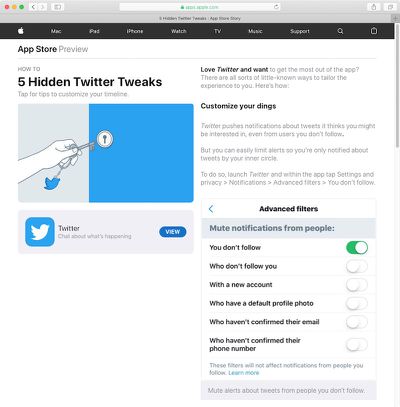
app store today stories web
The new two-column layout features a title card on the left and content on the right, ranging from text and images to app lists and links. Previously, the web previews simply directed users to the ‌App Store‌ on an iOS device.

Today stories can be read on the web by opening a story from an iOS device, scrolling down to the bottom, and tapping "share story."

Top Rated Comments

orbital~debris Avatar
88 months ago
Another quibble, eliminated.

I think this will make John Gruber pleased ('https://daringfireball.net/linked/2018/11/02/frakes-mac-app-store').
Score: 2 Votes (Like | Disagree)
MisterSavage Avatar
88 months ago
I really like this. I can read it on my big screen while working and waiting for something else to complete.
Score: 1 Votes (Like | Disagree)
orbital~debris Avatar
88 months ago
Makes me pleased too. I've had numerous times when I've come across something in the today tab that I want to look at later when I have more time, so I "share" it to Drafts ('https://getdrafts.com/'), but then could only look at it back in the App Store app on iOS. Now I can open the links from Drafts on the Mac to read them on a larger screen.

Indeed, I’ve been in the same situation many a time.

It will also help when sharing with someone who you can’t be certain will be reading on an iOS device.

The Today tab is a goldmine of app discovery & new approaches, now more accessible.
Score: 1 Votes (Like | Disagree)
CarlJ Avatar
88 months ago
Another quibble, eliminated.

I think this will make John Gruber pleased ('https://daringfireball.net/linked/2018/11/02/frakes-mac-app-store').
Makes me pleased too. I've had numerous times when I've come across something in the today tab that I want to look at later when I have more time, so I "share" it to Drafts ('https://getdrafts.com/'), but then could only look at it back in the App Store app on iOS. Now I can open the links from Drafts on the Mac to read them on a larger screen.

Score: 1 Votes (Like | Disagree)

Popular Stories

iOS App Store General Feature Desaturated

Apple Removes Freecash App From App Store After Months of Data Harvesting

Tuesday April 14, 2026 3:54 pm PDT by
Apple removed scam app Freecash from the App Store this week after the app spent months harvesting data from iPhone users, reports TechCrunch. Freecash reached the number two spot on the U.S. App Store charts in January after being heavily marketed on TikTok. It promised users up to $35 per hour for watching TikTok content, but it was collecting swaths of user data. Back in January, Wired...


grok logo purple gradient

Apple Threatened to Pull Grok From App Store Over Sexualized Images

Wednesday April 15, 2026 7:10 am PDT by
Apple privately warned Elon Musk's xAI company in January that it would remove the Grok app from the App Store unless the company put a stop to the chatbot's nude and sexualized deepfakes, according to a letter Apple sent to U.S. senators and obtained by NBC News ($). Earlier this year, Grok's AI capabilities came under scrutiny after X users shared nonconsensual sexualized images of women...

iOS App Store General Feature Dock


Apple Quietly Tweaked the iOS App Store App – Here's What's Changed

Friday April 17, 2026 2:32 am PDT by
No, you aren't going crazy – Apple has quietly made a backend change to the App Store app in iOS that switches the location of the Updates tab and renames it to make it more prominent. In the App Store app, you can see the change by tapping your profile picture in the top-right corner. The "Apps & Purchase History" tab used to be at the top the list, but it has switched places with...