

Apple today released iOS and iPadOS 13.4, the latest major updates to the iOS 13 operating system that was released in September. iOS and iPadOS 13.4 come two months after the release of iOS and iPadOS 13.3.1 with Screen Time Communication Limits.

The iOS and iPadOS 13.4 updates are available on all eligible devices over-the-air in the Settings app. To access the updates, go to Settings > General > Software Update. Apple is also releasing iOS 12.4.6 for older iPhones, with the update adding security improvements.
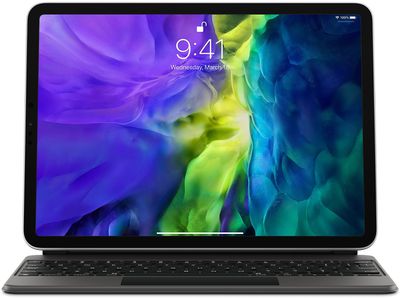
iOS and iPadOS 13.4 are significant updates, bringing several important new features to the iPhone and the iPad. Most notably, the iPadOS 13.4 update introduces mouse and trackpad support for the iPad to allow for greater precision and improved navigation.
Mouse and trackpad support comes ahead of the May release of Apple's new Magic Keyboard, which is a keyboard for the 2018 and 2020 iPad Pro that includes a trackpad. The update adds support for Magic Mouse, Magic Mouse 2, Magic Trackpad, Magic Trackpad 2, and third-party USB and Bluetooth mouse options, plus it introduces multi-touch gestures when using the Magic Keyboard and Magic Trackpad 2.
There's a new toolbar available in the Mail app that's available when viewing an email, with the updated design featuring a more logical layout to address complaints about the Mail app in earlier versions of iOS 13.

The revamped design moves the reply icon away from the delete icon, making it harder to accidentally delete an email. It also adds Folder and Compose icons.
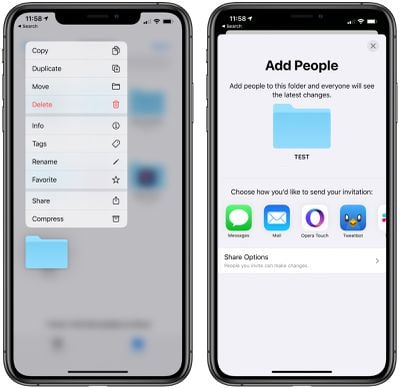
iCloud Folder Sharing, which is designed to let users share iCloud Drive folders with other people, is included in iOS 13.4. iCloud Folder Sharing was initially announced at WWDC as an iOS 13 feature last year, but it has taken Apple several months to implement it. The feature shows real-time updates so file changes will sync across the devices of all people with access to a specific folder.
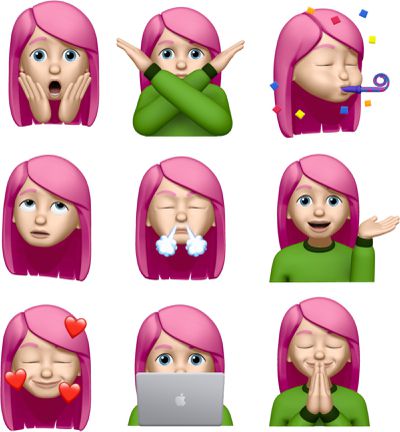
Apple has added nine new Memoji and Animoji stickers in the update, with the new stickers featuring emoji-style poses like shocked face, face with hearts, eyes rolling, and more.
Apple has also made a subtle but notable change to the way the URL bar works in Safari. In iOS 13.4, you can tap into the URL bar right away even when a URL is highlighted, which is different behavior from iOS 13.3.1. In iOS 13.3.1, an extra tap outside of a URL was required to deselect it before it could be tapped to be edited.
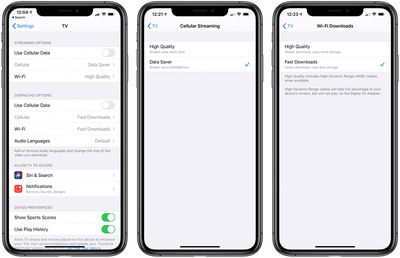
New settings in the TV app allow users to control streaming and downloading over Wi-Fi and cellular, adding new data saving options for those who don't have unlimited streaming plans.
Hints of a new "CarKey" API were found in iOS 13.4, which would allow the iPhone to be used to lock, unlock, and start a car that has NFC capabilities. Sharing features will also be available for assigning keys to friends and family members through the Messages app.
CarKey functionality hasn't been announced by Apple as of yet, and it's not mentioned in the release notes for the update, but when launched, it will iPhone owners to use their devices in lieu of a car key. CarKey could be coming as an iOS 14 feature, and BMW could be one of the first partners.
Though not an iOS specific feature, Apple with iOS 13.4, macOS 10.15.4, tvOS 13.4, and Xcode 11.4 is allowing developers to create apps with universal purchase support, which means Apple device users will be able to purchase one app that works across multiple platforms.
iOS 13.4 includes third-party navigation app support for the CarPlay Dashboard along with support for in-call information. There are new keyboard shortcuts for the Photos app on the iPad and AR Quick Look supports audio playback for USDZ files.
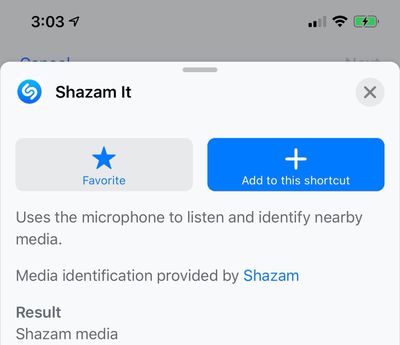
Apple also added a new Shazam Shortcuts action, options for remapping hardware keys of a keyboard connected to the iPad, there's a new status indicator to display when a VPN has disconnected on iPhones with all-screen displays, and Apple has introduced a number of bug fixes.
A bug that could cause the camera viewfinder to appear as a black screen has been addressed, as has an issue that could cause Photos to appear to use too much storage. The update addresses a problem that could cause Mail message to appear out of order, fixes a Settings issue that resulted in cellular data incorrectly displaying as off, and fixes an issue that could cause CarPlay to lose connection in certain vehicles.
Apple's full release notes for the iOS 13.4 update are below:
iOS 13.4 introduces new Memoji stickers and iCloud Drive folder sharing from the Files app. This update also contains bug fixes and improvements.
Memoji
- Nine new Memoji stickers, including Smiling Face with Hearts, Hands Pressed Together, and Party FaceFiles
- iCloud Drive folder sharing from the Files app
- Controls to limit access only to people you explicitly invite or grant access to anyone with the folder link
- Permissions to choose who can make changes and upload files and who can only view and download files
- Always-visible controls to delete, move, reply to, or compose a message in conversation view
- Responses to encrypted emails are automatically encrypted when you have configured S/MIMEApp Store with Apple Arcade
- Universal Purchase support enables the use of a singular purchase of a participating app across iPhone, iPod touch, iPad, Mac, and Apple TV
- Recently played Arcade games appear in the Arcade tab so you can continue playing on iPhone, iPod touch, iPad, Mac, and Apple TV
- List view for See All GamesCarPlay
- Third-party navigation app support for the CarPlay Dashboard
- In-call information appears on the CarPlay DashboardAugmented Reality
- AR Quick Look supports audio playback in USDZ filesKeyboard
- Predictive typing support for ArabicThis update also includes bug fixes and other improvements. This update:
- Adds status bar indicator to display when VPN has disconnected on iPhone models with all-screen displays
- Fixes an issue in Camera where the viewfinder may appear as a black screen after launch
- Addresses an issue where Photos may appear to use excess storage
- Resolves an issue in Photos that may prevent sharing an image to Messages if iMessage is disabled
- Fixes an issue in Mail where messages may appear out of order
- Addresses an issue in Mail where the conversation list may display empty rows
- Resolves an issue where Mail may crash when tapping the Share button in Quick Look
- Fixes an issue in Settings where cellular data may incorrectly display as off
- Addresses an issue in Safari where webpages may not be inverted when both Dark Mode and Smart Invert are active
- Resolves an issue where text copied from web content may appear invisible when pasted when Dark Mode is active
- Fixes an issue in Safari where a CAPTCHA tile may display incorrectly
- Addresses an issue where Reminders may not issue new notifications for an overdue recurring reminder until it is marked as completed
- Resolves an issue where Reminders may send notifications for completed reminders
- Fixes an issue where iCloud Drive appears to be available in Pages, Numbers, and Keynote even when not signed in
- Addresses an issue in Apple Music where music videos may not stream in high quality
- Resolves an issue where CarPlay may lose its connection in certain vehicles
- Fixes an issue in CarPlay where the view in Maps may move away briefly from the current area
- Addresses an issue in the Home app where tapping an activity notification from a security camera may open a different recording
- Resolves an issue where Shortcuts may not appear when tapping on the Share menu from a screenshot
- Improves the Burmese keyboard so punctuation symbols are now accessible from numbers and symbols
Apple has also provided separate release notes for the iPadOS update, which are available below and cover all of the new mouse and trackpad features.
iPadOS 13.4 introduces support for mouse and trackpad with iPad for greater precision and navigating the system with Multi-Touch gestures, and adds iCloud Drive folder sharing from the Files app and new Memoji stickers. This update also contains bug fixes and improvements.
Mouse and Trackpad Support
- All-new cursor design highlights app icons on the Home Screen and Dock and buttons and controls in apps
- Magic Keyboard for iPad support on iPad Pro 12.9-inch (3rd generation or later) and iPad Pro 11-inch (1st generation or later)
- Magic Mouse, Magic Mouse 2, Magic Trackpad, Magic Trackpad 2, and third-party Bluetooth and USB mouse support
- Multi-Touch gestures on Magic Keyboard for iPad and Magic Trackpad 2 enable you to scroll, swipe between app spaces, go Home, access App Switcher, zoom in or out, tap to click, secondary click (right-click), and swipe between pages
- Multi-Touch gestures on Magic Mouse 2 enable you to scroll, secondary click (right-click), and swipe between pagesFiles
- iCloud Drive folder sharing from the Files app
- Controls to limit access only to people you explicitly invite or grant access to anyone with the folder link
- Permissions to choose who can make changes and upload files and who can only view and download filesMemoji
- Nine new Memoji stickers, including Smiling Face with Hearts, Hands Pressed Together, and Party Face
- Always-visible controls to delete, move, reply to, or compose a message in conversation view
- Responses to encrypted emails are automatically encrypted when you have configured S/MIMEApp Store with Apple Arcade
- Universal Purchase support enables the use of a singular purchase of a participating app across iPhone, iPod touch, iPad, Mac, and Apple TV
- Recently played Arcade games appear in the Arcade tab so you can continue playing on iPhone, iPod touch, iPad, Mac, and Apple TV
- List view for See All GamesAugmented Reality
- AR Quick Look supports audio playback in USDZ filesKeyboard
- Live Conversion for Zhuyin automatically transforms Zhuyin into the correct characters without pressing the space bar to convert text or select candidates
- Live Conversion for Japanese automatically transforms Hiragana into the correct characters without pressing the space bar to convert text or select candidates
- Predictive typing support for Arabic
- Swiss German keyboard layout supported on iPad Pro 12.9-inch
- On-screen keyboard layout for iPad Pro 12.9-inch now matches Smart KeyboardThis update also includes bug fixes and other improvements. This update:
- Fixes an issue in Camera where the viewfinder may appear as a black screen after launch
- Addresses an issue where Photos may appear to use excess storage
- Resolves an issue in Photos that may prevent sharing an image to Messages if iMessage is disabled
- Fixes an issue in Mail where messages may appear out of order
- Addresses an issue in Mail where the conversation list may display empty rows
- Resolves an issue where Mail may crash when tapping the Share button in Quick Look
- Fixes an issue in Settings where cellular data may incorrectly display as off
- Addresses an issue in Safari where webpages may not be inverted when both Dark Mode and Smart Invert are active
- Resolves an issue where text copied from web content in a third-party app may appear invisible when pasted if Dark Mode is active
- Fixes an issue in Safari where a CAPTCHA tile may display incorrectly
- Addresses an issue where Reminders may not issue new notifications for an overdue recurring reminder until it is marked as completed
- Resolves an issue where Reminders may send notifications for completed reminders
- Fixes an issue where iCloud Drive appears to be available in Pages, Numbers, and Keynote even when not signed in
- Addresses an issue in Apple Music where music videos may not stream in high quality
- Addresses an issue in the Home app where tapping an activity notification from a security camera may open a different recording
- Resolves an issue where Shortcuts may not appear when tapping on the Share menu from a screenshot
- Improves the Burmese keyboard so punctuation symbols are now accessible from numbers and symbols
iOS 13.4 is likely to be one of the last major updates to the iOS 13 operating system as Apple begins to shift focus to iOS 14, which is expected to be previewed in June ahead of a fall release. There have already been quite a few iOS 14 leaks, which can be found in our iOS 14 roundup.




/https://forums.macrumors.com/attachments/900968/)
/https://forums.macrumors.com/attachments/900969/)

/https://forums.macrumors.com/attachments/900973/)
/https://forums.macrumors.com/attachments/900974/)














































