Testing Apple's New Magic Keyboard for iPad Pro - MacRumors
Skip to Content

Testing Apple's New Magic Keyboard for iPad Pro

Apple last week surprised us with the early launch of the new Magic Keyboard designed for the 2018 and 2020 iPad Pro models, and as of this week, orders are arriving to customers. We picked up one of the new Magic Keyboards for the 12.9-inch ‌iPad Pro‌ and tested it out to see how it works and whether it's worth the $350 selling price.


Apple actually sells the Magic Keyboard in 11 and 12.9-inch sizes, and while the 12.9-inch model is $350, the 11-inch version is priced at $299. Though sized to fit the 2020 ‌iPad Pro‌ models, the Magic Keyboards are also compatible with the 2018 ‌iPad Pro‌ models, so 2018 ‌iPad Pro‌ owners won't need to upgrade to take advantage of the keyboard.
magickeyboard
Apple has offered an iPad keyboard in the form of the Smart Keyboard (and ‌Smart Keyboard‌ Folio) for quite some time, but this is the first time that Apple has developed an ‌iPad‌ keyboard with a trackpad with the intention of turning the ‌iPad‌ into something more akin to a MacBook.

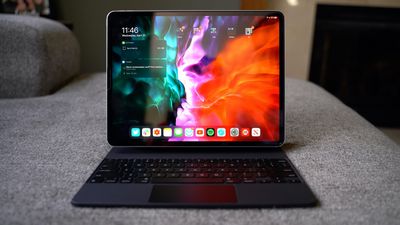
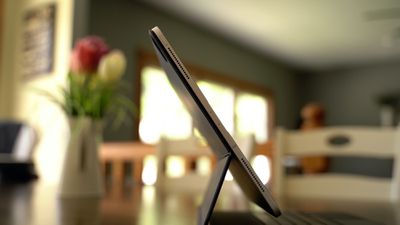
Design wise, coming out of the box, the Magic Keyboard looks similar to the ‌Smart Keyboard‌ that was previously sold, but it's a lot thicker and a lot heavier.
magickeyboard4
The Magic Keyboard for the 12.9-inch ‌iPad Pro‌ weighs more than the ‌iPad Pro‌ itself, in fact, at 1.6 pounds (the ‌iPad Pro‌ weighs 1.4 pounds). When you put the keyboard on the ‌iPad Pro‌, that's a combined weight of three pounds, which is heavier than a MacBook Air and close to the weight of a MacBook Pro.

It is a hefty keyboard that absolutely adds a lot of bulk to the sleek and slim ‌iPad Pro‌. The 11-inch Magic Keyboard is smaller and not quite as heavy, but you're still doubling the weight of the ‌iPad‌.

magickeyboard2
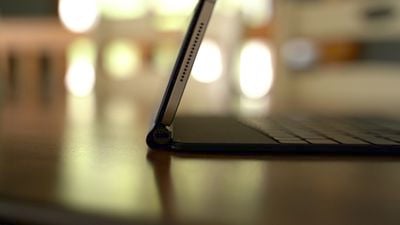
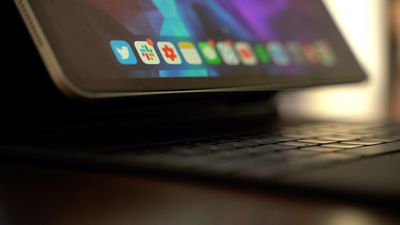
The Magic Keyboard is made from the same polyurethane material that Apple's ‌Smart Keyboard‌ Folio was made from, and design wise, what sets it apart is a hinge that enables a "floating" design. The case attaches magnetically but pulls away at the bottom when the keyboard is in use, with lower part of the ‌iPad‌ kind of floating in space to allow for adjustable viewing angles with the hinge.
magickeyboard5
The magnetic attachment is strong enough that you don't need to worry about the ‌iPad Pro‌ shifting or being shaken loose if you move it, and the case itself provides a minimal amount of protection, similar to the ‌Smart Keyboard‌ case.

The hinge at the bottom of the case is made from aluminum and it has a built-in USB-C port for passthrough charging so you can charge your ‌iPad Pro‌ while the Magic Keyboard is connected. The USB-C port on the ‌iPad Pro‌ isn't obscured by the Magic Keyboard, but a cable from the side of the keyboard itself and out of the way looks nicer than one coming out of the middle of the ‌iPad‌ while it's used in landscape mode.

magickeyboard7
The USB-C port is limited to passthrough charging and it does not support data transfer, so you'll still need adapters for doing things like connecting the ‌iPad Pro‌ to an external display. Charging is also not quite as fast as it is when plugging a USB-C cable directly into the ‌iPad Pro‌.

When it comes to the hinge, it's sturdy and strong, and when the Magic Keyboard is opened, it locks right into place and is in an upright position, but then you can make adjustments to the viewing angle. Apple's ‌Smart Keyboard‌ Folio only had two viewing angles, but the hinge can be fine tuned and set at more angles, though the range of motion is similar to the ‌Smart Keyboard‌ Folio.

magickeyboard3
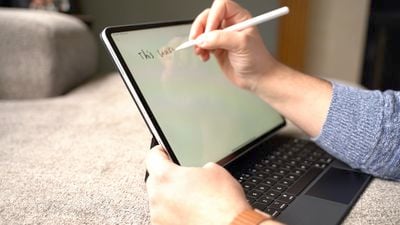
There is no way to fold the Magic Keyboard back behind the ‌iPad Pro‌ to get to an ideal sketching angle for the ‌iPad Pro‌, but flipping the whole thing backwards kind of works. The best solution for drawing is probably to pop the Magic Keyboard off of the ‌iPad Pro‌, but it's definitely a disappointment that there's no built-in drawing angle.

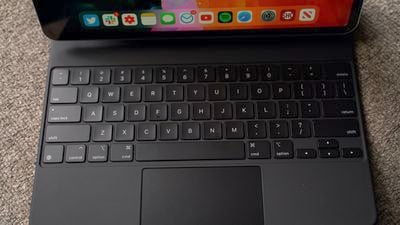
The keyboard itself feels great, and it's nothing like Apple's previous Smart Keyboards. The keys have a good amount of travel and feel nice under the fingers, plus there's backlighting for the keys. Unfortunately Apple did not include a row of function keys so there's no quick way to adjust backlighting, change brightness, or access media playback controls from the keyboard itself.
magickeyboard6
The backlighting changes based on the ambient lighting in the room so users shouldn't need too much manual adjustment, but it's still a disappointment not to have the function keys, including an escape key. Command + the period key typically serves as an alternative to an escape key or another key can be remapped to that function, but it would have been nice to have a dedicated escape key.

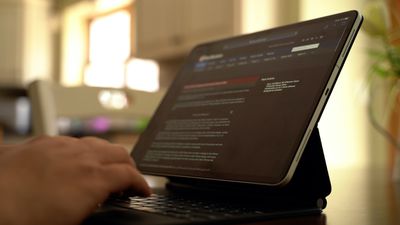
Apple's main selling point for the new Magic Keyboard is, of course, the trackpad, and it works great. It's similar to using a trackpad with a Mac, though much smaller of course. Many gestures are supported, such as swiping down with three fingers to access the Home screen, swiping up with three fingers to get to the multitasking view, and more. We have a list of gestures in our Magic Keyboard guide, if you're looking for more comprehensive gesture info.

Having a trackpad to use with the keyboard and the touch screen makes the ‌iPad Pro‌ experience much more similar to a traditional laptop, but you are, of course, still limited to iPadOS rather than macOS, which is still a major factor when it comes to multitasking, app selection, and more.

The Magic Keyboard is heavy and it definitely reduces the portability of the ‌iPad Pro‌, but for those who plan to use the ‌iPad Pro‌ as a full computer replacement, it adds so much utility that it's most likely worth the weight and the price tag. If the ‌iPad Pro‌ is a secondary machine and you already have a Mac, the Magic Keyboard might not be as worthwhile, but it certainly provides the most Mac-like experience on an ‌iPad‌ to date.

What do you think of the Magic Keyboard? Are you getting one? Let us know in the comments.

Popular Stories

M5 MacBook Pro

RIP, MacBook Ultra

Monday October 19, 2026 9:37 am PDT by
Apple today sent out invites for an experience in Los Angeles on Wednesday, October 28, and the "Pro and tell" tagline on the invitation likely means that the rumored MacBook models with touch-enabled OLED displays will stick with MacBook Pro branding instead of the once-rumored "MacBook Ultra" name. The long-rumored "iPhone Ultra" ended up being named iPhone Duo, so speculation that Apple...
iPhone Duo Trio

Here's What Apple's Apps Look Like on the iPhone Duo

Tuesday October 20, 2026 11:12 am PDT by
With just three days to go until the iPhone Duo is released, Apple is getting ready for the launch. Behind the scenes, the App Store now has screenshots of Apple's built-in apps running on the Duo. We've seen some apps in marketing materials, but images of the ones we haven't seen give us an idea of what it will be like using the iPhone Duo day to day. Many apps are shown in landscape...
apple pro tell logo

Apple Announcing New Products Next Week: 'Pro and Tell'

Monday October 19, 2026 9:05 am PDT by
Apple's Greg Joswiak today hinted at new product announcements coming next week, sharing a social media post that says "Can't wait to pro and tell next week." Rumors suggest Apple is planning to debut the new MacBook Pro with an OLED touchscreen display, an M6 entry-level MacBook Pro, an M6 iMac, an iPad mini with an OLED display. Can't wait to pro and tell next week....

Top Rated Comments

LeeW Avatar
85 months ago
4 mins 50 in, how to justify the poor design


Attachment Image
Score: 41 Votes (Like | Disagree)

AngerDanger Avatar
85 months ago
I'm glad Dan didn't have any notable issues with the hummingbirds these things seem to attract.


Attachment Image
Score: 31 Votes (Like | Disagree)
aevan Avatar
85 months ago

Apple digs themselves in a hole all the time. Magic mouse design (charging port on bottom) is one of the many. They are just like the japanese - 2 steps forward, 3 steps backwards (see psp, walkman, minidisc, etc).

They will eat poo if they are caught “copying” great designs on the market right now - as in touch screen laptop - which makes sense because you can choose to use it or not.

They won’t even make any of the macbooks pencil compatible. This keyboard is an optional accessory but the price is just bonkers. Unless you are one of those people like in the show succession, this keyboard is just sold to the dumb. Look at post #8 - this is exactly how apple designers think these days - it’s almost as if they don’t go outside their labs ever to see products that are sold currently.
You could’ve just written “I don‘t like Apple”.
Score: 28 Votes (Like | Disagree)
CausticSoda Avatar
85 months ago
It just seems a clumsy direction to go in. They are trying to morph the iPad into a MacBook replacement. Why not give us a MacBook Air with a touch screen that double back on itself? I suppose they want people owning both devices, which I can understand. I do have both, but I prefer the Air by far.
Score: 21 Votes (Like | Disagree)
85 months ago

Mine is due to arrive on Friday and this does not damper my excitement!
I was so upset after I placed the order and I saw the reviews I almost canceled.
Then I lost the chance and the keyboard arrived.

I was - and still am - blown away!
So glad to have it. The weight is high but it’s not as much of a problem as people make it.
It is heavy, true, but the size and portability is still there. It’s not that much of weight to cry about it.
Score: 18 Votes (Like | Disagree)
85 months ago
Bought one, love it. I used a Smart Keyboard Folio since the launch of the 3rd gen iPad Pro 11 and its ok but this is a dream for me. Rock solid, don't think this is the "same" thing as the SKF because the material looks the same... its rigid and well built. The magnets are rock solid unlike the SKF, your iPad isn't going anywhere. The keyboard is as good as any Mac keyboard and the folding and unfolding is perfect. The integrated trackpad changes everything and makes this a truly do everything device.
Score: 16 Votes (Like | Disagree)
Latest Stories
Simplicity and Siri AI Are HomeView's Killer Features, Apple Says
18 minutes ago
iPhone Duo Reviewers Really Miss Face ID
5 hours ago
Does the iPhone Duo Run Hot? Here's What Reviews Found
7 hours ago
Apple Music's New Look is Now Live on Apple's Website
7 hours ago
Anthropic Launches Claude Duet, a Proactive AI Agent
8 hours ago
What 32,000 Folds Did to the iPhone Duo's Hinge
9 hours ago
iPhone Duo's Hidden FaceTime Camera Takes 'Trash' Photos
10 hours ago
iPhone Duo Has 'Edge Light' Feature That Debuted on Macs Last Year
11 hours ago
Apple Support App Updated for iPhone Duo's Larger Display
11 hours ago
Amazon Sweetens the Deal on Entry-Level 16-Inch MacBook Pro With $570 Off
11 hours ago
iPhone Duo Tips Over on MagSafe Stands When Unfolded
11 hours ago
Apple Music's New Look Officially Announced
13 hours ago
iPhone Duo Supports Apple Pencil Starting With iOS 27.2
13 hours ago
iPhone Duo Accessories Roundup: Cases and Screen Protectors From OtterBox, ZAGG, and More
14 hours ago
Apple Stores Will Have 'Limited' Availability of iPhone Duo for Walk-In Customers
15 hours ago
iPhone Duo Reviews Explain Why Device is Both 'Fun' and 'Frustrating'
15 hours ago
Apple Says 'Reachability' Feature Coming to iPhone Duo Later This Year
16 hours ago
Loop Capital Cuts Apple Rating Over iPhone Sales Outlook
20 hours ago
Apple Stores in Bordeaux and Lille Looted During French Protests
20 hours ago
Bluesound Adds Native Apple Music Support
21 hours ago
Apple CEO John Ternus Explains What Makes Good Product Design
22 hours ago
UK Proposes New Ways to Help Apple Pay Rivals
1 day ago
WhatsApp Developing In-App Browser for All Chat Links on iPhone
1 day ago
Apple's App Store Chief Explains Its Push for Premium Games
1 day ago
Apple Could Owe Even More After $5.7 Billion Patent Verdict
1 day ago
Skyrim Comes to Apple Silicon Macs With New Unofficial Installer
1 day ago
Apple Highlights Mac and iPad Use in Paris Design Exhibition
1 day ago
Apple Seeks 6G Modem Engineers as It Plans for Post-5G iPhones
1 day ago
First iPhone Duo Unboxing Video Appears Ahead of Friday Launch
1 day ago
Perplexity Computer Can Now Run Fully Locally on Mac
1 day ago