
Adobe Adds Curves and Apple Pencil Pressure Sensitivity Adjustments to Photoshop for iPad

When Adobe introduced Photoshop for iPad back in November, it promised to provide regular updates to add missing features that are available on the desktop but not in the tablet version of the software.
photoshopipadcurves
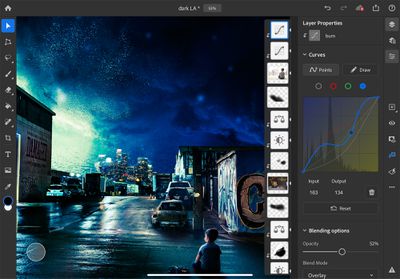
Adobe is making good on that promise and today has a Photoshop for iPad update out that introduces two useful features: Curves and Apple Pencil pressure sensitivity adjustments.

Curves are designed to allow ‌iPad‌ Photoshop users to make adjustments to the color and the tone of the image, editing contrast, exposure, saturation, highlights, shadows, and color balance in a non-destructive way. The initial version of the Curves tool includes adjustments of total curves for all channels, multi-node selections, and a feature that lets the app recognize when you want to tap and drag a node or select it.

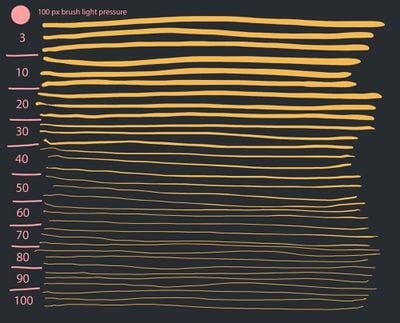
As for ‌Apple Pencil‌, Adobe is adding options to adjust the pressure sensitivity of the ‌Apple Pencil‌ for more precise brushing and effects when using brush-based tools. A new pressure sensitivity slider provides greater pressure values applied with less force at the end of the range and greater force for maximum pressure at the higher end of the range.
photoshopipadapplepencil
Adobe is also updating Adobe Fresco today, adding a multicolor eyedrop for selecting multiple colors, capture shapes, vector trimming tools for cleaning up vector art, support for Photoshop Mixer brushes, advancements to the ruler tool (pinning and pixel-length measurements), better blending for Live Oil brushes, new keyboard shortcuts, and more, with full details available in Adobe's blog post covering the update.

adobefresco1
Adobe Fresco and Adobe Photoshop can both be downloaded from the App Store for free, but there are subscriptions required to use the software. Adobe Photoshop for ‌iPad‌ is available for all Creative Cloud plans that include Photoshop access, while Adobe Fresco is $9.99 per month after a 7-day free trial on a standalone basis or available through Creative Cloud plans.


Popular Stories

Apple Logo Zoomed

Tim Cook Teases Plans for Apple's Upcoming 50th Anniversary

Thursday February 5, 2026 12:54 pm PST by
Apple turns 50 this year, and its CEO Tim Cook has promised to celebrate the milestone. The big day falls on April 1, 2026. "I've been unusually reflective lately about Apple because we have been working on what do we do to mark this moment," Cook told employees today, according to Bloomberg's Mark Gurman. "When you really stop and pause and think about the last 50 years, it makes your heart ...
wwdc sans text feature

Apple Rumored to Announce New Product on February 19

Thursday February 5, 2026 12:22 pm PST by
Apple plans to announce the iPhone 17e on Thursday, February 19, according to Macwelt, the German equivalent of Macworld. The report, citing industry sources, is available in English on Macworld. Apple announced the iPhone 16e on Wednesday, February 19 last year, so the iPhone 17e would be unveiled exactly one year later if this rumor is accurate. It is quite uncommon for Apple to unveil...
Finder Siri Feature

Why Apple's iOS 26.4 Siri Upgrade Will Be Bigger Than Originally Promised

Friday February 6, 2026 3:06 pm PST by
In the iOS 26.4 update that's coming this spring, Apple will introduce a new version of Siri that's going to overhaul how we interact with the personal assistant and what it's able to do. The iOS 26.4 version of Siri won't work like ChatGPT or Claude, but it will rely on large language models (LLMs) and has been updated from the ground up. Upgraded Architecture The next-generation...
iOS 26

iOS 26.3 and iOS 26.4 Will Add These New Features to Your iPhone

Tuesday February 3, 2026 7:47 am PST by
While the iOS 26.3 Release Candidate is now available ahead of a public release, the first iOS 26.4 beta is likely still at least a week away. Following beta testing, iOS 26.4 will likely be released to the general public in March or April. Below, we have recapped known or rumored iOS 26.3 and iOS 26.4 features so far. iOS 26.3 iPhone to Android Transfer Tool iOS 26.3 makes it easier...
maxresdefault

Apple Shows Off a Key Reason to Upgrade to the iPhone 17

Saturday February 7, 2026 9:26 am PST by
Apple today shared an ad that shows how the upgraded Center Stage front camera on the latest iPhones improves the process of taking a group selfie. "Watch how the new front facing camera on iPhone 17 Pro takes group selfies that automatically expand and rotate as more people come into frame," says Apple. While the ad is focused on the iPhone 17 Pro and iPhone 17 Pro Max, the regular iPhone...

Top Rated Comments

ikir Avatar
75 months ago
Just use Affinity Photo, ditch Adobe.
Score: 6 Votes (Like | Disagree)
cfurlin Avatar
75 months ago
Meh. Moved on to Affinity products a couple of years ago.
Score: 6 Votes (Like | Disagree)
2013.1 Avatar
75 months ago
This is as if Ford would say, hey, we added windshield wipers to our smaller cars.
Affinity has the full feature set in Photo and Designer.
Score: 4 Votes (Like | Disagree)
richpjr Avatar
75 months ago

Meh. Moved on to Affinity products a couple of years ago.
If Affinity ever comes out with a good DAM, I would consider it. I already have both the iPad and desktop version, but the cross platform access that Lightroom and Creative Cloud provides is just way too convenient for my workflow.
Score: 3 Votes (Like | Disagree)
shaun3000 Avatar
75 months ago
I’m late to the party, here. Curves weren’t present at release? Seriously?? They’ve LITERALLY been part of Photoshop since version 1 ('https://creativeoverflow.net/history-of-photoshop-journey-from-photoshop-1-0-to-photoshop-cs5/'), way back in 1990, yet they didn’t include them on the iPad version?!!
Score: 3 Votes (Like | Disagree)
cupcakes2000 Avatar
75 months ago
This is great news, and it will be a solid app. Two things make it still unusable for the most part for me.

1) No RAW support ? This is ridiculous.
2) No round tripping from lightroom CC. This will be a key feature, for me. To be able to link lightroom classic to lightroom CC using smart previews like normal, and then be able to round trip those previews between Lightroom and Photoshop on the ipad, and then have them sync back to classic with the edits applied to the raw.
Score: 2 Votes (Like | Disagree)














