
Eve App for HomeKit Devices Gains Contextual Touch and Hold Menus, Quick Automation Access - MacRumors
Skip to Content

Eve App for HomeKit Devices Gains Contextual Touch and Hold Menus, Quick Automation Access

Eve Systems, known for its line of Eve-branded HomeKit products, today updated its Eve app to version 4.3, adding a number of useful new features.
evehomekitappupdate
The Eve update will primarily be of interest to those who own Eve ‌HomeKit‌ accessories, but it is one of the better ‌HomeKit‌ apps on the market, and it also works with non-Eve devices.

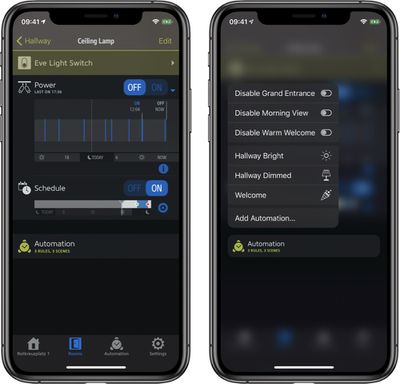
Eve 4.3 introduces Touch and Hold functionality, allowing users to touch and hold almost anywhere in the app to open up contextual menus that provide additional control options. Where the new gesture can be used:

  • At a Glance: quickly control an accessory, set a scene that it's part of and view all accessory details.
  • Room Overview: instantly toggle all lights in a room and refine room settings in a snap.
  • Accessory Details & Types: jumping back and forth between individual accessories' details and the overview by Types has never been easier.
  • Automation: quickly toggle Rules and set Scenes.

Quicker automation access has been bundled into the app update. When viewing an accessory's details, there's an "Automation" entry that lists Rules and Scenes that it is part of. Entries support long press gestures for toggling Rules and setting Scenes, and tapping the "Add Rule" or "Add Scene" buttons provides a quick way to create a new automation.

Along with these major new features, the update provides different colors for each Home, a feature that's useful to those who have multiple homes, and it adds additional icons for ‌HomeKit‌ devices.

There's also support for Eve Window Guard and the Eve Cam, a camera with HomeKit Secure Video support that is set to start shipping in the near future.

The Eve for ‌HomeKit‌ app can be downloaded from the App Store for free. [Direct Link]

Popular Stories

iOS 26

iOS 26.4 Adds Two New Features to CarPlay

Tuesday March 24, 2026 1:55 pm PDT by
iOS 26.4 was released today, and it includes a couple of new features for CarPlay: an Ambient Music widget and support for voice-based chatbot apps. To update your iPhone 11 or newer to iOS 26.4, open the Settings app and tap on General → Software Update. CarPlay will automatically offer the new features so long as the iPhone connected to your vehicle is running iOS 26.4 or later....
Apple Business hero

Apple Unveils 'Apple Business' All-in-One Platform

Tuesday March 24, 2026 8:53 am PDT by
Apple today announced Apple Business, a new all-in-one platform that unifies device management, productivity tools, and customer outreach features. The service is designed to be a consolidated replacement for several of Apple's existing business-focused offerings, including Apple Business Essentials, Apple Business Manager, and Apple Business Connect. It provides organizations with a single...
AirPods Pro Firmware Feature

Apple Releases New Firmware for AirPods Pro 3, AirPods Pro 2 and AirPods 4

Tuesday March 24, 2026 12:31 pm PDT by
Apple today released new firmware for the AirPods Pro 2, AirPods Pro 3, and the AirPods 4. The firmware has a version number of 8B39, up from 8B34 on the AirPods Pro 3, 8B28 on the AirPods Pro 2, and 8B21 on the AirPods 4. There is no word on what's included in the firmware, but Apple has a support document with limited notes. Most updates are limited to bug fixes and performance...

Top Rated Comments

75 months ago
The new version hangs on startup. Fortunately, the developer is bringing out a quick update (I read this in the Dutch app reviews).
Score: 1 Votes (Like | Disagree)
















