
Developer's Visual Comparison of macOS Catalina and Big Sur Offers Closer Look at Apple's UI Redesign for Macs - MacRumors
Skip to Content

Developer's Visual Comparison of macOS Catalina and Big Sur Offers Closer Look at Apple's UI Redesign for Macs

macOS 11 Big Sur is the next major release of Apple's operating system for Mac, and following its preview at WWDC, one of the biggest discussions has revolved around the all-new user interface redesign.
Andrew Denty
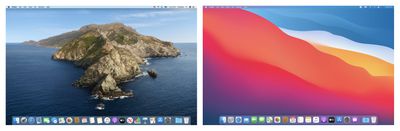
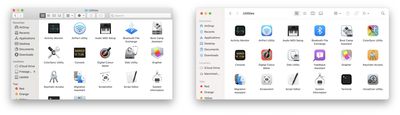
Developers are still learning what the impact the new UI will have on their apps, and with that in mind, app designer Andrew Denty has compiled an extensive visual comparison of the user interface changes between macOS Catalina and macOS Big Sur.

All of the screenshots are taken on a default install of macOS and the Catalina version is always on the left. I made a conscious effort not to resize any windows or change any default settings. I haven't captured everything, but it is a good taste of the changes so far.

The side-by-side comparisons cover changes to Finder, Preview, System Preferences, the menu bar, Notification Center, Safari, Calendar, Contacts, Reminders, Notes, Photos, Apple Music, Podcasts, and many other native apps.
Andrew Denty
Overall, Denty's takeaway is that the UI differences in Big Sur aren't as dramatic as he first thought, consisting of a "largely incremental set of changes to make macOS feel more coherent with iOS and iPad OS."

That said, he thinks Apple "still has a vast amount of work to do to perfect the new macOS UI" before it exits the beta, and he hopes to see more consistency in the launch experience of apps, as well as more visual separation in elements like status bars and path bars, which he admits "look a little unloved" and don't yet feel properly integrated.


Big Sur is available for developers at the current time, but Apple also plans to make a beta available for public beta testers in July, followed by an official release in the fall. What are your thoughts on the redesigned UI? Let us know in the comments below, and don't forget to check out our Big Sur roundup for an extensive look at all the new features.


Related Forums: macOS Catalina, macOS Big Sur

Popular Stories

Apple Event Logo

Apple's Next Era Begins September 1

Thursday May 7, 2026 10:36 am PDT by
Apple recently announced that Tim Cook will be stepping down as CEO later this year, after 15 years of leading the company. Effective September 1, Apple's hardware engineering chief John Ternus will become the company's next CEO, while Cook will become executive chairman of Apple's board of directors. In his new role, Apple said Cook will assist with "certain aspects" of the company,...
Instagram Feature 2

PSA: Instagram Encrypted Messaging Ends on Friday, May 8

Tuesday May 5, 2026 8:24 am PDT by
Instagram will remove end-to-end encryption for direct messages between users from May 8, 2026. When the date comes around, Meta will potentially be able to see the contents of all messages between users on the social media platform. Encrypting messages has been an optional feature in Instagram since 2023, but in March of this year the social media platform quietly updated a help page to say ...
macbook neo launch day

Apple May Drop Base $599 MacBook Neo as Chip, DRAM Costs Climb

Thursday May 7, 2026 4:55 am PDT by
Apple is considering dropping the cheapest MacBook Neo configuration as one possible response to the rising cost of building the popular laptop, according to Taiwan-based tech columnist and former Bloomberg reporter Tim Culpan. The Neo currently starts at $599 for a 256GB model, with a 512GB version at $699. Writing in his latest Culpium newsletter, Culpan says cutting the entry-level...

Top Rated Comments

76 months ago
Deleted.
Score: 64 Votes (Like | Disagree)

backslash-f Avatar
76 months ago
I'm currently using it and I'm in love with it.


It feels fresh and I had no big issues so far. Some UI glitches here and there but that's all.

Attachment Image
Score: 25 Votes (Like | Disagree)
76 months ago

It is the infantilization of software, making it appeal to kids rather than adults. Candification, with transparency and effects using the combined wattage of a medium nuclear power plant. Duolingofication, just plain silly.
Quite the contrary, it looks fantastic. This refresh is long overdue. Very excited to get it.
Score: 20 Votes (Like | Disagree)
PickUrPoison Avatar
76 months ago

Is it stable enough to be installed on my corporate machine?
K.
A developer beta? Ummmm sure. Roll that puppy out to the production machines. That’s what your corporate IT department recommended, right? 🤣
Score: 17 Votes (Like | Disagree)
macdos Avatar
76 months ago
It is the infantilization of software, making it appeal to kids rather than adults. Candification, with transparency and effects using the combined wattage of a medium nuclear power plant. Duolingofication, just plain silly.
Score: 16 Votes (Like | Disagree)
76 months ago
The only thing that bothers me about the redesign is lack of contrast for controls/buttons.

I always remove all apps from Dock after installing macOS so don't really care about the icons much (and like most of them anyway).


Question for anyone with the preview: can you right click on the window name in Finder to get access to the folder hierarchy or is that completely gone now?
You can still do that:


Attachment Image
Score: 14 Votes (Like | Disagree)









































