Spotify for Mac Can Now Initiate Streams to Chromecast Devices
Spotify for desktop can now directly initiate Chromecast streams, reports 9to5Google.
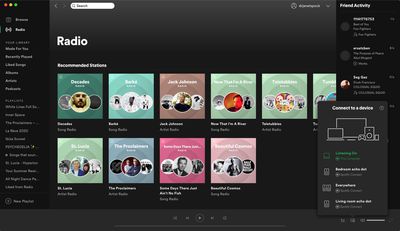
Previously, the only way to control Chromecast streams on the desktop app was by initiating the stream on the Spotify mobile app first, but now you can do this directly from your Mac via Spotify Connect.
Starting a Chromecast stream on the desktop app can be done by clicking the Devices Available button on the bottom-right corner of the interface, where Google Cast as well as Spotify Connect-enabled speakers will now appear alongside any Bluetooth or AirPlay devices.
The functionality is available in version 1.1.38 of the Spotify app for Mac, and should delight users who have been asking for it in the Spotify Community forums for years.
Popular Stories
Apple today sent out invites for an experience in Los Angeles on Wednesday, October 28, and the "Pro and tell" tagline on the invitation likely means that the rumored MacBook models with touch-enabled OLED displays will stick with MacBook Pro branding instead of the once-rumored "MacBook Ultra" name.
The long-rumored "iPhone Ultra" ended up being named iPhone Duo, so speculation that Apple...
With just three days to go until the iPhone Duo is released, Apple is getting ready for the launch. Behind the scenes, the App Store now has screenshots of Apple's built-in apps running on the Duo. We've seen some apps in marketing materials, but images of the ones we haven't seen give us an idea of what it will be like using the iPhone Duo day to day.
Many apps are shown in landscape...
Apple's Greg Joswiak today hinted at new product announcements coming next week, sharing a social media post that says "Can't wait to pro and tell next week."
Rumors suggest Apple is planning to debut the new MacBook Pro with an OLED touchscreen display, an M6 entry-level MacBook Pro, an M6 iMac, an iPad mini with an OLED display.
Can't wait to pro and tell next week....







/https://forums.macrumors.com/attachments/938202/)














































