
Hands-On With iOS 14.2's New Shazam Music Recognition Toggle in Control Center - GeekWebGuides
Skip to Content

Hands-On With iOS 14.2's New Shazam Music Recognition Toggle in Control Center

Shortly after launching iOS 14, Apple introduced an upcoming iOS 14.2 update, which is now available to developers and public beta testers ahead of a public release that could come at some point in October.
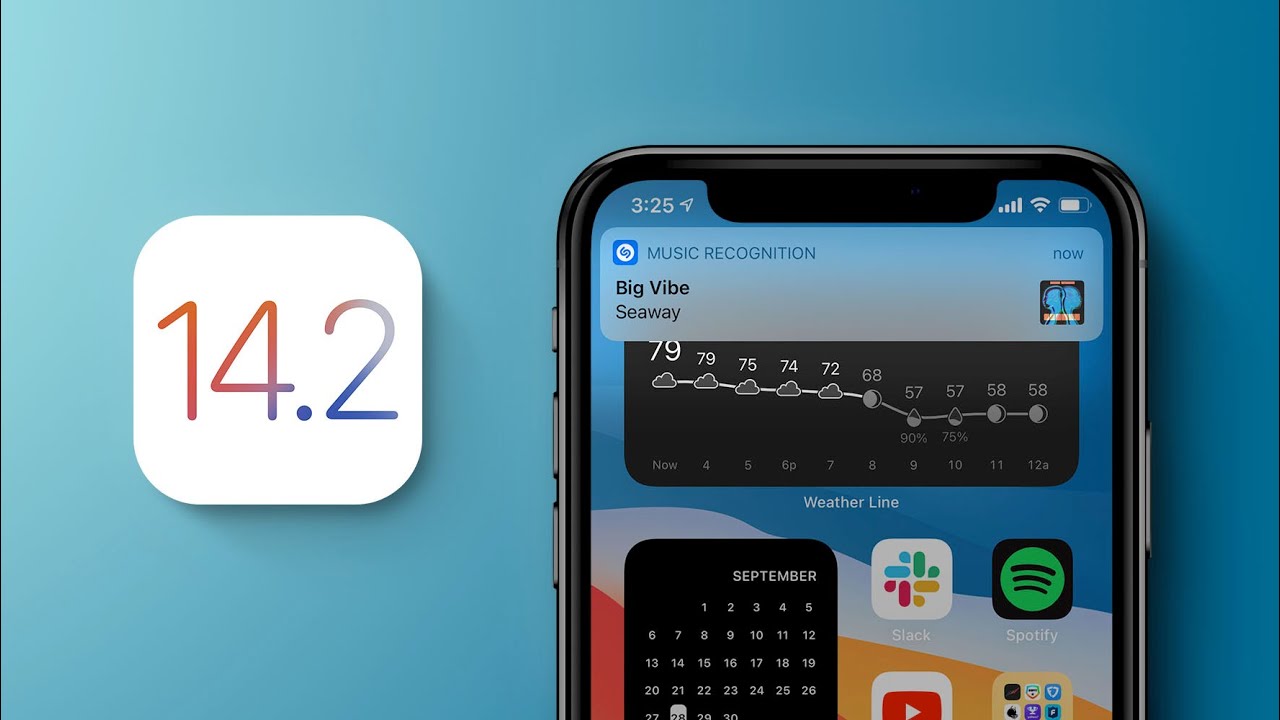

The iOS 14.2 update mainly focuses on the Control Center, introducing a new Music Recognition toggle that deepens the Shazam integration in the iPhone and iPad. We thought we'd test out the new Shazam toggle in the Control Center in our latest YouTube video, giving those who haven't installed the beta a look at what it does.

For those unfamiliar with Shazam, it's designed to listen for music that's playing, providing a song title and artist for identification purposes. Apple's iPhones and iPads have long had Shazam integration, available through the Shazam app and by asking Siri to identify a song that's playing.

After years of ‌Siri‌ integration, Apple acquired Shazam in 2017, and the acquisition was finished in 2018, but until now, Apple hasn't made a move to make song recognition a system-level function.

iOS 14.2 adds a new "Music Recognition" toggle to the Control Center, which you can tap whenever music is playing to get a song recognition. Note that Music Recognition is distinct from Sound Recognition, an Accessibility feature introduced in iOS 14 to help those who are hard of hearing listen for sounds like alarms.

The Music Recognition toggle doesn't show up in Control Center by default (at least in the beta), but it can be enabled by opening up the Settings app, choosing Control Center, and then scrolling down and tapping the "+" button next to Music Recognition.
music recognition

Tapping the Music Recognition button in Control Center will cause an iPhone or ‌iPad‌ to listen for a song that's playing, and when a song is recognized, you'll be notified through a pop up banner. Tapping the banner opens up Shazam, but a long press will give you the option to open the song right in Apple Music, which is handy for ‌Apple Music‌ subscribers.

Music Recognition works with songs playing in the ambient environment as well as songs playing on your iPhone. So if you're watching a video and want to know what song is in it, you can just tap the Music Recognition toggle to find out. It even works when AirPods are connected, so the sound doesn't need to be out loud. This was possible with a ‌Siri‌ command before, but the functionality is easier to use with the simple Control Center toggle.

Along with Music Recognition, there are a few other bonus tweaks in the iOS 14.2 update. The Now Playing interface in Control Center has been redesigned and now, when there's no music playing, it will show suggestions based on songs and albums that you've listened to recently. The design has also been streamlined, and if you want to AirPlay to other devices, there's now a little toggle to tap that brings up all nearby ‌AirPlay‌ 2 compatible devices in a list, rather than displaying them at all times in the widget.

iOS 14.2 also adds one more Accessibility feature, enhancing the Magnifier app on the iPhone. There's now an option to turn on People Detection in Magnifier, which lets the app detect people to let those with low sight know when someone is within six feet. The People Recognition option is also able to identify specific people that have been labeled in the Photos app using the iPhone's facial detection feature.

The iOS 14.2 update is available to both developers and public beta testers at this time, so anyone can test it out if desired. It is a beta, so expect some bugs. iOS 14.2 will likely be in beta testing for some time as we await new iPhones, with a launch perhaps coming later in October.


Related Forum: iOS 14

Popular Stories

M5 MacBook Pro

RIP, MacBook Ultra

Monday October 19, 2026 9:37 am PDT by
Apple today sent out invites for an experience in Los Angeles on Wednesday, October 28, and the "Pro and tell" tagline on the invitation likely means that the rumored MacBook models with touch-enabled OLED displays will stick with MacBook Pro branding instead of the once-rumored "MacBook Ultra" name. The long-rumored "iPhone Ultra" ended up being named iPhone Duo, so speculation that Apple...

iPhone Duo Trio

Here's What Apple's Apps Look Like on the iPhone Duo

Tuesday October 20, 2026 11:12 am PDT by
With just three days to go until the iPhone Duo is released, Apple is getting ready for the launch. Behind the scenes, the App Store now has screenshots of Apple's built-in apps running on the Duo. We've seen some apps in marketing materials, but images of the ones we haven't seen give us an idea of what it will be like using the iPhone Duo day to day. Many apps are shown in landscape...
apple pro tell logo

Apple Announcing New Products Next Week: 'Pro and Tell'

Monday October 19, 2026 9:05 am PDT by
Apple's Greg Joswiak today hinted at new product announcements coming next week, sharing a social media post that says "Can't wait to pro and tell next week." Rumors suggest Apple is planning to debut the new MacBook Pro with an OLED touchscreen display, an M6 entry-level MacBook Pro, an M6 iMac, an iPad mini with an OLED display. Can't wait to pro and tell next week....

Top Rated Comments

79 months ago
A long long time ago, Shazam or Soundhound (can't remember which one) was smart enough to recognize and name a song if you just hummed it. It was magical, and I swear I'm not hallucinating it. Now neither seems capable of this. Does anyone know of an app that has this capability?
Score: 9 Votes (Like | Disagree)
nymphe Avatar
79 months ago
It is SoundHound and it still can do it. I used this feature on a French song couple of weeks ago and it recognized the song.

btw I can’t speak French, so I just hummed the melody, so no words at all.

(The song is: une belle histoire)


A long long time ago, Shazam or Soundhound (can't remember which one) was smart enough to recognize and name a song if you just hummed it. It was magical, and I swear I'm not hallucinating it. Now neither seems capable of this. Does anyone know of an app that has this capability?
Score: 7 Votes (Like | Disagree)
mashdots Avatar
79 months ago
I've been using shazam for years and i've loved how easily it has worked. very excited to have it integrated into the OS!
Score: 5 Votes (Like | Disagree)
AppleGuesser Avatar
79 months ago

If the new 14.2 Update is as bug-prone with issues as the original iOS 14 was, PLEASE iron out the kinks before you release it, Apple. I know too many people who have screwed up their Apple watches, iPads & iPhones with battery issues, color shifts, pages that will not load, freeze up, etc. due to updating to iOS 14. :mad:
This is a tired quote. For everyone of these posts, 100 are positive about ios 14. The only mistake apple made was moving from GM to Public release in about a day instead of 1-2 weeks. Other than that, this is better than iOS 13 or 11 judging from the hate comments here on GeekWebGuides.
Score: 4 Votes (Like | Disagree)
Digital Dude Avatar
79 months ago
I just took a look-see at the Magnifier App. While all this adds utility, I'd rather see existing Apps that work. To date, iOS 14.x is the most bug-infested version I have ever used. 🤨

I didn't even see the post above mine (#7) before I posted my comment.
Score: 4 Votes (Like | Disagree)
RevTEG Avatar
79 months ago

If the new 14.2 Update is as bug-prone with issues as the original iOS 14 was, PLEASE iron out the kinks before you release it, Apple. I know too many people who have screwed up their Apple watches, iPads & iPhones with battery issues, color shifts, pages that will not load, freeze up, etc. due to updating to iOS 14. :mad:
I know many are having a different experience, but I’m with you on this one. I’m currently running 14.2 PB on my 2018 12.9. I’m still having issues with battery, widgets not working, some apps are not the correct size and I keep getting stuck with the spinning “wheel” in the upper right corner, which drains the battery really fast. A restart stops the spinning “wheel” but only for a few hours. I‘ve done all I know to do except for erasing and fresh install. Again, not hating on Apple, I’m positive many are not having these issues. However, for me, iOS/PadOS14 has been the most unstable update I‘ve ever experienced.
Score: 4 Votes (Like | Disagree)
Latest Stories
iPhone Duo Reviewers Really Miss Face ID
5 hours ago
Does the iPhone Duo Run Hot? Here's What Reviews Found
6 hours ago
Apple Music's New Look is Now Live on Apple's Website
7 hours ago
Anthropic Launches Claude Duet, a Proactive AI Agent
8 hours ago
What 32,000 Folds Did to the iPhone Duo's Hinge
8 hours ago
iPhone Duo's Hidden FaceTime Camera Takes 'Trash' Photos
10 hours ago
iPhone Duo Has 'Edge Light' Feature That Debuted on Macs Last Year
10 hours ago
Apple Support App Updated for iPhone Duo's Larger Display
11 hours ago
Amazon Sweetens the Deal on Entry-Level 16-Inch MacBook Pro With $570 Off
11 hours ago
iPhone Duo Tips Over on MagSafe Stands When Unfolded
11 hours ago
Apple Music's New Look Officially Announced
12 hours ago
iPhone Duo Supports Apple Pencil Starting With iOS 27.2
13 hours ago
iPhone Duo Accessories Roundup: Cases and Screen Protectors From OtterBox, ZAGG, and More
14 hours ago
Apple Stores Will Have 'Limited' Availability of iPhone Duo for Walk-In Customers
14 hours ago
iPhone Duo Reviews Explain Why Device is Both 'Fun' and 'Frustrating'
15 hours ago
Apple Says 'Reachability' Feature Coming to iPhone Duo Later This Year
16 hours ago
Loop Capital Cuts Apple Rating Over iPhone Sales Outlook
20 hours ago
Apple Stores in Bordeaux and Lille Looted During French Protests
20 hours ago
Bluesound Adds Native Apple Music Support
20 hours ago
Apple CEO John Ternus Explains What Makes Good Product Design
21 hours ago
UK Proposes New Ways to Help Apple Pay Rivals
23 hours ago
WhatsApp Developing In-App Browser for All Chat Links on iPhone
1 day ago
Apple's App Store Chief Explains Its Push for Premium Games
1 day ago
Apple Could Owe Even More After $5.7 Billion Patent Verdict
1 day ago
Skyrim Comes to Apple Silicon Macs With New Unofficial Installer
1 day ago
Apple Highlights Mac and iPad Use in Paris Design Exhibition
1 day ago
Apple Seeks 6G Modem Engineers as It Plans for Post-5G iPhones
1 day ago
First iPhone Duo Unboxing Video Appears Ahead of Friday Launch
1 day ago
Perplexity Computer Can Now Run Fully Locally on Mac
1 day ago
Apple's Touchscreen OLED MacBook Pro: Everything We Know
1 day ago









































