Somfy Tahoma Gateway to Gain HomeKit Support From December 1, 2020

European smart home company Somfy will make its Tahoma gateway hub HomeKit compatible from the beginning of next month, according to the iFun.de tech website.
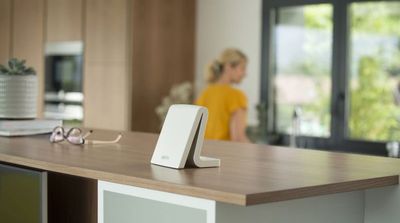
tahoma gateway
The gateway is used to control the France-based company's shutters and blinds, including external blinds, vertical awnings, patio awnings and pergolas, so if the company sticks to its scheduled rollout, owners of these Somfy products will be able to control them via Apple's Home app from December 1.

According to the German tech website, Somfy is delivering the promised ‌HomeKit‌ support around a year late. Compatibility was reportedly planned for a 2019 rollout, but the update had to be postponed several times. Somfy security cameras, on the other hand, have been ‌HomeKit‌ compatible for some time.

As noted by HomeKitNews, the Tahoma gateway is also capable of controlling other areas of the home, including smart lights, gates and garage doors, which is why it's already compatible with Google Home, Amazon Alexa, and IFTTT, in addition to integrations with Sonos, Philips Hue, and Velux.

Popular Stories

Apple Logo Zoomed

Tim Cook Teases Plans for Apple's Upcoming 50th Anniversary

Thursday February 5, 2026 12:54 pm PST by
Apple turns 50 this year, and its CEO Tim Cook has promised to celebrate the milestone. The big day falls on April 1, 2026. "I've been unusually reflective lately about Apple because we have been working on what do we do to mark this moment," Cook told employees today, according to Bloomberg's Mark Gurman. "When you really stop and pause and think about the last 50 years, it makes your heart ...
wwdc sans text feature

Apple Rumored to Announce New Product on February 19

Thursday February 5, 2026 12:22 pm PST by
Apple plans to announce the iPhone 17e on Thursday, February 19, according to Macwelt, the German equivalent of Macworld. The report, citing industry sources, is available in English on Macworld. Apple announced the iPhone 16e on Wednesday, February 19 last year, so the iPhone 17e would be unveiled exactly one year later if this rumor is accurate. It is quite uncommon for Apple to unveil...
Finder Siri Feature

Why Apple's iOS 26.4 Siri Upgrade Will Be Bigger Than Originally Promised

Friday February 6, 2026 3:06 pm PST by
In the iOS 26.4 update that's coming this spring, Apple will introduce a new version of Siri that's going to overhaul how we interact with the personal assistant and what it's able to do. The iOS 26.4 version of Siri won't work like ChatGPT or Claude, but it will rely on large language models (LLMs) and has been updated from the ground up. Upgraded Architecture The next-generation...
iOS 26

iOS 26.3 and iOS 26.4 Will Add These New Features to Your iPhone

Tuesday February 3, 2026 7:47 am PST by
While the iOS 26.3 Release Candidate is now available ahead of a public release, the first iOS 26.4 beta is likely still at least a week away. Following beta testing, iOS 26.4 will likely be released to the general public in March or April. Below, we have recapped known or rumored iOS 26.3 and iOS 26.4 features so far. iOS 26.3 iPhone to Android Transfer Tool iOS 26.3 makes it easier...
maxresdefault

Apple Shows Off a Key Reason to Upgrade to the iPhone 17

Saturday February 7, 2026 9:26 am PST by
Apple today shared an ad that shows how the upgraded Center Stage front camera on the latest iPhones improves the process of taking a group selfie. "Watch how the new front facing camera on iPhone 17 Pro takes group selfies that automatically expand and rotate as more people come into frame," says Apple. While the ad is focused on the iPhone 17 Pro and iPhone 17 Pro Max, the regular iPhone...

Top Rated Comments

JamesLeSmash Avatar
68 months ago
So there are lots of moving part to this. But to summarise: if your wireless devices are 'RTS' or 'IO' compatible then you can add them to the Tahoma hub. You need to do some research before buying.

For example, I have some velux motorised blinds which are IO compatible. To be clear, these are not part of the Integra Range (Velux's true Smart Blinds) but they are controlled by a wireless remote, which is IO compatible. I have these blinds added to my Tahoma hub, which makes them controllable.

I also have some internal patio blinds which are Somfy, using RTS. Now these blinds are controlled by the Somfy RTS remote, which also can be added to the Tahoma hub.

However, RTS and IO are not equal.

IO is two-way so allows the motor to feed back to the blind whether a command was successful. So for example, "Hey Siri, set the IO Blind to 70%" works.

RTS is one way (point and shoot) so the motor does not feed back. The hub/remote only have three options for RTS: Open, Closed and 'My' (which is a preset height). You can ask Siri to Open or Close the blind. You cannot set a %.
Somfy is bringing out it's own version of IO (called io-homecontrol ('https://www.somfy.co.uk/support/somfy-motor')) which is new hardware motors which will make them function like IO.

Note: I am running HomeBridge on a RaspberryPi with the Somfy Tahoma plugin. This makes the blinds visible to HomeKit. IO works as above. RTS can only be opened or closed (even though the UI allows for the % slider, it doesn't not work). The Tahoma plugin also allows the Tahoma Scenes to be created as HomeKit Switches, which allows you to control multiple blinds or groups, but only with Open, Closed and 'My' control.

What is not clear is:
- how the native Tahoma HomeKit update will handle the RTS blind limitations (mentioned above)
- whether the native Tahoma HomeKit update will allow the 'My' reset height issue.


I’m curious what exactly this does. Does it receive signals from ANY wireless items such as my garage door or blinds. Or do I need special compatible ones to connect to this box? I should be more clear. My blinds are wireless on the 433mhz range. Just connected to a standard remote. Does this box take that remotes place I guess I’m asking
Score: 4 Votes (Like | Disagree)
JPSaltzman Avatar
68 months ago
Oh, to have such a spotless, clean, modern kitchen/living area with minimal electronics, no plugs, no wires, no dongles. Just peace and serenity and let the high-tech world just take care of your every need and care and worry.
/s (I just find these stock photos or ones supplied by the companies just so ridiculous.)

PS. Still waiting for that Flying Car and "The Jetsons" world that all the visionaries said we would have by the end of the 20th century. Hmm.
Score: 2 Votes (Like | Disagree)
wilhelmd Avatar
68 months ago
For the impatient: I can happily report that this exact Somfy Tahoma gateway already works very well with HomeKit using homebridge-tahoma ('https://www.npmjs.com/package/homebridge-tahoma').
Score: 1 Votes (Like | Disagree)
adriweb Avatar
68 months ago

so did they say what they were going to do with RTS motors? Just omit them from Tahoma native HomeKit...? Any source documentation would be greatly appreciated
The official list is here, page 21 for HomeKit: https://service.somfy.com/downloads/fr_v5/liste-des-compatibilites-tahoma-novembre-2020.pdf
And yes, other things simply won't show up in HomeKit, they actually specifically mentioned RTS as incompatible in their news article.
Score: 1 Votes (Like | Disagree)
dannys1 Avatar
68 months ago

Thank you - guess my raspberryPi Tahoma-plugin hackaround will remain in place until I upgrade the RTS motors in favour of io-homecontrol ('https://www.somfy.co.uk/support/somfy-motor') ?‍♂️
I hope they're just plug and play with my current RTS motors - being able to actually control 0-100% open and every percent along the way with the controller actually know where it was would be a big upgrade though.
Score: 1 Votes (Like | Disagree)
JamesLeSmash Avatar
60 months ago

Thanks James … at the risk of asking for free tech support, how hard would it be to do using Hoobs? Does Hoobs sync with Somfy Tacoma device or do I need to add RTS roller blinds in some other way? Is this something a amateur like me could do without freaking out? Cheers, Barry
I haven't used Hoobs myself, but I'm told it's very easy. You plug in the dongle to your router, looks like this guide is pretty straight forward: https://support.hoobs.org/docs/5e875bda0ab68b0344e872c8

Before spending any money I would recommend just installing HomeBridge on a laptop, installing the Tahoma Plugin & having a play with your devices to see the features & limitations of this approach. Hoobs is essentially a branded packaged version of HomeBridge.

Score: 1 Votes (Like | Disagree)


















