
Apple Seeds Second Public Beta of macOS Big Sur 11.3 - GeekWebGuides
Skip to Content

Apple Seeds Second Public Beta of macOS Big Sur 11.3

Apple today seeded the second public beta of an upcoming macOS Big Sur 11.3 update to its public beta testing group, with the new software coming two weeks after the first public beta.

First Look Big Sur Feature2
Public beta testers can download ‌macOS Big Sur‌ 11.3 from the Software Update section of the System Preferences app after installing the proper profile from Apple's beta software website.

macOS Big Sur 11.3 introduces more customization options for Safari, adding a way to rearrange the different sections on the Start Page like Favorites, Reading List, Siri Suggestions, Privacy Report, and more. Developers also have access to a new integration to develop features for the Start Page.

The update includes optimizations for using iOS apps on M1 Macs. When running iPhone and iPad apps on ‌M1‌ Macs, there's a Touch Alternatives preference pane that allows users to set keyboard commands for touch input alternatives, plus iPadOS apps launch with a larger window if the Mac's display allows it. Touch Alternatives can be enabled for iPhone or ‌iPad‌ apps by clicking on the app's name in the menu bar and then selecting the Preferences option. Touch Alternatives let you customize taps, swipes, and drags.

macOS Big Sur 11.3 also adds support for the latest PlayStation 5 DualSense and Xbox Series X/S controllers for use with macOS games.

In the Reminders app, reminder lists can be sorted by Due Date, Creation Date, Priority, or Title, and there is an option to print lists by going to File > Print. Reminders can also be moved manually across lists with drag and drop, something that wasn't possible before.

Apple is adding a new "Made For You" library shortcut in Apple Music for finding personal mixes and Replay playlists, and the Listen Now section has been updated with support for highlighting live events. In the second beta, there's a new autoplay feature in the ‌Apple Music‌ app that allows the streaming service to continue to play music after a playlist or music queue ends. ‌Apple Music‌ sources music similar to what's in a person's ‌Apple Music‌ library, similar to the autoplay feature added in iOS 14.
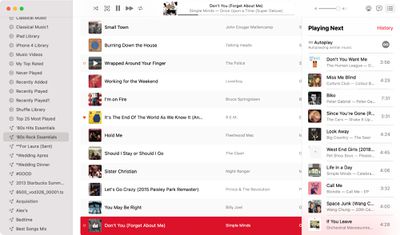
macos big sur apple music autoplay
With this feature enabled, ‌Apple Music‌ audio will not end even after a playlist or album is over. To check that it's on, play a playlist or album and then click on the three dot/line menu button in the upper right hand corner. From there, make sure the infinity symbol is toggled on.

In the Apple News app, there's a redesigned ‌Apple News‌+ tab with a dedicated "For You" section and a new Browse tab that makes it easier to browse through available content. The new For You section is designed to help ‌Apple News‌+ users find favorite magazines and newspapers much faster, plus it adds new tools for managing downloaded issues.

There's also an updated "Support" interface when accessing "About This Mac." The new design includes details on your warranty and it allows for starting a repair right from the Mac interface.
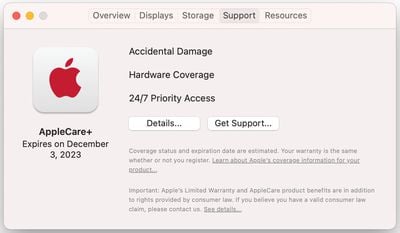
macos big sur beta support
macOS Big Sur 11.3 adds support for HomePod Stereo pairs, allowing a set of paired HomePods to be set as the default sound output option, with the two HomePods showing up as a single selectable speaker rather than separate as in prior versions of macOS.

Code in the update suggests that the Optimized Battery Charging feature will now make sure the Mac's battery is fully charged before a scheduled calendar event. The Mac will charge to 100 percent three hours before a calendar event's start time.

Optimized Battery Charging is designed to preserve the lifespan of the Mac's battery by limiting the amount of time that a Mac sits at 100 percent battery.

In Safari, there's support for WebM video playback, allowing users to play WebM videos using Apple's browser. WebM is a niche video format designed to be a royalty-free alternative to the H.264 codec used in the MP4 format. WebM allows video files to remain small without sacrificing quality and can be played with little processing power, making it ideal for webpages and browsers.

More on macOS Big Sur can be found in our macOS Big Sur roundup. The software is expected to see a release this spring.


Related Forum: macOS Big Sur

Popular Stories

M5 MacBook Pro

RIP, MacBook Ultra

Monday October 19, 2026 9:37 am PDT by
Apple today sent out invites for an experience in Los Angeles on Wednesday, October 28, and the "Pro and tell" tagline on the invitation likely means that the rumored MacBook models with touch-enabled OLED displays will stick with MacBook Pro branding instead of the once-rumored "MacBook Ultra" name. The long-rumored "iPhone Ultra" ended up being named iPhone Duo, so speculation that Apple...
iPhone Duo Trio

Here's What Apple's Apps Look Like on the iPhone Duo

Tuesday October 20, 2026 11:12 am PDT by
With just three days to go until the iPhone Duo is released, Apple is getting ready for the launch. Behind the scenes, the App Store now has screenshots of Apple's built-in apps running on the Duo. We've seen some apps in marketing materials, but images of the ones we haven't seen give us an idea of what it will be like using the iPhone Duo day to day. Many apps are shown in landscape...
apple pro tell logo

Apple Announcing New Products Next Week: 'Pro and Tell'

Monday October 19, 2026 9:05 am PDT by
Apple's Greg Joswiak today hinted at new product announcements coming next week, sharing a social media post that says "Can't wait to pro and tell next week." Rumors suggest Apple is planning to debut the new MacBook Pro with an OLED touchscreen display, an M6 entry-level MacBook Pro, an M6 iMac, an iPad mini with an OLED display. Can't wait to pro and tell next week....

Top Rated Comments

hybrid_x Avatar
74 months ago
I think it's hilarious that Apple is adding calendar awareness to charging of all things, when they've totally broken the calendar awareness of things like Do Not Disturb (no more "… until the end of this event"), and have broken the options for snoozing notifications as well (no more options for how an alert gets snoozed… the only option is "snooze" which is 9 minutes, no more "until it's time to leave," "until X minutes before start time" or anything… just… snooze). Considering they've been trying to make macOS more iPhone-like, this is one area where they have fallen down badly.

And another thing, while I'm here…

I just plugged in an external display for the first time since upgrading to Big Sur, and holy crap, have they ever turned display spanning into a hot mess.

You get a menu bar on every display now, not just your Primary display. This was confusing to me at first, but I can see how it might come in handy.

Auto-show/hide of the dock on spanned displays is also now a complete mess. The dock no longer automatically shows when the cursor is touched to the bottom of the primary display. You have to put the cursor there and click for the dock to appear. Again, unexpected and undocumented behaviour. I can see where it might be handy, but it's weird and feels broken. There is also no longer a keyboard shortcut (command+option+D) to manually show/hide the dock.

[HR][/HR]

UPDATE: It turns out, this issue was actually being caused by a mouse that was acting as if it had a button held down, which was interfering with several other click/gesture inputs.

[HR][/HR]

Also, the little "displays" widget we used to get in the menu bar? It's only there for "mirroring" now. If you're spanning your display, you get nothing in the menu bar or the Control Center. Apparently display spanners are second-class citizens compared to mirroring now.
Score: 5 Votes (Like | Disagree)
74 months ago

Do you have a list of the "many, many bugs"? I am not seeing any, notta, zilcho, zero-ony. so many, many strikes me as a bit of a false narrative. are some of them specific to certain hardware? I guess many many must be at least 20, right?
Sure. Some are major, some aren't major. Apple Music still throws up errors of "Failed to load" when browsing around the app. When logging out and then logging back into a user account (without restarting the machine), iMessage notifications show up as phone numbers rather than as contacts. When channeling audio from a phone call to a nearby Mac, using the audio selection circle on the call screen, the call cuts off. There are other issues that I've run into that seem more difficult to reproduce. This is all in addition to the iCloud tabs issue I mentioned in my previous comment, which might or might not relate specifically to macOS software. Everybody has different usage patterns than everybody else, so it's possible that some folks like you might not have encountered many or even any bugs. But many of us here on this forum, heck even in this very thread, have.

None of these issues existed for me under Catalina. Zilcho, notta, zero-ony. So while this might be a "false narrative" in your case (in which case I am actually happy things are working smoothly for you!), it's not false for all too many people. I don't know why anybody would try to disseminate a "false narrative" about a computer operating system they are using. That strikes me as ... odd.
Score: 5 Votes (Like | Disagree)
SkyRom Avatar
74 months ago
Big Sur has been the worst Apple OS I've ever used, bar none. It was not ready for primetime. Too many issues to even bother listing. Apparently they spent all their time making COVID emoji's to explain how the 'talent' were treated during their filming instead of making a stable product.
Score: 4 Votes (Like | Disagree)
hagjohn Avatar
74 months ago
Apple need stop introducing new features and concentrate on getting these long term bugs fixed for the next few updates.
Score: 3 Votes (Like | Disagree)
yukari Avatar
74 months ago

Not having any issues with this at all. Maybe you can be more specific instead of making such a generic complaint. I don't know, computer, display mode, application where it is occurring, what is it doing?
You are kidding, right?

https://forums.macrumors.com/threads/osx-big-sur-11-1-reverts-size-of-open-save-windows-annoying.2275465/
Score: 3 Votes (Like | Disagree)
74 months ago

I think it's hilarious that Apple is adding calendar awareness to charging of all things, when they've totally broken the calendar awareness of things like Do Not Disturb (no more "… until the end of this event"), and have broken the options for snoozing notifications as well (no more options for how an alert gets snoozed… the only option is "snooze" which is 9 minutes, no more "until it's time to leave," "until X minutes before start time" or anything… just… snooze). Considering they've been trying to make macOS more iPhone-like, this is one area where they have fallen down badly.

And another thing, while I'm here…

I just plugged in an external display for the first time since upgrading to Big Sur, and holy crap, have they ever turned display spanning into a hot mess.

You get a menu bar on every display now, not just your Primary display. This was confusing to me at first, but I can see how it might come in handy.

Auto-show/hide of the dock on spanned displays is also now a complete mess. The dock no longer automatically shows when the cursor is touched to the bottom of the primary display. You have to put the cursor there and click for the dock to appear. Again, unexpected and undocumented behaviour. I can see where it might be handy, but it's weird and feels broken. There is also no longer a keyboard shortcut (command+option+D) to manually show/hide the dock.

Also, the little "displays" widget we used to get in the menu bar? It's only there for "mirroring" now. If you're spanning your display, you get nothing in the menu bar or the Control Center. Apparently display spanners are second-class citizens compared to mirroring now.
I think you may be mistaken

- there was almost always a menu on all screens
- putting my cursor at the bottom and waiting a moment does show the dock (no clicking)
- CMD OPTION + D is hiding and showing my dock
- the display item from the menu bar is moved into the control centre but you can drag it out of there back up on to the menu if you want


I am on 11.3 beta 2

Attachment Image
Score: 3 Votes (Like | Disagree)
Latest Stories
Apple Will Label Apps 'Made for iPhone Duo' in App Store
1 hour ago
Amazon Takes $49 Off iPad With Prices Starting at $399.99
2 hours ago
F1 on Apple TV Now Available in Dolby Atmos
3 hours ago
Apple Reveals More Than 50 Apps That Will Be Updated for iPhone Duo
3 hours ago
Apple Blocks Certificates That Could Help Attackers Fake Websites
4 hours ago
Giant iPhone Duo Installations Spotted at Apple Fifth Avenue
5 hours ago
iPhone Duo 2 Prototypes Include Under-Display Face ID
5 hours ago
Tesla App Gains iPad and iPhone Duo Support
9 hours ago
Apple Reportedly Boosts iPhone Duo Orders by 44%
10 hours ago
Fortnite Returning to Australian App Store After Court Ruling
10 hours ago
Apple Ordered to Open iPhone to Rival App Stores in Australia
10 hours ago
Apple Suppliers Face Hurdles Cutting Circuit Board Emissions
11 hours ago
Things Updated for iPhone Duo With Adaptive Layout
11 hours ago
Simplicity and Siri AI Are HomeView's Killer Features, Apple Says
12 hours ago
iPhone Duo Reviewers Really Miss Face ID
17 hours ago
Does the iPhone Duo Run Hot? Here's What Reviews Found
18 hours ago
Apple Music's New Look is Now Live on Apple's Website
19 hours ago
Anthropic Launches Claude Duet, a Proactive AI Agent
19 hours ago
What 32,000 Folds Did to the iPhone Duo's Hinge
20 hours ago
iPhone Duo's Hidden FaceTime Camera Takes 'Trash' Photos
22 hours ago
iPhone Duo Has 'Edge Light' Feature That Debuted on Macs Last Year
22 hours ago
Apple Support App Updated for iPhone Duo's Larger Display
22 hours ago
Amazon Sweetens the Deal on Entry-Level 16-Inch MacBook Pro With $570 Off
23 hours ago
iPhone Duo Tips Over on MagSafe Stands When Unfolded
23 hours ago
Apple Music's New Look Officially Announced
1 day ago
iPhone Duo Supports Apple Pencil Starting With iOS 27.2
1 day ago
iPhone Duo Accessories Roundup: Cases and Screen Protectors From OtterBox, ZAGG, and More
1 day ago
Apple Stores Will Have 'Limited' Availability of iPhone Duo for Walk-In Customers
1 day ago
iPhone Duo Reviews Explain Why Device is Both 'Fun' and 'Frustrating'
1 day ago
Apple Says 'Reachability' Feature Coming to iPhone Duo Later This Year
1 day ago









































