macOS Monterey Automatically Resizes Windows Moved to a Secondary Display
Apple announced macOS Monterey this week, and one small but convenient feature that went unmentioned during the WWDC keynote is automatic window resizing.
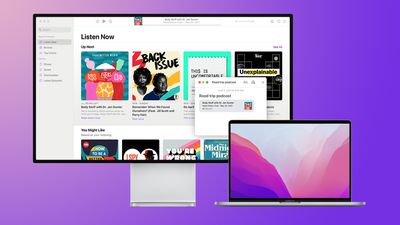
As explained on the macOS Monterey features page, windows now automatically resize when they are moved from a Mac's built-in display to a secondary display, including an external monitor, another Mac, or an iPad using Sidecar.
This feature should prove to be particularly useful when moving windows between a smaller MacBook display and a larger external monitor.
Another new window management feature in macOS Monterey is the option to display the menu bar at all times when an app is in full-screen mode, making it easy to view an app's various menus and other glanceable information at any time.
macOS Monterey is available now in beta for developers, with a public release likely to occur at some point between September and November.
Popular Stories
Apple today sent out invites for an experience in Los Angeles on Wednesday, October 28, and the "Pro and tell" tagline on the invitation likely means that the rumored MacBook models with touch-enabled OLED displays will stick with MacBook Pro branding instead of the once-rumored "MacBook Ultra" name.
The long-rumored "iPhone Ultra" ended up being named iPhone Duo, so speculation that Apple...
With just three days to go until the iPhone Duo is released, Apple is getting ready for the launch. Behind the scenes, the App Store now has screenshots of Apple's built-in apps running on the Duo. We've seen some apps in marketing materials, but images of the ones we haven't seen give us an idea of what it will be like using the iPhone Duo day to day.
Many apps are shown in landscape...
Apple's Greg Joswiak today hinted at new product announcements coming next week, sharing a social media post that says "Can't wait to pro and tell next week."
Rumors suggest Apple is planning to debut the new MacBook Pro with an OLED touchscreen display, an M6 entry-level MacBook Pro, an M6 iMac, an iPad mini with an OLED display.
Can't wait to pro and tell next week....







/https://forums.macrumors.com/attachments/1790121/)













































