
Apple Putting a Stop to Email Tracking Pixels With Mail Privacy Protection in iOS 15 and macOS Monterey - GeekWebGuides
Skip to Content

Apple Putting a Stop to Email Tracking Pixels With Mail Privacy Protection in iOS 15 and macOS Monterey

Tracking when you've opened up an email and what you've read is something that many companies and advertisers rely on for their marketing efforts, plus there are email clients out there designed to let users know when the emails they've sent have been opened up.
ios15 mail privacy feature
Much of this tracking is facilitated by remote images that load when viewing an email, and some of it is even sneakier, with advertisers using invisible tracking pixels. Tracking pixels are hidden graphics that you might not see in an email, but your email client loads them, allowing senders to gather data from you. Senders can see that you've opened an email get other information, such as your IP address.

With iOS 15, iPadOS 15, and macOS Monterey, Apple is putting a stop to email tracking with a suite of Mail Privacy Protection features.

Mail Privacy Protection is not enabled by default, but Apple will highlight it as an option when you upgrade to iOS 15 or iPadOS 15. If you're running one of these updates, you can turn it on in Settings > Mail. Tap on "Privacy Protection" and then toggle on "Protect Mail Activity." In macOS Monterey, open up Mail, go to the Mail Preferences, and then click on Privacy. From there, toggle on Protect Mail Activity.
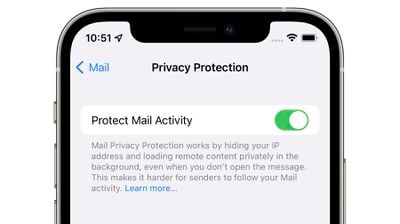
mail privacy protection
When enabled, Mail Privacy Protection hides your IP address and loads all remote content privately in the background, routing it through multiple proxy services and randomly assigning an IP address.

Here's how Apple describes the feature in full:

Emails that you receive may include hidden pixels that allow the email's sender to learn information about you. As soon as you open an email, information about your Mail activity can be collected by the sender without transparency and an ability to control what information is shared. Email senders can learn when and how many times you opened their email, whether you forwarded the email, your Internet Protocol (IP) address, and other data that can be used to build a profile of your behavior and learn your location.

If you choose to turn it on, Mail Privacy Protection helps protect your privacy by preventing email senders, including Apple, from learning information about your Mail activity. When you receive an email in the Mail app, rather than downloading remote content when you open an email, Mail Privacy Protection downloads remote content in the background by default - regardless of how you do or don't engage with the email. Apple does not learn any information about the content.

In addition, all remote content downloaded by Mail is routed through multiple proxy servers, preventing the sender from learning your IP address. Rather than share your IP address, which can allow the email sender to learn your location, Apple's proxy network will randomly assign an IP address that corresponds only to the region your device is in. As a result, email senders will only receive generic information rather than information about your behavior. Apple does not access your IP address.

It's worth noting that senders will see an IP address that corresponds to the region where you're located, giving them generic information about your behavior that is non-specific and cannot be used for building a profile of your behavior.

You could previously block email trackers by blocking the loading of remote content in the Mail app on iOS and macOS, but Apple's new feature is superior because you can still view all email content as normal while Mail Privacy Protection works in the background with no visual compromises.

Email senders can still monitor your behavior with tracked links that you will need to be mindful of, but the behind the scenes tracking that you might not notice won't happen.

Mail Tracking Privacy pairs well with iCloud Private Relay, a feature that's included in ‌iCloud‌+. ‌iCloud‌+ is just Apple's name for its paid ‌iCloud‌ plans, which start out at $0.99 per month. With that $1 per month, all the traffic that leaves your device is routed through two separate internet relays so advertisers can't see your IP address or location, nor can they link your browsing history to this information to build a profile about you.
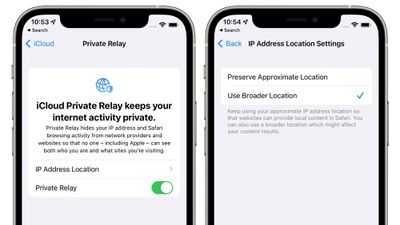
icloud private relay
‌iCloud‌ Private Relay is not quite a VPN, but it's similar, and it's an incredible feature for the less technically inclined that would not think to use a VPN or wouldn't know how, such as elderly people who need the most protection from tracking and scams.

Apple's plans for ‌iCloud‌ Private Relay and Mail Tracking Privacy are already worrying advertisers, according to a report earlier this week from The Wall Street Journal. Ad-measurement firm Branch Metrics' CEO Alex Austin said that Private Relay could be "vastly more damaging to the advertising ecosystem than the App Tracking Transparency measures implemented early this year. "If IP were to go away entirely, it would be very challenging for a lot of companies to operate," he said.

As for Mail Privacy Protection, advertisers are "surprised" that Apple blocked tracking in emails because of how much harder it will be for brands to know if their emails are working.

These new privacy features could spur Google to adopt similar measures for Chrome, and a Google spokesperson confirmed that Google is indeed considering similar features for blocking IP addresses.

‌iCloud‌ Private Relay and Mail Privacy Protection alone are enough reason to upgrade to the newest software when it becomes available this fall, but the rest of the features coming in iOS 15 and macOS Monterey can be found in our roundups.


Related Forums: iOS 15, macOS Monterey

Popular Stories

M5 MacBook Pro

RIP, MacBook Ultra

Monday October 19, 2026 9:37 am PDT by
Apple today sent out invites for an experience in Los Angeles on Wednesday, October 28, and the "Pro and tell" tagline on the invitation likely means that the rumored MacBook models with touch-enabled OLED displays will stick with MacBook Pro branding instead of the once-rumored "MacBook Ultra" name. The long-rumored "iPhone Ultra" ended up being named iPhone Duo, so speculation that Apple...
iPhone Duo Trio

Here's What Apple's Apps Look Like on the iPhone Duo

Tuesday October 20, 2026 11:12 am PDT by
With just three days to go until the iPhone Duo is released, Apple is getting ready for the launch. Behind the scenes, the App Store now has screenshots of Apple's built-in apps running on the Duo. We've seen some apps in marketing materials, but images of the ones we haven't seen give us an idea of what it will be like using the iPhone Duo day to day. Many apps are shown in landscape...
apple pro tell logo

Apple Announcing New Products Next Week: 'Pro and Tell'

Monday October 19, 2026 9:05 am PDT by
Apple's Greg Joswiak today hinted at new product announcements coming next week, sharing a social media post that says "Can't wait to pro and tell next week." Rumors suggest Apple is planning to debut the new MacBook Pro with an OLED touchscreen display, an M6 entry-level MacBook Pro, an M6 iMac, an iPad mini with an OLED display. Can't wait to pro and tell next week....

Top Rated Comments

macsplusmacs Avatar
70 months ago
I am so into this feature. thx apple.
Score: 39 Votes (Like | Disagree)
TheYayAreaLiving 🎗️ Avatar
70 months ago
Protection + privacy = transparency to the consumers.

win/win for everyone.

Score: 29 Votes (Like | Disagree)
70 months ago

Can someone clarify; if an invisible pixel is associated with my email address then what does it matter how many proxies it goes through? If that image is loaded they know it was my email address that did it. Is this literally just hiding my IP and nothing more?
I’m not 100% positive, but I read this line:

“When you receive an email in the Mail app, rather than downloading remote content when you open an email, Mail Privacy Protection downloads remote content in the background by default - regardless of how you do or don't engage with the email. Apple does not learn any information about the content.”

… as meaning that Apple’s service will automatically download remote content through THEIR proxy servers (possibly anonymized), whether the email was ever opened by the user or not. This would result in the sender not having reliable tracking data. If every email they send is automatically loaded by a proxy server with a scrubbed IP, their data is mostly noise and no signal. It could essentially render most remote tracking pixels/images/etc useless to the sender, because it doesn’t tell them anything about the user’s behavior. Including whether the end user actually ever opened the email or not. It may look to the sender as if every email was always opened immediately, but that’s not actually what’s happening. The more widely adopted this feature is, the less reliable the data is for the senders.

I could be misunderstanding, but that’s how I read this.
Score: 22 Votes (Like | Disagree)
fwmireault Avatar
70 months ago
It’s annoying for apple mail to have all these great privacy features but lacking basic features that all other mail client have, like send later mail, giving a distinct color for each account connected or customizable notifications. I want Spark features with Apple privacy policy
Score: 21 Votes (Like | Disagree)
Morod Avatar
70 months ago
Apple costs, but saves even more…
Score: 15 Votes (Like | Disagree)
Lyoha Avatar
70 months ago

It's not loaded and parsed by Apple. It works similiar to an ad blocker but only for this use case. It checks for a tracking pixel and blocks it from loading. If the sender uses other tricks, they'll probably still get through.
I think a lot of you guys are really missing how this works. The remote content IS loaded by Apple and is NOT blocked in an ad blocker fashion. What happens is that 100% of the content is loaded whether or not you eventually open the email. This way the request that says the email was opened is always fulfilled, making the data useless to the advertiser. In addition, since it's going through a proxy, the location the advertiser gets will be imprecise.
Score: 11 Votes (Like | Disagree)
Latest Stories
Apple Will Label Apps 'Made for iPhone Duo' in App Store
1 hour ago
Amazon Takes $49 Off iPad With Prices Starting at $399.99
2 hours ago
F1 on Apple TV Now Available in Dolby Atmos
2 hours ago
Apple Reveals More Than 50 Apps That Will Be Updated for iPhone Duo
3 hours ago
Apple Blocks Certificates That Could Help Attackers Fake Websites
4 hours ago
Giant iPhone Duo Installations Spotted at Apple Fifth Avenue
5 hours ago
iPhone Duo 2 Prototypes Include Under-Display Face ID
5 hours ago
Tesla App Gains iPad and iPhone Duo Support
9 hours ago
Apple Reportedly Boosts iPhone Duo Orders by 44%
9 hours ago
Fortnite Returning to Australian App Store After Court Ruling
10 hours ago
Apple Ordered to Open iPhone to Rival App Stores in Australia
10 hours ago
Apple Suppliers Face Hurdles Cutting Circuit Board Emissions
11 hours ago
Things Updated for iPhone Duo With Adaptive Layout
11 hours ago
Simplicity and Siri AI Are HomeView's Killer Features, Apple Says
11 hours ago
iPhone Duo Reviewers Really Miss Face ID
16 hours ago
Does the iPhone Duo Run Hot? Here's What Reviews Found
18 hours ago
Apple Music's New Look is Now Live on Apple's Website
18 hours ago
Anthropic Launches Claude Duet, a Proactive AI Agent
19 hours ago
What 32,000 Folds Did to the iPhone Duo's Hinge
20 hours ago
iPhone Duo's Hidden FaceTime Camera Takes 'Trash' Photos
21 hours ago
iPhone Duo Has 'Edge Light' Feature That Debuted on Macs Last Year
22 hours ago
Apple Support App Updated for iPhone Duo's Larger Display
22 hours ago
Amazon Sweetens the Deal on Entry-Level 16-Inch MacBook Pro With $570 Off
22 hours ago
iPhone Duo Tips Over on MagSafe Stands When Unfolded
22 hours ago
Apple Music's New Look Officially Announced
1 day ago
iPhone Duo Supports Apple Pencil Starting With iOS 27.2
1 day ago
iPhone Duo Accessories Roundup: Cases and Screen Protectors From OtterBox, ZAGG, and More
1 day ago
Apple Stores Will Have 'Limited' Availability of iPhone Duo for Walk-In Customers
1 day ago
iPhone Duo Reviews Explain Why Device is Both 'Fun' and 'Frustrating'
1 day ago
Apple Says 'Reachability' Feature Coming to iPhone Duo Later This Year
1 day ago








































