
iOS 15: Check Out Safari's New Tab Bar, Tab Groups, and Tab Switcher - GeekWebGuides
Skip to Content

iOS 15: Check Out Safari's New Tab Bar, Tab Groups, and Tab Switcher

In iOS 15, Safari has been completely redesigned with easier-to-reach controls in mind. Foremost is a new, compact tab bar that floats at the bottom of the screen when you're not inputting a URL address. Safari on iOS has also inherited the Start Page from macOS Big Sur, and you can now create tab groups to allow you to easily access them across devices. Let's take a closer look at how it all fits together.

safari ios 15

The Start Page

First seen in macOS Big Sur, Safari's redesigned Start Page is where your Bookmarks, Favorites, Frequently Visited sites, Siri Suggestions, iCloud Tabs, Reading List, and Privacy Report all live.
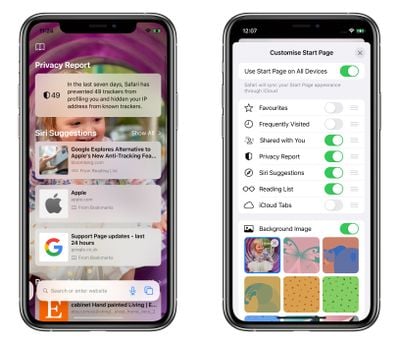
safari
Like macOS, you can customize which of these items appear on your Start Page via the Edit button at the bottom, and you can also add a custom wallpaper of your own or use an existing alternative background. In addition, you have the option of syncing your Start Page in iCloud so that it's mirrored across all your devices.

Tab Bar Functions

At the bottom of the Start Page is the new tab bar. Apple has consolidated several controls into the new floating bar, which spends most of its time at the bottom of the UI while you're browsing.

safari
Tapping the Tab Bar URL makes it fly up to the top of the screen, where you can search or enter a website address. As soon as you hit Enter, the page loads and the Tab Bar flies back down to the bottom of the screen so as not to impede your view.

If you find the Tab Bar distracting you can swipe down on it to minimize it, but either way it automatically minimizes as you scroll down a page, and all you have to do to reveal it again is tap it again. (To refresh the current page, just pull down on it from the top.)


Swiping between open tabs is as simple as swiping across the Tab Bar. You can also tap the ends of the Tab Bars trailing off either side of the screen to switch to adjacent open tabs, but swiping will be easier for most users.

A long press on the Tab Bar brings up a menu offering options including Copy, Paste and Search, Add to Reading List, Add Bookmark, Add Bookmarks for X Tabs, Share, and Move to Tab Group. (See below for more on Tab Groups.)

safari
Tapping on the ellipsis (three dots) icon in the Tab Bar brings up the usual Actions menu with sharing options, but you can also long press the ellipsis icon to switch into Reader View for the current page. Tapping the rightmost icon – or swiping up on the Tab Bar – takes you into the Tabs Switcher, where are there also some surprises.

Tab Switcher and Tab Groups

In iOS 15, gone is the familiar stacked card-style view of multiple open tabs. Instead, tabs are arranged as thumbnail previews in a vertically scrolling grid, while the Tab Bar functions in the Tabs Switcher view are transformed to help you organize your tabs more efficiently. A long press on the center of it brings up a menu of Tab Group options.
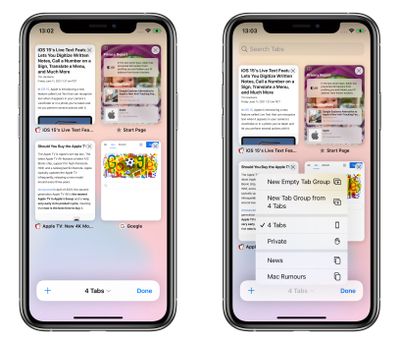
safari
As well as an option to open a Private Browsing tab, you can create a New Empty Tab Group, or create a new tap group containing the currently open tabs. If you've already created at least one Tab Group and named it, then you'll also see it listed in this menu and you can tap to switch between it and any grouped or ungrouped tabs. (If there are open tabs that don't belong to any group, they'll just be listed as X number of Tabs.)
safari
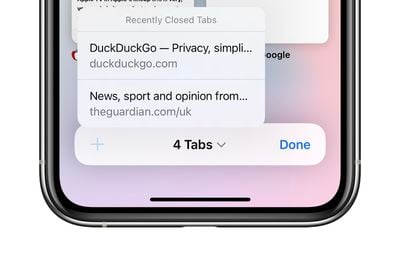
As you'd expect, the plus (+) icon in the Tab Switcher Bar opens a new tab, but if you long press on it you'll also see a list of recently closed tabs.

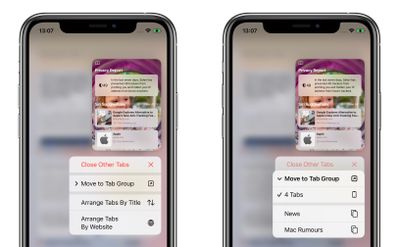
Elsewhere, you can long press any open tab displayed in the Tab Switcher to access options like Close Other Tabs, move the selected tab to a Tab Group (tapping this opens a submenu of Tab Groups), Arrange Tabs By Title, and Arrange Tabs By Website.
safari
Overall, Safari in iOS 15 feels very different indeed, and may not chime with user's expectations. While there's more screen space dedicated to the browsing experience itself, the interface changes are drastic, although now that the ‌iPhone‌ also supports extensions for the first time, there's plenty of scope for additional customization.

Note that iOS 15 is still in early beta, and the public beta is still a month away, so the usual caveat applies in that any of these functions could change before Apple releases its new operating system in the fall.


Tag: Safari
Related Forum: iOS 15

Popular Stories

Switch to Safari

Apple Explains Why Chrome Users Should 'Switch to Safari'

Tuesday October 13, 2026 5:29 am PDT by
Apple has launched a new "Switch to Safari" marketing campaign that encourages Chrome users to switch to Safari as their web browser of choice on the Mac. "Safari is a more powerful and private browser than Chrome," says Apple. Apple has a new "Switch to Safari" page on its website that outlines more than 10 reasons that Chrome users should switch to Safari, including faster performance...

M5 MacBook Pro

RIP, MacBook Ultra

Monday October 19, 2026 9:37 am PDT by
Apple today sent out invites for an experience in Los Angeles on Wednesday, October 28, and the "Pro and tell" tagline on the invitation likely means that the rumored MacBook models with touch-enabled OLED displays will stick with MacBook Pro branding instead of the once-rumored "MacBook Ultra" name. The long-rumored "iPhone Ultra" ended up being named iPhone Duo, so speculation that Apple...
iPhone Duo Trio

Here's What Apple's Apps Look Like on the iPhone Duo

Tuesday October 20, 2026 11:12 am PDT by
With just three days to go until the iPhone Duo is released, Apple is getting ready for the launch. Behind the scenes, the App Store now has screenshots of Apple's built-in apps running on the Duo. We've seen some apps in marketing materials, but images of the ones we haven't seen give us an idea of what it will be like using the iPhone Duo day to day. Many apps are shown in landscape...

Top Rated Comments

Apple Mac Daz Avatar
70 months ago
Awful update. everything takes twice as long so more taps

Switching tabs is better but that’s about it
Score: 17 Votes (Like | Disagree)
Your Royal Highness Avatar
70 months ago
Such a better design having search and switching with a swipe on the bottom within thumb reach.
Score: 14 Votes (Like | Disagree)
70 months ago
Looks terrible, and clunky.
The tab view is a major step backwards, makes the current one look so modern.

like seriously how many sub-menus and contexual menus can you have?
Score: 13 Votes (Like | Disagree)
IAmGLaDOS Avatar
70 months ago
As a web application developer, I really hate it.
Score: 11 Votes (Like | Disagree)
gusping Avatar
70 months ago

I love everything in this safari redesign except the floating url bar at the bottom. It looks terrible and makes the whole thing ugly.
Yep. I will not be updating if that isn’t changed. Looks absolutely horrible. Completely ruins Safari for me.
Score: 10 Votes (Like | Disagree)
70 months ago
Horrible.
Score: 8 Votes (Like | Disagree)
Latest Stories
Apple Will Label Apps 'Made for iPhone Duo' in App Store
1 hour ago
Amazon Takes $49 Off iPad With Prices Starting at $399.99
2 hours ago
F1 on Apple TV Now Available in Dolby Atmos
2 hours ago
Apple Reveals More Than 50 Apps That Will Be Updated for iPhone Duo
3 hours ago
Apple Blocks Certificates That Could Help Attackers Fake Websites
4 hours ago
Giant iPhone Duo Installations Spotted at Apple Fifth Avenue
5 hours ago
iPhone Duo 2 Prototypes Include Under-Display Face ID
5 hours ago
Tesla App Gains iPad and iPhone Duo Support
9 hours ago
Apple Reportedly Boosts iPhone Duo Orders by 44%
9 hours ago
Fortnite Returning to Australian App Store After Court Ruling
10 hours ago
Apple Ordered to Open iPhone to Rival App Stores in Australia
10 hours ago
Apple Suppliers Face Hurdles Cutting Circuit Board Emissions
11 hours ago
Things Updated for iPhone Duo With Adaptive Layout
11 hours ago
Simplicity and Siri AI Are HomeView's Killer Features, Apple Says
11 hours ago
iPhone Duo Reviewers Really Miss Face ID
16 hours ago
Does the iPhone Duo Run Hot? Here's What Reviews Found
18 hours ago
Apple Music's New Look is Now Live on Apple's Website
18 hours ago
Anthropic Launches Claude Duet, a Proactive AI Agent
19 hours ago
What 32,000 Folds Did to the iPhone Duo's Hinge
20 hours ago
iPhone Duo's Hidden FaceTime Camera Takes 'Trash' Photos
21 hours ago
iPhone Duo Has 'Edge Light' Feature That Debuted on Macs Last Year
22 hours ago
Apple Support App Updated for iPhone Duo's Larger Display
22 hours ago
Amazon Sweetens the Deal on Entry-Level 16-Inch MacBook Pro With $570 Off
22 hours ago
iPhone Duo Tips Over on MagSafe Stands When Unfolded
22 hours ago
Apple Music's New Look Officially Announced
1 day ago
iPhone Duo Supports Apple Pencil Starting With iOS 27.2
1 day ago
iPhone Duo Accessories Roundup: Cases and Screen Protectors From OtterBox, ZAGG, and More
1 day ago
Apple Stores Will Have 'Limited' Availability of iPhone Duo for Walk-In Customers
1 day ago
iPhone Duo Reviews Explain Why Device is Both 'Fun' and 'Frustrating'
1 day ago
Apple Says 'Reachability' Feature Coming to iPhone Duo Later This Year
1 day ago









































