
WhatsApp Stops Auto-Saving Media From Disappearing Messages on iPhone - GeekWebGuides
Skip to Content

WhatsApp Stops Auto-Saving Media From Disappearing Messages on iPhone

WhatsApp is changing the way the platform handles media sent over chats with disappearing messages enabled, reports WABetaInfo.

Whatsapp Feature

Going forward, WhatsApp will no longer automatically save images and other visual media to your iPhone’s Photos library if they appear within a chat thread that has disappearing messages turned on. The "Save to Camera Roll" option is now automatically turned off for disappearing chats, meaning images, videos, and GIFs won't be saved even if the general auto-save setting is enabled.

The previous default of saving images from disappearing chats to the Photos app was a discrepancy given the privacy focus of disappearing messages, so the change is likely to be welcomed by those who depend on the feature to share sensitive media.

Having said that, WhatsApp users can still manually save media that appears in disappearing chats they’ve received, or even take a screenshot of the chat thread, so what you send using the feature can still be potentially saved by the recipient after the message has disappeared.
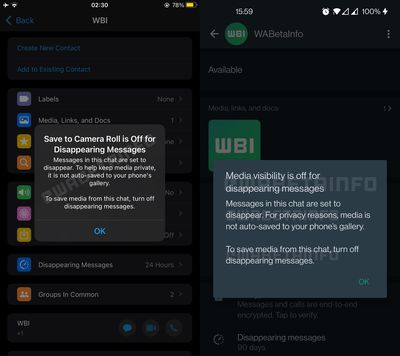
whatsapp media disappearing messages no longer saved

In another change coming to WhatsApp and highlighted by WABetaInfo, the drawing interface is being tweaked so that the blur tool appears at the bottom of the screen, where it will sit alongside two new drawing pencils.

The change to the way WhatsApp handles media in disappearing messages is rolling out now to all users on iOS, but it’s not clear when the drawing interface tweaks will come out of beta and be made available to the chat platform’s wider user base.


Popular Stories

Whatsapp Feature

WhatsApp Now Lets Anyone Join Calls, No Account Needed

Wednesday October 14, 2026 7:00 am PDT by
Popular Meta chat app WhatsApp today gained guest calling, a feature that lets users invite anyone to join a voice or video call, even if the invitee doesn't have a WhatsApp account. WhatsApp says everyone has access to free, end-to-end encrypted calls with no time limits and support for up to 32 people at once. A guest joining a call needs permission from the call host, and guests will...


Whatsapp Feature

WhatsApp Developing In-App Browser for All Chat Links on iPhone

Tuesday October 20, 2026 9:15 pm PDT by
WhatsApp is developing an optional in-app browser for its iPhone app that would let users open any link shared in chats without leaving the app, according to WABetaInfo. A new "In-app browser" option under Settings and Chats would let users enable the feature or continue opening links in their default browser. Users would also be able to clear cookies, cache, and other browsing data. The...
M5 MacBook Pro

RIP, MacBook Ultra

Monday October 19, 2026 9:37 am PDT by
Apple today sent out invites for an experience in Los Angeles on Wednesday, October 28, and the "Pro and tell" tagline on the invitation likely means that the rumored MacBook models with touch-enabled OLED displays will stick with MacBook Pro branding instead of the once-rumored "MacBook Ultra" name. The long-rumored "iPhone Ultra" ended up being named iPhone Duo, so speculation that Apple...

Top Rated Comments

Danfango Avatar
59 months ago

This is an example of a privacy-friendly feature, though.
No it's not. It's not even remotely privacy oriented. I prefer to refer to it as digital flashing. For the disempowered at the receiving end it allows people to send stuff to them with no evidence that it was ever sent. For those who can take a screenshot on their phone, it completely removes the privacy stance of it. Thus it's stupid and it's not privacy friendly.


Apple needs to have a look at WhatsApp and steal how they handle attachments. It is such a mess on iMessage, especially with iCloud Messages enabled. I also hate how it doesn’t automatically save photos to the photo library (shared with you just isn’t the same).

I delete a photo right from the messaging app and it sometimes appears again after closing the app (or it just doesn’t let me delete it at all). I delete an image but somehow they still appear under iPhone storage, i delete all photos in iPhone storage yet it still shows photos in the messaging app. I delete every single photo but iCloud claims i have 3GB of iMessage attachments, yet there is NOTHING. Or I delete all iMessage photos on my iPhone but my Mac shows me images that do not appear for the same conversation on my iPad or iPhone whatsoever.

there isn’t even a button to remove all attachments at once! You literally have to tap on each individually because for some reason swipe to select doesn’t work either, unlike the photos app
You just tap to save the ones you want. I'm not sure what the issue is. Literally I don't want my photos library cluttered with every meme my kids send me. If you delete the conversation then the attachments go with it. I have about 6Gb in iMessage at the moment. It's mostly a non-issue for me as I've saved everything worth keeping as I go.
Score: 8 Votes (Like | Disagree)
sw1tcher Avatar
59 months ago

There is no valid usage for "this message will self destruct" that I can think of.
Jim Phelps would disagree. :p


Attachment Image
Score: 5 Votes (Like | Disagree)
chucker23n1 Avatar
59 months ago

No it's not. It's not even remotely privacy oriented. I prefer to refer to it as digital flashing. For the disempowered at the receiving end it allows people to send stuff to them with no evidence that it was ever sent. For those who can take a screenshot on their phone, it completely removes the privacy stance of it. Thus it's stupid and it's not privacy friendly.
That's quite a cynical read. I imagine such scenarios happen, but "I want to share something but with a time limit" has tons and tons of users who aren't malicious like that at all; they really just want stuff to remain private.


Score: 3 Votes (Like | Disagree)
contacos Avatar
59 months ago
Apple needs to have a look at WhatsApp and steal how they handle attachments. It is such a mess on iMessage, especially with iCloud Messages enabled. I also hate how it doesn’t automatically save photos to the photo library (shared with you just isn’t the same).

I delete a photo right from the messaging app and it sometimes appears again after closing the app (or it just doesn’t let me delete it at all). I delete an image but somehow they still appear under iPhone storage, i delete all photos in iPhone storage yet it still shows photos in the messaging app. I delete every single photo but iCloud claims i have 3GB of iMessage attachments, yet there is NOTHING. Or I delete all iMessage photos on my iPhone but my Mac shows me images that do not appear for the same conversation on my iPad or iPhone whatsoever.

there isn’t even a button to remove all attachments at once! You literally have to tap on each individually because for some reason swipe to select doesn’t work either, unlike the photos app
Score: 3 Votes (Like | Disagree)
sos47 Avatar
59 months ago
i turned disappearing messages on a while ago because i dont wont that others flood my iphone with their attachments. i can’t understand why i should automatically save content to my photos lib. even if i get some nice family pics the resolution is really bad, i always demand sending interesting content with iMessage
Score: 1 Votes (Like | Disagree)
59 months ago

There is no valid usage for "this message will self destruct" that I can think of.
Well, if you can’t think of it, I guess it doesn’t exist ;)
Score: 1 Votes (Like | Disagree)
Latest Stories
Apple Will Label Apps 'Made for iPhone Duo' in App Store
36 minutes ago
Amazon Takes $49 Off iPad With Prices Starting at $399.99
1 hour ago
F1 on Apple TV Now Available in Dolby Atmos
2 hours ago
Apple Reveals More Than 50 Apps That Will Be Updated for iPhone Duo
2 hours ago
Apple Blocks Certificates That Could Help Attackers Fake Websites
4 hours ago
Giant iPhone Duo Installations Spotted at Apple Fifth Avenue
4 hours ago
iPhone Duo 2 Prototypes Include Under-Display Face ID
5 hours ago
Tesla App Gains iPad and iPhone Duo Support
8 hours ago
Apple Reportedly Boosts iPhone Duo Orders by 44%
9 hours ago
Fortnite Returning to Australian App Store After Court Ruling
9 hours ago
Apple Ordered to Open iPhone to Rival App Stores in Australia
10 hours ago
Apple Suppliers Face Hurdles Cutting Circuit Board Emissions
10 hours ago
Things Updated for iPhone Duo With Adaptive Layout
10 hours ago
Simplicity and Siri AI Are HomeView's Killer Features, Apple Says
11 hours ago
iPhone Duo Reviewers Really Miss Face ID
16 hours ago
Does the iPhone Duo Run Hot? Here's What Reviews Found
17 hours ago
Apple Music's New Look is Now Live on Apple's Website
18 hours ago
Anthropic Launches Claude Duet, a Proactive AI Agent
18 hours ago
What 32,000 Folds Did to the iPhone Duo's Hinge
19 hours ago
iPhone Duo's Hidden FaceTime Camera Takes 'Trash' Photos
21 hours ago
iPhone Duo Has 'Edge Light' Feature That Debuted on Macs Last Year
21 hours ago
Apple Support App Updated for iPhone Duo's Larger Display
21 hours ago
Amazon Sweetens the Deal on Entry-Level 16-Inch MacBook Pro With $570 Off
22 hours ago
iPhone Duo Tips Over on MagSafe Stands When Unfolded
22 hours ago
Apple Music's New Look Officially Announced
23 hours ago
iPhone Duo Supports Apple Pencil Starting With iOS 27.2
1 day ago
iPhone Duo Accessories Roundup: Cases and Screen Protectors From OtterBox, ZAGG, and More
1 day ago
Apple Stores Will Have 'Limited' Availability of iPhone Duo for Walk-In Customers
1 day ago
iPhone Duo Reviews Explain Why Device is Both 'Fun' and 'Frustrating'
1 day ago
Apple Says 'Reachability' Feature Coming to iPhone Duo Later This Year
1 day ago







































