
Four iOS Safari Extensions to Make the Web Less Annoying - MacRumors
Skip to Content

Four iOS Safari Extensions to Make the Web Less Annoying

Constant pop-ups, annoying forms, and frustrating website behaviors can make browsing and using the web an unpleasant experience. Thankfully on iOS, iPadOS, and macOS, several Safari extensions help turn the experience around.
General iOS 15 Safari Feature
We've listed some Safari extensions that you may not have known about that can help remove annoyances and make a pleasant Safari experience.

No More Cookies
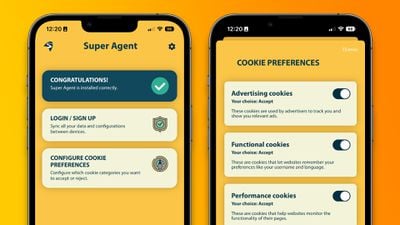
super agent ios safari extension
Perhaps the most universally dreaded web pop-up is: "This website uses cookies. Accept or Reject?" Virtually every website shows users a form to consent to using cookies as they browse that website. While it may be helpful for some to have granular controller over the use of cookies on each website they visit, there is likely to be a better solution for many.

Super Agent for Safari is an extension that automatically fills out the cookies consent form on each website you visit, meaning you'll no longer see those annoying pop-ups. The Super Agent for Safari app lets you customize how you would like websites to use cookies.

Users can choose whether they want to accept or reject advertising, functional, performance, and other cookies. The settings are applied universally to all websites.

Super Agent for Safari is free with no in-app subscription and can be found in the App Store.

'Open in App?' No Thanks.
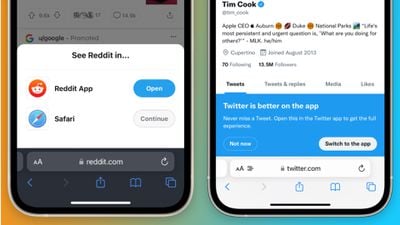
banish safari app pop ups
Some websites with accompanying apps on the App Store love to bombard users with pop-ups and banners to push them to use their app rather than the website.

Banish, a relatively new Safari extension on the ‌App Store‌ gets rid of such website notifications. Banish is a one-time purchase of $2 with no in-app subscription and can be found in the App Store.

StopTheMadness, Literally
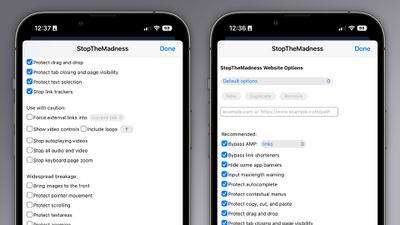
stopthemadness ios safari extension
StopTheMadness, as the name suggests, is a general-purpose privacy protection extension with several nifty features. Within the extension's settings page, StopTheMadness includes several toggles that users can enable and disable, including:

  • Bypassing Google's AMP webpages
  • Protects the ability to copy, cut, and paste on websites
  • Gets rid of link trackers and clickjacking in Google search results, and others
  • Stop autoplaying videos
  • Stop all audio and video on websites

StopTheMadness is a one-time purchase of $7.99 with no in-app subscription and can be found in the App Store.

Dark Mode For All
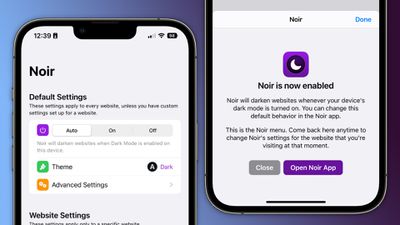
noir ios safari extension
Spearheaded by the introduction of systemwide dark mode in iOS 13, many websites on the web now have the option of light and dark themes. For those websites that don’t have a dark mode option, however, there is a solution.

Noir is a Safari extension that automatically turns a website into dark mode, even if it doesn’t support it. Noir only kicks in if the website doesn’t have a native dark mode theme built-in. This can be especially helpful when your phone is in dark mode, but a website isn’t and you’re suddenly blinded by a bright white webpage.

Noir is a $2.99 purchase with no in-app subscription and can be found in the App Store.

Tag: Safari

Popular Stories

Switch to Safari

Apple Explains Why Chrome Users Should 'Switch to Safari'

Tuesday October 13, 2026 5:29 am PDT by
Apple has launched a new "Switch to Safari" marketing campaign that encourages Chrome users to switch to Safari as their web browser of choice on the Mac. "Safari is a more powerful and private browser than Chrome," says Apple. Apple has a new "Switch to Safari" page on its website that outlines more than 10 reasons that Chrome users should switch to Safari, including faster performance...
M5 MacBook Pro

RIP, MacBook Ultra

Monday October 19, 2026 9:37 am PDT by
Apple today sent out invites for an experience in Los Angeles on Wednesday, October 28, and the "Pro and tell" tagline on the invitation likely means that the rumored MacBook models with touch-enabled OLED displays will stick with MacBook Pro branding instead of the once-rumored "MacBook Ultra" name. The long-rumored "iPhone Ultra" ended up being named iPhone Duo, so speculation that Apple...
iPhone Duo Trio

Here's What Apple's Apps Look Like on the iPhone Duo

Tuesday October 20, 2026 11:12 am PDT by
With just three days to go until the iPhone Duo is released, Apple is getting ready for the launch. Behind the scenes, the App Store now has screenshots of Apple's built-in apps running on the Duo. We've seen some apps in marketing materials, but images of the ones we haven't seen give us an idea of what it will be like using the iPhone Duo day to day. Many apps are shown in landscape...

Top Rated Comments

ct2k7 Avatar
55 months ago
If you use YouTube on Safari, use the Vinegar.app to make the video element a <video> one. Kills adds, and adds useful options. (Also works on Mac)/
Score: 17 Votes (Like | Disagree)
maktaba Avatar
55 months ago
My biggest concern with Safari extensions is that these can collect your browser data. Content blockers are fine - no data is sent back to the app. But with extensions, everything is sent.
Score: 14 Votes (Like | Disagree)
DMG35 Avatar
55 months ago
Awesome stuff; thank you for this!
Score: 12 Votes (Like | Disagree)
krspkbl Avatar
55 months ago
Only extension i use is Wipr which is an adblocker. Also gets rid of trackers and the cookie/GDPR notices. i'm quite happy with it.

it blocks 89% of trackers on this page:

https://d3ward.github.io/toolz/adblock.html

for comparison, default safari is 12%, Duckduck Go browser is ~40% and Block Bear is ~64%

it is a paid app but worth it, imo. by far the best adblocker i've used on iOS.
Score: 6 Votes (Like | Disagree)
55 months ago
On this article i got this:

"MacRumors Forums would like your permission to enable push notifications."

When i clicked it away, i got this:
"We strongly recommend enabling push notifications on this device so that you can be kept up-to-date with site activity."


I wonder if any of these extensions would prevent this annoyance 😂
Score: 6 Votes (Like | Disagree)
55 months ago

Me too. Hit the “Learn More” link and it gets confusing. It’s as if the developer and 3rd party apps it goes through may collect data.

So just downloading it means you’re safe. But be careful if you start using it, you might not be. 😂

I’m sure someone will come along that knows more.


Every extension that can read or modify a page has the same templated warning put out there by Apple. It’s a notice that the extensions are being given access to view your pages and modify them, which is what many extensions do need to perform their function.


It’s important to trust the app that you’re giving the access to. Many will note no data is sent and in some cases that’s probably verifiable by monitoring network traffic if they truly send no data to their servers. Some apps that do have network components might be harder to monitor but.

I think it’s worth being weary with extensions, but at the same time be mindful that the Apple warning is very nuclear in its wording and that apps that don’t send data off your device at all will still have that notice.
Score: 6 Votes (Like | Disagree)
Latest Stories
Apple Will Label Apps 'Made for iPhone Duo' in App Store
22 minutes ago
Amazon Takes $49 Off iPad With Prices Starting at $399.99
57 minutes ago
F1 on Apple TV Now Available in Dolby Atmos
1 hour ago
Apple Reveals More Than 50 Apps That Will Be Updated for iPhone Duo
2 hours ago
Apple Blocks Certificates That Could Help Attackers Fake Websites
3 hours ago
Giant iPhone Duo Installations Spotted at Apple Fifth Avenue
4 hours ago
iPhone Duo 2 Prototypes Include Under-Display Face ID
4 hours ago
Tesla App Gains iPad and iPhone Duo Support
8 hours ago
Apple Reportedly Boosts iPhone Duo Orders by 44%
9 hours ago
Fortnite Returning to Australian App Store After Court Ruling
9 hours ago
Apple Ordered to Open iPhone to Rival App Stores in Australia
9 hours ago
Apple Suppliers Face Hurdles Cutting Circuit Board Emissions
10 hours ago
Things Updated for iPhone Duo With Adaptive Layout
10 hours ago
Simplicity and Siri AI Are HomeView's Killer Features, Apple Says
11 hours ago
iPhone Duo Reviewers Really Miss Face ID
16 hours ago
Does the iPhone Duo Run Hot? Here's What Reviews Found
17 hours ago
Apple Music's New Look is Now Live on Apple's Website
18 hours ago
Anthropic Launches Claude Duet, a Proactive AI Agent
18 hours ago
What 32,000 Folds Did to the iPhone Duo's Hinge
19 hours ago
iPhone Duo's Hidden FaceTime Camera Takes 'Trash' Photos
20 hours ago
iPhone Duo Has 'Edge Light' Feature That Debuted on Macs Last Year
21 hours ago
Apple Support App Updated for iPhone Duo's Larger Display
21 hours ago
Amazon Sweetens the Deal on Entry-Level 16-Inch MacBook Pro With $570 Off
21 hours ago
iPhone Duo Tips Over on MagSafe Stands When Unfolded
22 hours ago
Apple Music's New Look Officially Announced
23 hours ago
iPhone Duo Supports Apple Pencil Starting With iOS 27.2
1 day ago
iPhone Duo Accessories Roundup: Cases and Screen Protectors From OtterBox, ZAGG, and More
1 day ago
Apple Stores Will Have 'Limited' Availability of iPhone Duo for Walk-In Customers
1 day ago
iPhone Duo Reviews Explain Why Device is Both 'Fun' and 'Frustrating'
1 day ago
Apple Says 'Reachability' Feature Coming to iPhone Duo Later This Year
1 day ago







































