
Apple Explains iOS 16.3's New Security Keys Feature - GeekWebGuides
Skip to Content

Apple Explains iOS 16.3's New Security Keys Feature

Apple this week shared a support document with details about its new Security Keys for Apple ID feature, available starting with iOS 16.3, iPadOS 16.3, and macOS 13.2. The document provides an overview of the feature and explains how to use it.
Apple advanced security Security Keys screen Feature crop
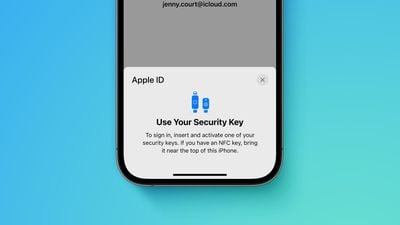
Apple says the optional security feature is designed for individuals who want "extra protection from targeted attacks, such as phishing or social engineering scams." When it is enabled, signing into an Apple ID requires entering your account's password and then using a FIDO Certified security key to complete two-factor authentication, instead of a traditional six-digit verification code from another Apple device.

Those who enable the feature must be very careful not to lose their security keys, as this could result in losing access to your Apple ID account permanently. For this reason, you must set up at least two security keys, with up to six supported in total.

Apple recommends keeping security keys in more than one place. For example, you could hide a key somewhere at home as a backup solution.

"Keep your security keys in a safe place, and consider keeping a security key in more than one place," the document says. "For example, keep one key at home and one key at work. If you're traveling, you might want to leave one of your security keys at home."

To enable Security Keys for Apple ID on an iPhone or iPad, open the Settings app, tap your name, tap "Password & Security," select "Add Security Keys" and follow the on-screen instructions. On the Mac, open the System Settings app, click on your name, click "Password & Security," click "Add" next to "Security Keys," and follow the steps.

Security keys can be removed at any time by repeating the steps outlined above and tapping or clicking on "Remove All Security Keys," at which point your Apple ID reverts to using a six-digit verification code for two-factor authentication.

Many security keys look similar to a USB thumb drive, with some options available with NFC for wireless use and others equipped with Lightning, USB-C, and/or USB-A ports for direct connectivity with iPhones, iPads, and Macs. Apple recommends a few security keys in the document, such as the YubiKey 5Ci with both Lightning and USB-C.

Apple's document provides some other important details, so it is worth reviewing before enabling the feature. For example, you can't sign in to iCloud for Windows when the feature is enabled, and some types of Apple ID accounts are not supported.


Related Forum: iOS 16

Popular Stories

M5 MacBook Pro

RIP, MacBook Ultra

Monday October 19, 2026 9:37 am PDT by
Apple today sent out invites for an experience in Los Angeles on Wednesday, October 28, and the "Pro and tell" tagline on the invitation likely means that the rumored MacBook models with touch-enabled OLED displays will stick with MacBook Pro branding instead of the once-rumored "MacBook Ultra" name. The long-rumored "iPhone Ultra" ended up being named iPhone Duo, so speculation that Apple...
iPhone Duo Trio

Here's What Apple's Apps Look Like on the iPhone Duo

Tuesday October 20, 2026 11:12 am PDT by
With just three days to go until the iPhone Duo is released, Apple is getting ready for the launch. Behind the scenes, the App Store now has screenshots of Apple's built-in apps running on the Duo. We've seen some apps in marketing materials, but images of the ones we haven't seen give us an idea of what it will be like using the iPhone Duo day to day. Many apps are shown in landscape...
apple pro tell logo

Apple Announcing New Products Next Week: 'Pro and Tell'

Monday October 19, 2026 9:05 am PDT by
Apple's Greg Joswiak today hinted at new product announcements coming next week, sharing a social media post that says "Can't wait to pro and tell next week." Rumors suggest Apple is planning to debut the new MacBook Pro with an OLED touchscreen display, an M6 entry-level MacBook Pro, an M6 iMac, an iPad mini with an OLED display. Can't wait to pro and tell next week....

Top Rated Comments

49 months ago
iPhone Forum:

I lost my security key and forgot my password. Am I screwed?
Score: 21 Votes (Like | Disagree)
krspkbl Avatar
49 months ago
I bought 2x Yubico Keys for this. Well, not just Apple but my other accounts too obviously. I've been thinking of getting a key for a while but now Apple supports it I might as well jump on it now.

I got the Yubico 5 NFC key. Won't arrive for a couple days but excited to set it up. I'll have a read over the document to familiarise myself with how to set it up. Unfortunatly most people won't care about security keys so I am one of the few who see this is as the biggest feature of 16.3!

Requiring 2x keys will put a lot of people off, I think. I spent almost £100 on the 2 keys. Other accounts allow you to set them up with just 1. I think it's good that Apple requires 2 keys to set it up. If you don't want to spend £100 on security then might as well not bother using a key at all.
Score: 13 Votes (Like | Disagree)
49 months ago
“For example, you could hide a key somewhere at home as a backup solution.”

No; please don’t do this. You’ll just forget where you put it

“ … and one key at work.”

*PLEASE* don’t do this! Whoever owns the company can trivially steal your account if you do so. Even if you’re the person who owns the company, whoever cleans your office could steal your account.

You should have a secure place at home to keep important documents. At the very least, a drawer of a filing cabinet, but a small fireproof safe is preferable. You can decide the level of security you need, all the way up to a personal bank vault — but don’t rely on obscurity to keep it secure. Keep the backup there.

And it’s a good idea to have a safe deposit box at a bank. Keep the other backup there.

If you really need more than those two backups, then add more safe deposit boxes at different banks, or a locked fireproof safe at a trusted family member’s home, or some other variation on the theme. But you almost certainly don’t need nor want that many backups.

Incidentally, these are also where you should be keeping portable hard drives with backups of whatever data you most care about.

b&
Score: 7 Votes (Like | Disagree)
riverfreak Avatar
49 months ago

Two-factor authentication is enough major PITA. I don't work for the NSA, so major pass.

Anyone else want a phone dongle?

Wonder how long it will be before a future iOS update turns it on by default.

Here's a scenario; some of the ppl using these things will be dealing with nuclear emergencies and will lose their dongle and backup dongle or have them appropriated for espionage. Doesn't anyone at Apple ever think of worst-case scenarios?

I know. Corporate culture.
2FA is a total pain? So is having your bank account drained.

I don’t use sites or services that can’t be bothered to implement 2FA, at a bare minimum via SMS which I despise as it isn’t always VOIP or travel-friendly. I’ve even moved financial institutions as they refused for years to add 2FA.

Security keys FTW. Different strokes I guess.
Score: 6 Votes (Like | Disagree)
krspkbl Avatar
49 months ago

Two-factor authentication is enough major PITA. I don't work for the NSA, so major pass.

Anyone else want a phone dongle?

Wonder how long it will be before a future iOS update turns it on by default.

Here's a scenario; some of the ppl using these things will be dealing with nuclear emergencies and will lose their dongle and backup dongle. Doesn't anyone at Apple ever think of worst-case scenarios?

I know. Corporate culture.
You already need 2FA enabled on your Apple account for things like Airtags, iCloud Keychain, Find my iPhone, Apple Card/Cash, and Sign in with Apple.

I don't think they'll force people to use physical keys but they'll keep pushing 2FA. As it is I don't mind having 2FA enabled as it makes my account secure.
Score: 5 Votes (Like | Disagree)
49 months ago
If Apple would kindly put NFC in iPads and Macs as well this would be even better, and quicker to use.
Not sure why it isn’t.

Regards keeping one at work, ‘they’ would still need to know the actual account username and password, so fairly low risk, and for most people the most obvious/easiest off site option.
Advantage of course if you work in IT and have access to a media safe 😉
Score: 5 Votes (Like | Disagree)
Latest Stories
Apple Will Label Apps 'Made for iPhone Duo' in App Store
2 minutes ago
Amazon Takes $49 Off iPad With Prices Starting at $399.99
37 minutes ago
F1 on Apple TV Now Available in Dolby Atmos
1 hour ago
Apple Reveals More Than 50 Apps That Will Be Updated for iPhone Duo
2 hours ago
Apple Blocks Certificates That Could Help Attackers Fake Websites
3 hours ago
Giant iPhone Duo Installations Spotted at Apple Fifth Avenue
4 hours ago
iPhone Duo 2 Prototypes Include Under-Display Face ID
4 hours ago
Tesla App Gains iPad and iPhone Duo Support
8 hours ago
Apple Reportedly Boosts iPhone Duo Orders by 44%
8 hours ago
Fortnite Returning to Australian App Store After Court Ruling
9 hours ago
Apple Ordered to Open iPhone to Rival App Stores in Australia
9 hours ago
Apple Suppliers Face Hurdles Cutting Circuit Board Emissions
9 hours ago
Things Updated for iPhone Duo With Adaptive Layout
10 hours ago
Simplicity and Siri AI Are HomeView's Killer Features, Apple Says
10 hours ago
iPhone Duo Reviewers Really Miss Face ID
15 hours ago
Does the iPhone Duo Run Hot? Here's What Reviews Found
17 hours ago
Apple Music's New Look is Now Live on Apple's Website
17 hours ago
Anthropic Launches Claude Duet, a Proactive AI Agent
18 hours ago
What 32,000 Folds Did to the iPhone Duo's Hinge
19 hours ago
iPhone Duo's Hidden FaceTime Camera Takes 'Trash' Photos
20 hours ago
iPhone Duo Has 'Edge Light' Feature That Debuted on Macs Last Year
21 hours ago
Apple Support App Updated for iPhone Duo's Larger Display
21 hours ago
Amazon Sweetens the Deal on Entry-Level 16-Inch MacBook Pro With $570 Off
21 hours ago
iPhone Duo Tips Over on MagSafe Stands When Unfolded
21 hours ago
Apple Music's New Look Officially Announced
23 hours ago
iPhone Duo Supports Apple Pencil Starting With iOS 27.2
23 hours ago
iPhone Duo Accessories Roundup: Cases and Screen Protectors From OtterBox, ZAGG, and More
1 day ago
Apple Stores Will Have 'Limited' Availability of iPhone Duo for Walk-In Customers
1 day ago
iPhone Duo Reviews Explain Why Device is Both 'Fun' and 'Frustrating'
1 day ago
Apple Says 'Reachability' Feature Coming to iPhone Duo Later This Year
1 day ago







































