iOS 17 Locks Your Safari Private Browsing Behind Face ID
Apple is enhancing the security of Safari in iOS 17, and private browsing now requires Face ID authentication or a passcode to access. If you open up a private browsing window in Safari, you will need to authenticate with Face ID.
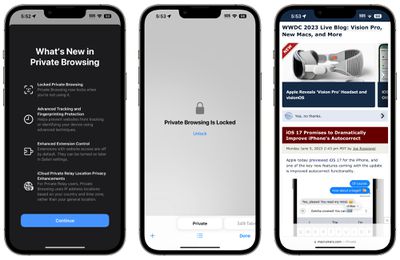
That means someone who has access to your unlocked phone and opens your Safari browser won't be able to get to your private browsing history without secondary authentication. Face ID or a passcode can be used to access the Safari private tabs.
Private browsing also completely blocks known trackers from loading on pages and removes tracking added to URLs as you browse, improving privacy. Websites are prevented from tracking or identifying your device with these new additions, plus Apple also offers improved extension control.
In private mode, extensions with website access are turned off, and you will need to manually re-enable them. iCloud Private Relay also uses IP address locations based on country and time zone rather than a general location.
Safari in iOS 17 is also gaining a Profiles feature so you can keep your personal browsing and work browsing separate, with different histories, Tab Groups, cookies, and favorites.
Popular Stories
Apple has launched a new "Switch to Safari" marketing campaign that encourages Chrome users to switch to Safari as their web browser of choice on the Mac.
"Safari is a more powerful and private browser than Chrome," says Apple.
Apple has a new "Switch to Safari" page on its website that outlines more than 10 reasons that Chrome users should switch to Safari, including faster performance...
Apple today sent out invites for an experience in Los Angeles on Wednesday, October 28, and the "Pro and tell" tagline on the invitation likely means that the rumored MacBook models with touch-enabled OLED displays will stick with MacBook Pro branding instead of the once-rumored "MacBook Ultra" name.
The long-rumored "iPhone Ultra" ended up being named iPhone Duo, so speculation that Apple...
With just three days to go until the iPhone Duo is released, Apple is getting ready for the launch. Behind the scenes, the App Store now has screenshots of Apple's built-in apps running on the Duo. We've seen some apps in marketing materials, but images of the ones we haven't seen give us an idea of what it will be like using the iPhone Duo day to day.
Many apps are shown in landscape...



















































