
iOS 17's StandBy Mode Turns a Charging iPhone Into a Home Hub - MacRumors
Skip to Content

iOS 17's StandBy Mode Turns a Charging iPhone Into a Home Hub

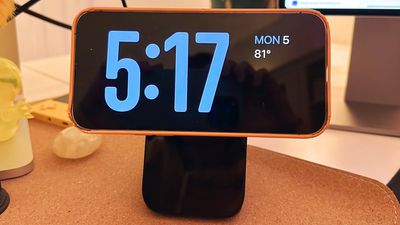
Apple in iOS 17 is introducing StandBy mode, which is a new display experience designed for a charging iPhone that's placed in a horizontal orientation. An iPhone in this position is able to display an array of full-screen widgets, turning it into a useful home hub.
standby mode 1
StandBy mode activates automatically on an iPhone running iOS 17 that's placed horizontally on a charger. You can see information such as the time, weather, a calendar, music controls, your photos, and more.

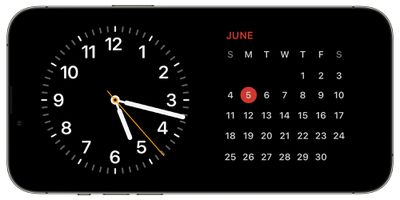
You can swipe left or right through the available StandBy options, and long press or swipe up/down to customize. With the time, for example, you can choose from an analog view, a digital view, a bubbly font, and a solar view where the background color shifts based on the time.
standby mode 2
There are options to add Home Screen widgets to the main StandBy view, which is the first option you see when activating StandBy. In this view, you can select two widgets to display side-by-side, so you can control your HomeKit products, see your calendar events, keep an eye on the stock market, check on device battery life, see the weather, and more.

If a Live Activity is active, it will be displayed full screen, as will results from Siri requests.

At night, StandBy mode will get darker if the room you're in is dark, so that it is not distracting at night while you're sleeping. StandBy mode is akin to Nightstand Mode on the Apple Watch, and it functions in much of the same way.

Note that having the iPhone continually show information requires an iPhone 14 Pro or Pro Max with always-on display technology. On other iPhones, a tap is required to see what's on the screen.


Related Forums: iOS 17, iPadOS 17

Popular Stories

iOS 26

iOS 26.4 Adds Two New Features to CarPlay

Tuesday March 24, 2026 1:55 pm PDT by
iOS 26.4 was released today, and it includes a couple of new features for CarPlay: an Ambient Music widget and support for voice-based chatbot apps. To update your iPhone 11 or newer to iOS 26.4, open the Settings app and tap on General → Software Update. CarPlay will automatically offer the new features so long as the iPhone connected to your vehicle is running iOS 26.4 or later....
Apple Business hero

Apple Unveils 'Apple Business' All-in-One Platform

Tuesday March 24, 2026 8:53 am PDT by
Apple today announced Apple Business, a new all-in-one platform that unifies device management, productivity tools, and customer outreach features. The service is designed to be a consolidated replacement for several of Apple's existing business-focused offerings, including Apple Business Essentials, Apple Business Manager, and Apple Business Connect. It provides organizations with a single...
AirPods Pro Firmware Feature

Apple Releases New Firmware for AirPods Pro 3, AirPods Pro 2 and AirPods 4

Tuesday March 24, 2026 12:31 pm PDT by
Apple today released new firmware for the AirPods Pro 2, AirPods Pro 3, and the AirPods 4. The firmware has a version number of 8B39, up from 8B34 on the AirPods Pro 3, 8B28 on the AirPods Pro 2, and 8B21 on the AirPods 4. There is no word on what's included in the firmware, but Apple has a support document with limited notes. Most updates are limited to bug fixes and performance...

Top Rated Comments

CalMin Avatar
37 months ago


Note that having the iPhone continually show information requires an iPhone 14 Pro or Pro Max with always-on display technology. On other iPhones, a tap is required to see what's on the screen.

Ugh - Apple, c'mon! Needing an always on display seems unnecessary if it's connected to power.
Score: 15 Votes (Like | Disagree)
mudflap Avatar
37 months ago

The dumbest thing I've seen in years.
If this is the dumbest thing you've seen in years, you haven't been paying attention to the world's current state of affairs.
Score: 10 Votes (Like | Disagree)
37 months ago

Anyone know what stand they were using in the keynote?
Forté from Twelve South
Score: 10 Votes (Like | Disagree)
onFIRE Avatar
37 months ago
Anyone know what stand they were using in the keynote?
Score: 10 Votes (Like | Disagree)
37 months ago

Note that having the iPhone continually show information requires an iPhone 14 Pro or Pro Max with always-on display technology. On other iPhones, a tap is required to see what's on the screen.
Would be much more cool if Apple would make use of the hardware already on the phones like proximity sensors and FaceID IR illuminators to activate the display when a person moves into the device's field of view (or waves a hand etc). My cheap old Nest thermostat display basically already does this, no tapping required.
Score: 9 Votes (Like | Disagree)
37 months ago
Probably should use a different phrase other than "Home Hub", that's reserved for HomeKit - this headline confused me.
Score: 7 Votes (Like | Disagree)













