App Store App Can Now Tell You How Long an App Will Take to Download in iOS 17
In iOS 17, Apple has made a small but notable change to the App Store app so that it now tells users how long an app download will take once it's started.
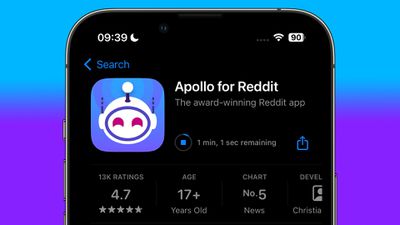
When the "Get" app button is tapped in an app listing and the circular download symbol appears, the time remaining for the download to complete is displayed beside it in minutes and seconds. If the installation is likely to take only a brief moment, the time remaining is not shown.
Obviously the time it takes for a given app to download will depend on the user's internet speed and the app's file size, which is why users might only see how long it will take once the download has been initiated and the App Store server connection is established.
Still, it gives users a more accurate idea of how long a download is likely to take than a circular downloading symbol does, and users can always opt to cancel the download by tapping the cancel button within the circular icon if the remaining time is considered to be too long.
(Thanks, Dimitri!)
Popular Stories
Apple today announced that apps optimized for the iPhone Duo can now be submitted for App Store approval, ahead of the foldable device launching on Friday, October 23.
While existing App Store apps will automatically run on the iPhone Duo, only apps built with the iOS 27.1 SDK or later can dynamically resize to fill the entire space of the inner display, whereas unoptimized apps will have...
Apple today expanded its App Store moderation rules to cover AI-generated nonconsensual intimate imagery. Sexually explicit content was already banned, but now Apple says app developers must proactively prevent and remove AI-generated deepfakes from their platforms. Apple warns that apps with offending content could be removed from the App Store if developers fail to act.
The updated 1.2...
More premium games are launching on the App Store this year than last, Apple's App Store Worldwide head Carson Oliver told Polygon, including more franchises coming from PC and consoles.
Oliver said:
We've seen incredible growth of games coming to the App Store, in general, with more premium games releasing on the App Store this year than last. While many of those are indies, we're also...