
macOS Sonoma Tidbits: New FaceTime UI, Safari Profiles, Screen Sharing Improvements, and More - GeekWebGuides
Skip to Content

macOS Sonoma Tidbits: New FaceTime UI, Safari Profiles, Screen Sharing Improvements, and More

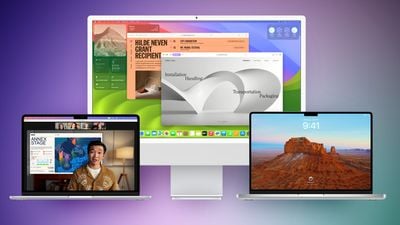
The first macOS Sonoma beta was released to developers and early adopters this week, and changes in the newest version of Apple's macOS operating system are still being unearthed. Below are just a handful of notable differences that may have passed you by.
macos sonoma feature purple green

System Settings

In macOS Ventura, Apple replaced System Preferences with System Settings to align it with iOS and iPadOS, but the way controls were organized left many users wanting.
macos sonoma tidbits2
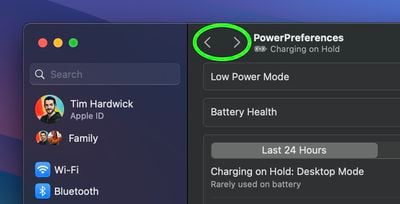
The same System Settings interface remains in macOS Sonoma, but it is now easier to navigate through different menu screens you have visited without continually scrolling through the side bar, thanks to the addition of backward and forward buttons.

FaceTime UI and Reactions

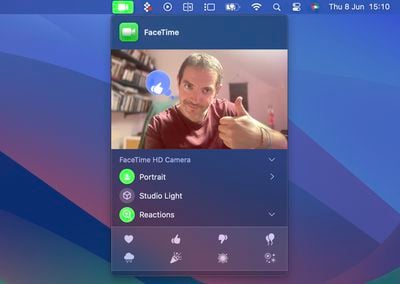
Apple has changed the way FaceTime integrates with the menu bar. The video effects options no longer appear in the Control Center, and instead have a new home in a dedicated green ‌FaceTime‌ menu bar item, which also includes a mini webcam view and buttons to trigger Reactions.
macos sonoma tidbits1
Reactions include Love, Like, Dislike, Balloons, Rain, Confetti, Lasers, and Fireworks. Some reactions are even triggered automatically by the user's physical actions: One thumb up triggers a Like, and two thumbs up are attended by Fireworks. Similarly, one thumb down counts as a dislike, and two thumbs down initiates a rain shower.

Safari Profiles

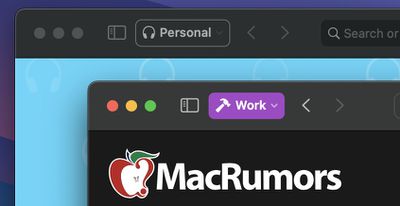
Safari has gained a new feature called Profiles, which is designed to help keep your browsing separate for topics like Work, School, or Personal.
macos sonoma tidbits3
Each profile gets its own icon and silos your history, Tab Groups, favorites, and cookies. You can even assign specific extensions to different profiles to optimize your browsing experience based on the task at hand.

Seamless Keyboard Input and Dictation

macOS Sonoma supports simultaneous use of keyboard input and Dictation, without any disruption in your flow of thought.
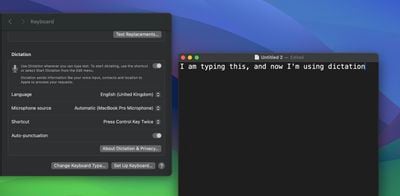
macos sonoma tidbits4
In other words, you can keep typing after hitting the Dictation shortcut. So whenever your fingers need a rest, you can complete the sentence you were just typing by saying it out loud.

Screen Sharing Improvements

When you're in a ‌FaceTime‌ or Zoom call, click-hold the green traffic light in the corner of an open app window and you'll see a screen sharing option, and a new Presenter Overlay feature can be used to keep you on screen and better able to point to details.
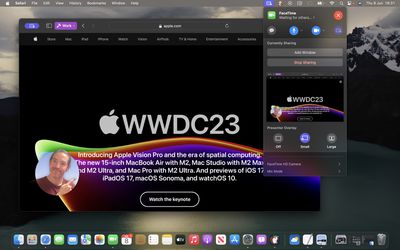
macos sonoma tidbits7
When on a video call, you can either place yourself inside a movable bubble in the corner of the window or desktop that you're sharing, or you can bring on-screen content into the background of your own environment so that it looks as if you're standing just in front of it.

Docked Web Apps

Thanks to a new option in Safari, you can now create independent web apps that can be added to your Dock.
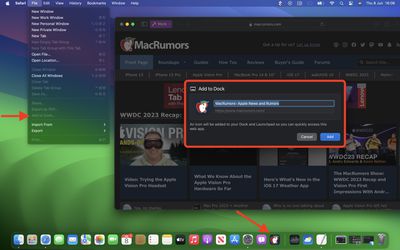
macos sonoma tidbits6
All you have to do is visit a website and select File -> Add to Dock.... You can then give the web app a name and even change its icon. When you open a docked web app, it will open in its own separate window that includes back and forward buttons for simple navigation.

Other Notable Tidbits

  • New visual Caps Lock indicator
  • Mail search prioritizes upcoming travel-related emails
  • Use the Share button to send a note in Notes into Pages.
  • New Zoom and Pan controls for Continuity Camera

Developers are still learning what else has changed in macOS Sonoma, so be sure to check back for more coverage here on GeekWebGuides.


Related Forum: macOS Sonoma

Popular Stories

M5 MacBook Pro

RIP, MacBook Ultra

Monday October 19, 2026 9:37 am PDT by
Apple today sent out invites for an experience in Los Angeles on Wednesday, October 28, and the "Pro and tell" tagline on the invitation likely means that the rumored MacBook models with touch-enabled OLED displays will stick with MacBook Pro branding instead of the once-rumored "MacBook Ultra" name. The long-rumored "iPhone Ultra" ended up being named iPhone Duo, so speculation that Apple...
iPhone Duo Trio

Here's What Apple's Apps Look Like on the iPhone Duo

Tuesday October 20, 2026 11:12 am PDT by
With just three days to go until the iPhone Duo is released, Apple is getting ready for the launch. Behind the scenes, the App Store now has screenshots of Apple's built-in apps running on the Duo. We've seen some apps in marketing materials, but images of the ones we haven't seen give us an idea of what it will be like using the iPhone Duo day to day. Many apps are shown in landscape...
apple pro tell logo

Apple Announcing New Products Next Week: 'Pro and Tell'

Monday October 19, 2026 9:05 am PDT by
Apple's Greg Joswiak today hinted at new product announcements coming next week, sharing a social media post that says "Can't wait to pro and tell next week." Rumors suggest Apple is planning to debut the new MacBook Pro with an OLED touchscreen display, an M6 entry-level MacBook Pro, an M6 iMac, an iPad mini with an OLED display. Can't wait to pro and tell next week....

Top Rated Comments

TheYayAreaLiving 🎗️ Avatar
44 months ago
The widgets on the desktop are amazing! Apple did a great job with that! Well-refined!
Score: 12 Votes (Like | Disagree)
44 months ago
What I most want for Safari is for every top-level domain to sandboxed. That is, even if foo.com sets a bunch of Google and Facebook tracking cookies, when you visit bar.com, it has no access to them whatsoever. And, of course, if bar.com sets those same cookies, foo.com can’t see them, either.

Of course, not just cookies, but all Website data.

That’s the reason why I always use private browsing everywhere. I’m okay with GeekWebGuides knowing which articles I click through to, but I’m not okay with Google knowing that I read both GeekWebGuides and, say, the Times. And that I might then click through to the Wirecutter and compare prices for a given product on a few different retailers.


Ideally, this should work even as I click through links from one domain to another. So, if GeekWebGuides links to the Times and I click on it, the Times should have no way to access anything that GeekWebGuides might have set. If I go back (or re-visit) GeekWebGuides, it shouldn’t have any clue that I even know that the Times exists.

And, of course, with embedded media … a YouTube video embedded in a GeekWebGuides page shouldn’t be able to know that I’ve logged into GeekWebGuides with my ID. Indeed, YouTube shouldn’t know anything other than the URL of the embedded video. If I then click, “Open in YouTube” and I’ve logged in to YouTube, it should see that as me directly pasting that link into YouTube, with no knowledge of how I got the link. If I’ve never visited YouTube before, or if I’ve cleared history for YouTube, then YouTube should get a completely clean slate. It would also be nice to designate sites as “always private (don’t save data),” so YouTube couldn’t build an anonymous profile of what I watch and then match that up should I log in later. Or, the reverse: everything private, but with an exception list for sites I don’t mind staying signed into across sessions.

Make that the default behavior … and Apple will have done as much to protect user privacy as everything else they’ve done combined. (And, to be sure, that’s an awful lot more than any other big company has done.)

b&
Score: 11 Votes (Like | Disagree)
44 months ago
Another tiny but nice tweak: The text input cursor now smoothly fades in and out like on iOS 🥰
Score: 9 Votes (Like | Disagree)
44 months ago

for people using Sonoma already, do you need to have safari itself opened , in order to launch a web app/pwa ? or can it be open undependantly?
Just tried - it opens independently. 👍
Score: 7 Votes (Like | Disagree)
44 months ago
I love the new moving screensavers/wallpapers, they’re really mesmerizing. They should really bring them to iOS and tvOS.

Web apps are finally here, too. Now I can just use those instead of native apps that suck up all our personal data. Tracking protection and extensions will be there now, too.
Score: 7 Votes (Like | Disagree)
gmanist1000 Avatar
44 months ago
The Safari profiles are confusing. I created two profiles, Work and Home. When I open Safari fresh, it opens.... neither profile... it's just a normal window. I have to navigate to the menu bar and click New > Work, or Home. How do I set a default to open automatically??
Score: 7 Votes (Like | Disagree)
Latest Stories
Amazon Takes $49 Off iPad With Prices Starting at $399.99
23 minutes ago
F1 on Apple TV Now Available in Dolby Atmos
53 minutes ago
Apple Reveals More Than 50 Apps That Will Be Updated for iPhone Duo
1 hour ago
Apple Blocks Certificates That Could Help Attackers Fake Websites
3 hours ago
Giant iPhone Duo Installations Spotted at Apple Fifth Avenue
3 hours ago
iPhone Duo 2 Prototypes Include Under-Display Face ID
4 hours ago
Tesla App Gains iPad and iPhone Duo Support
8 hours ago
Apple Reportedly Boosts iPhone Duo Orders by 44%
8 hours ago
Fortnite Returning to Australian App Store After Court Ruling
9 hours ago
Apple Ordered to Open iPhone to Rival App Stores in Australia
9 hours ago
Apple Suppliers Face Hurdles Cutting Circuit Board Emissions
9 hours ago
Things Updated for iPhone Duo With Adaptive Layout
10 hours ago
Simplicity and Siri AI Are HomeView's Killer Features, Apple Says
10 hours ago
iPhone Duo Reviewers Really Miss Face ID
15 hours ago
Does the iPhone Duo Run Hot? Here's What Reviews Found
16 hours ago
Apple Music's New Look is Now Live on Apple's Website
17 hours ago
Anthropic Launches Claude Duet, a Proactive AI Agent
18 hours ago
What 32,000 Folds Did to the iPhone Duo's Hinge
18 hours ago
iPhone Duo's Hidden FaceTime Camera Takes 'Trash' Photos
20 hours ago
iPhone Duo Has 'Edge Light' Feature That Debuted on Macs Last Year
21 hours ago
Apple Support App Updated for iPhone Duo's Larger Display
21 hours ago
Amazon Sweetens the Deal on Entry-Level 16-Inch MacBook Pro With $570 Off
21 hours ago
iPhone Duo Tips Over on MagSafe Stands When Unfolded
21 hours ago
Apple Music's New Look Officially Announced
22 hours ago
iPhone Duo Supports Apple Pencil Starting With iOS 27.2
23 hours ago
iPhone Duo Accessories Roundup: Cases and Screen Protectors From OtterBox, ZAGG, and More
1 day ago
Apple Stores Will Have 'Limited' Availability of iPhone Duo for Walk-In Customers
1 day ago
iPhone Duo Reviews Explain Why Device is Both 'Fun' and 'Frustrating'
1 day ago
Apple Says 'Reachability' Feature Coming to iPhone Duo Later This Year
1 day ago
Loop Capital Cuts Apple Rating Over iPhone Sales Outlook
1 day ago






































