

Apple today released macOS 14 Sonoma, the newest version of the operating system that runs on the Mac. macOS Sonoma has been in beta testing for several months, and it is compatible with the 2019 and later iMac, the iMac Pro, the 2018 and later Mac mini, the 2018 and later MacBook Pro, the 2019 and later Mac Pro, and the Mac Studio.
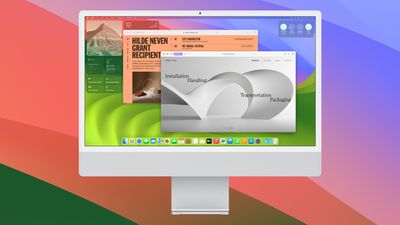
The macOS Sonoma update can be downloaded for free on all eligible Macs using the Software Update section of System Settings.
macOS Sonoma adds interactive widgets to the desktop, bringing them out of the Today view and making them more prominent and useful. With Continuity, you can even see and interact with your iPhone widgets on your Mac.
There are a range of new Apple TV-like screensavers that feature slow-motion videos of worldwide locations, along with matching desktop wallpapers. Apple added a new Game Mode for Macs with Apple silicon chips, and this option prioritizes games on the CPU and GPU for smoother performance.
Video conferencing gets a boost with a Presenter Overlay effect for sharing content, plus there's a high performance mode for Screen Sharing that offers higher frame rates and low-latency audio so pros can access their content creation workflows from anywhere.


Safari's Private Browsing mode is locked behind Touch ID, Profiles can be used to separate work and personal browsing, and there are improved tracking and fingerprinting protections to preserve your privacy. You can save your favorite websites as web apps on the desktop or the dock, and they will work as regular apps with a simplified toolbar.
Many of the features that are in iOS 17 are also in macOS Sonoma. The Messages app supports a new stickers experience that turns all emoji into stickers, the People album can recognize pets, and Visual Lookup works with videos and can recognize food and identify symbols on labels and signs.
AirTags can be shared with other people using Find My, iCloud Keychain passwords can be shared with friends and family members, the Notes app supports inline PDFs, and Siri can now be activated without saying "Hey." Apple's full release notes for the update are below.
macOS Sonoma brings all‑new capabilities that elevate your productivity and creativity. Discover even more ways to personalize your Mac with stunning screensavers and widgets that you can add to your desktop. Elevate your presence on video calls with a new way to present your work that keeps you a part of the presentation. Safari profiles and web apps help you organize your browsing in all-new ways. Game Mode boosts your gaming performance. Sonoma also brings big updates to Messages, Keyboard, and Accessibility. And when you upgrade, you get the latest security and privacy protections available for Mac.
Screen Savers
Stunning screen savers of locations from around the world seamlessly become your desktop wallpaper when you log-in
- Shuffle settings for rotating through screensavers by theme including Landscape, Cityscape, Underwater, and EarthWidgets
- Widgets can be placed anywhere on the desktop and adapt to the color of your wallpaper while working in apps
- iPhone widgets can be added to your Mac when your iPhone is nearby or on the same Wi-Fi network
- Interactive widgets let you take actions directly from the widget such as running a shortcut, pausing media, and moreVideo Conferencing
- Presenter Overlay keeps you front and center while sharing your screen in FaceTime or third-party video conferencing apps (Mac with Apple silicon)
- Reactions layer 3D effects like hearts, balloons, confetti, and more around you in video calls and can be triggered with gestures (Mac with Apple silicon, Continuity Camera with iPhone 12 and later)Safari and Passwords
- Profiles keep your browsing separate for topics like work and personal, separating your history, cookies, extensions, Tab Groups, and favorites
- Web apps let you use any website like an app, complete with an icon in the Dock for faster access and a simplified toolbar for easier browsing
- Enhanced Private Browsing locks your private browsing windows when you're not using them, blocks known trackers from loading, and removes tracking that identifies you from URLs
- Password and passkey sharing allows you to easily share accounts with trusted contactsMessages
- Live Stickers sync from iOS and iPadOS to macOS, giving you access to the Live Stickers you create on your iPhone and iPad
- Search filters for people, keywords, and content types like photos or links help you more easily find what you are looking for
- Swipe to reply inline on any iMessage bubbleGaming
- Game Mode gives games the highest priority on the CPU and GPU, delivering more consistent frame rates and lower latency to wireless controllers and AirPods (Mac with Apple silicon)Keyboard
- Improved autocorrect accuracy makes typing even easier by leveraging a more powerful transformer-based language model
- Inline predictive text shows single- and multi-word predictions that you can add by pressing the Space bar
- Improved Dictation experience supports using your voice and keyboard together to enter and edit textAirPods
- Adaptive Audio delivers a new listening mode that dynamically blends Active Noise Cancellation and Transparency to tailor the noise control experience based on the conditions of your environment (AirPods Pro (2nd generation) with the latest firmware)
- Personalized Volume adjusts the volume of your media in response to your environment and listening preferences over time (AirPods Pro (2nd generation) with the latest firmware)
- Conversation Awareness lowers your media volume and enhances the voices of the people in front of the user, all while reducing background noise (AirPods Pro (2nd generation) with the latest firmware)
- Press to mute and unmute your microphone by pressing the AirPods stem or the Digital Crown on AirPods Max when on a call (AirPods (3rd generation), AirPods Pro (1st and 2nd generation), or AirPods Max with the latest firmware)
- Improved AirPods automatic switching now detects Mac up to 2X faster (AirPods (2nd and 3rd generation), AirPods Pro (1st and 2nd generation), AirPods Max with the latest firmware)Privacy
- Sensitive Content Warnings can be enabled to help prevent users from unexpectedly viewing sensitive images in Messages
- Expanded Communication Safety protections for children now detect videos containing nudity in addition to photos shared through Messages and the system Photos picker
- Improved sharing permissions let you choose which photos to share and add calendar events without providing access to your entire photo library or calendarAccessibility
- Live Speech lets you type what you want to say and reads it aloud in FaceTime calls or in-person conversations
- Personal Voice helps users at risk of speech loss create a voice that sounds like them in a private and secure way using on-device machine learning
- Made for iPhone compatible hearing devices can be paired and used with Mac (MacBook Pro (2021), Mac Studio (2022), and Mac computers with M2 chip)This release also includes other features and improvements:
- One-Time verification code AutoFill from Mail helps you quickly sign into sites in Safari, without leaving the browser
- Inline PDFs and document scans in Notes are presented full-width making them easy to view
- Grocery Lists in Reminders automatically group related items into sections as you add them
- Visual Look Up for recipes helps you find similar dishes from photo
- Visual Look Up in video helps you learn about objects that appear in paused video frames
- Pets in the People album in Photos surfaces individual pets just like friends or family members
- Option to say "Siri" in addition to "Hey Siri" for a more natural way to activate Siri (Mac with Apple silicon, AirPods Pro (2nd generation))
- High performance mode in Screen Sharing supports color workflows and improves responsiveness while remotely accessing a Mac (Mac with Apple silicon)
- Item sharing in Find My allows you to share an AirTag with up to five other people
- Activity History in Home displays a recent history of events for door locks, garage doors, security systems, and contact sensors
- Battery health management updated on 13-inch MacBook Air with M2 chip to better optimize long term battery healthSome features may not be available for all regions or on all Apple devices.
Read More
For a deeper look at all of the new features in macOS Sonoma, we have a dedicated macOS Sonoma roundup.




/https://forums.macrumors.com/attachments/2281732/)


/https://forums.macrumors.com/attachments/2281738/)











































