Apple ID Security Keys Feature Now Supports iCloud for Windows - MacRumors
Skip to Content

Apple ID Security Keys Feature Now Supports iCloud for Windows

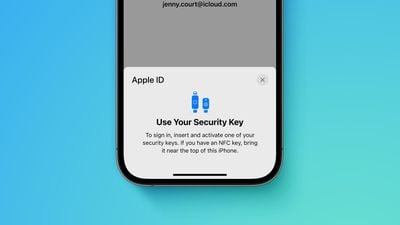
If you have physical security keys set up for your Apple ID account, you can now sign in to iCloud on Windows, after updating the app to version 15 or later. Apple confirmed this change in a support document updated today.
Apple advanced security Security Keys screen Feature crop
Previously, signing in to iCloud for Windows was not an option whatsoever after turning on the Apple ID security keys feature.

Apple ID security keys support was introduced early last year with iOS 16.3, iPadOS 16.3, and macOS 13.2. When the optional setting is turned on, signing in to an Apple ID requires entering the account's password and then using a FIDO-certified security key to complete two-factor authentication, instead of a traditional six-digit verification code from another Apple device. These security keys typically look similar to a USB thumb drive.

Apple says the feature is "designed for people who want extra protection from targeted attacks, such as phishing or social engineering scams." You should be extra careful if you turn on the feature, as you could be locked out of your Apple ID account permanently if you lose all of your trusted Apple devices and security keys.

Popular Stories

iOS 26

iOS 26.4 Adds Two New Features to CarPlay

Tuesday March 24, 2026 1:55 pm PDT by
iOS 26.4 was released today, and it includes a couple of new features for CarPlay: an Ambient Music widget and support for voice-based chatbot apps. To update your iPhone 11 or newer to iOS 26.4, open the Settings app and tap on General → Software Update. CarPlay will automatically offer the new features so long as the iPhone connected to your vehicle is running iOS 26.4 or later....
Apple Business hero

Apple Unveils 'Apple Business' All-in-One Platform

Tuesday March 24, 2026 8:53 am PDT by
Apple today announced Apple Business, a new all-in-one platform that unifies device management, productivity tools, and customer outreach features. The service is designed to be a consolidated replacement for several of Apple's existing business-focused offerings, including Apple Business Essentials, Apple Business Manager, and Apple Business Connect. It provides organizations with a single...
AirPods Pro Firmware Feature

Apple Releases New Firmware for AirPods Pro 3, AirPods Pro 2 and AirPods 4

Tuesday March 24, 2026 12:31 pm PDT by
Apple today released new firmware for the AirPods Pro 2, AirPods Pro 3, and the AirPods 4. The firmware has a version number of 8B39, up from 8B34 on the AirPods Pro 3, 8B28 on the AirPods Pro 2, and 8B21 on the AirPods 4. There is no word on what's included in the firmware, but Apple has a support document with limited notes. Most updates are limited to bug fixes and performance...


Top Rated Comments

28 months ago
What I really want is to be able to register my own Passkeys to unlock my Apple ID.

Apple makes it easy to use your iPhone as a Passkey for other sites, but they don't allow me to use Passkeys to secure my Apple ID itself.

Really irritating.
Score: 2 Votes (Like | Disagree)
Realityck Avatar
28 months ago
I noticed last night around 11 PM to Midnight PST Apple ID wasn't working, then it was. Via Safari web browser, not an app those all worked. I checked Apple system status it was all green. Possibly Apple was updating their Apple ID security?
Score: 2 Votes (Like | Disagree)
AppleTO Avatar
28 months ago
They've finally re-done the ancient UI as well. About time.
Score: 1 Votes (Like | Disagree)
28 months ago

I’m glad that Apple is expanding this feature to Windows users as well. These extra security features are definitely great for users

I logged into my Google account a few months ago and added a bunch of new ways to secure my Google account including Google Authenticator - something that I’ve been meaning to do for a while

There must’ve been 10 different options of securing your Google account that Google makes available so I hope that Apple does something similar because the more ways that a user has to get into their account, the less likely that they will get locked out of their own account. I’m trying to rely less on SMS authentication and more on these alternative methods to enable higher security

On my Google account I removed my main personal phone number and I now only use 2 phone numbers (that I don’t give out to people) for the SMS authentication - I think that’s a better alternative than using your main phone number that everyone knows
It’s nice that Google offers many different ways to authenticate and 2FA, but be mindful the more options you switch on, the more “attack surface area” you have on that account.

Best thing is to usually have only your most secure method switched on, such as PassKeys or hardware keys for 2FA. That way an attacker must possess a key to gain access.
Score: 1 Votes (Like | Disagree)
Justin Cymbal Avatar
28 months ago
I’m glad that Apple is expanding this feature to Windows users as well. These extra security features are definitely great for users

I logged into my Google account a few months ago and added a bunch of new ways to secure my Google account including Google Authenticator - something that I’ve been meaning to do for a while

There must’ve been 10 different options of securing your Google account that Google makes available so I hope that Apple does something similar because the more ways that a user has to get into their account, the less likely that they will get locked out of their own account. I’m trying to rely less on SMS authentication and more on these alternative methods to enable higher security

On my Google account I removed my main personal phone number and I now only use 2 phone numbers (that I don’t give out to people) for the SMS authentication - I think that’s a better alternative than using your main phone number that everyone knows
Score: 1 Votes (Like | Disagree)

















