Apple Announces watchOS 26 With Liquid Glass Design, Workout Buddy, and Smart Stack Intelligence - GeekWebGuides
Skip to Content

Apple Announces watchOS 26 With Liquid Glass Design, Workout Buddy, and Smart Stack Intelligence

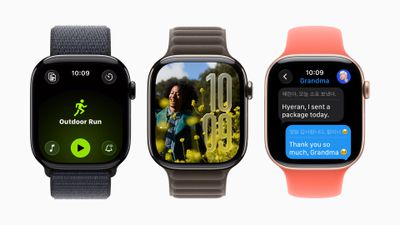
Apple announced watchOS 26 at WWDC, introducing the "Liquid Glass" design language from iOS 26, a new AI-powered fitness feature called Workout Buddy, and updated Smart Stack functionality.
Apple WWDC25 watchOS 26 hero 250609
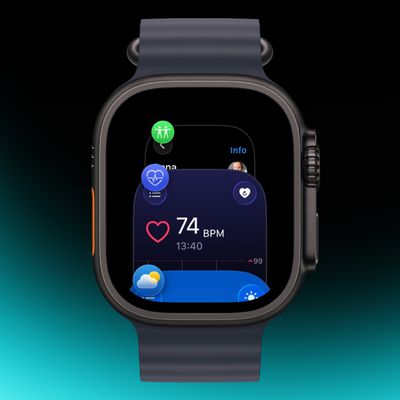
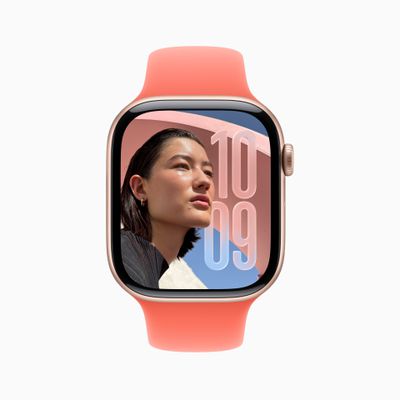
Liquid Glass uses real-time rendering to create translucent interface elements that reflect and refract content. The design appears across Smart Stack widgets, Control Center, notifications, and in-app navigation. The Photos watch face also receives numerals made of Liquid Glass, showing more of users' photos through the display.

Workout Buddy uses Apple Intelligence to analyze workout data and fitness history, providing spoken motivation during exercise sessions.
Apple WWDC25 watchOS 26 Photos Face Liquid Glass 250609
The feature incorporates data like heart rate, pace, distance, Activity rings, and fitness milestones to generate insights during workouts. It can provide updates like "You're 18 minutes away from closing your Exercise ring" or "Your total running distance for the year just crossed the 200-mile mark."

During workouts, it marks mile splits and milestones. At the end, it recaps workout statistics and achievements. The feature uses a text-to-speech model with voice data from Fitness+ trainers. It requires Bluetooth headphones and an Apple Intelligence-supported iPhone nearby.

Workout Buddy works in English for Outdoor and Indoor Run, Outdoor and Indoor Walk, Outdoor Cycle, HIIT, and Functional and Traditional Strength Training. The Workout app also receives a layout update with four corner buttons for accessing features like Workout Views, Custom Workout, Pacer, and Race Route.
watchos 26 workout
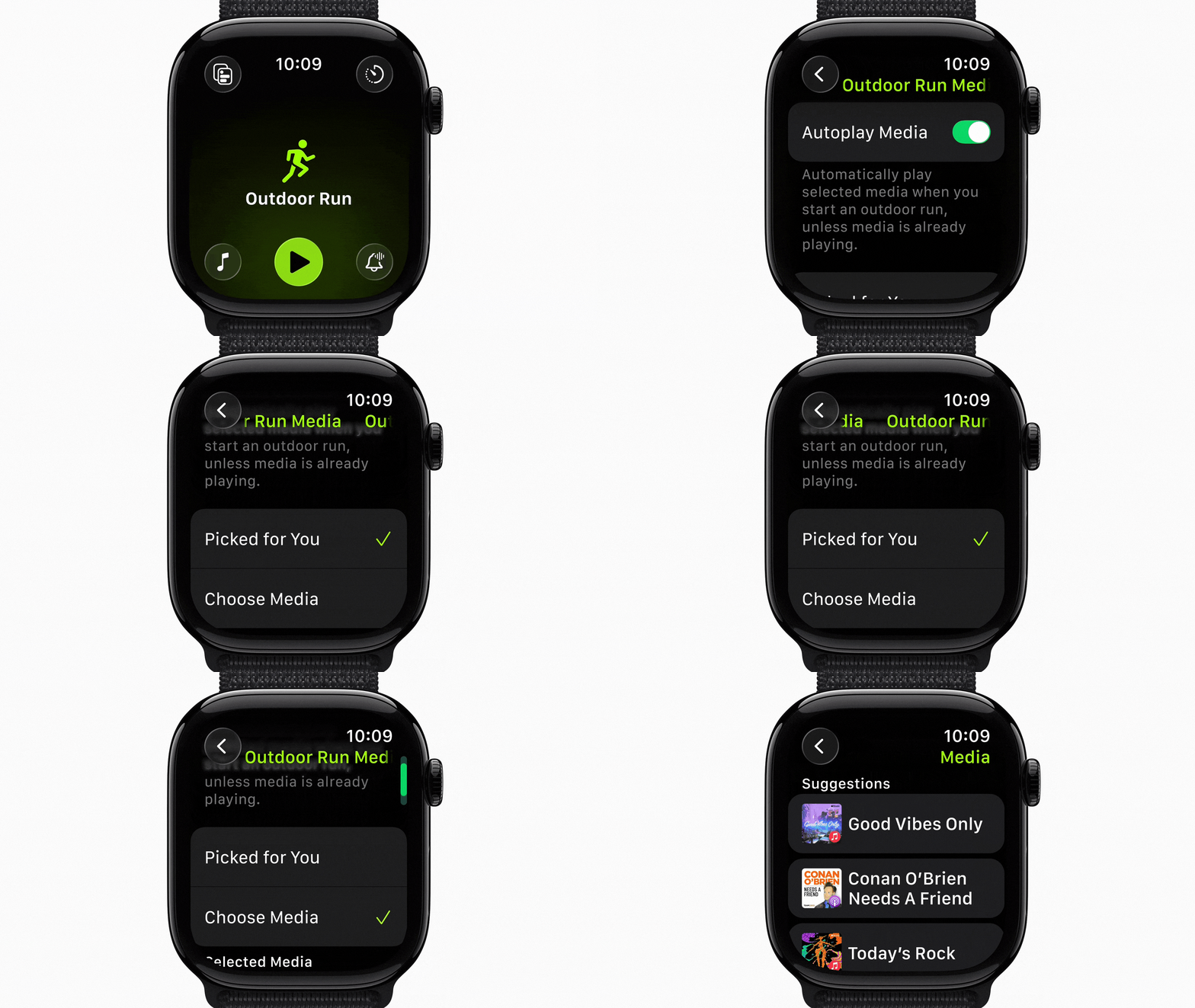
Users can set up music and podcasts in the Workout app to play automatically when workouts begin. Apple Music can select playlists based on workout type and user preferences, or suggest content based on listening habits for specific exercise types.

watchos 26 smart stack
The Smart Stack adds a hints feature using contextual data, sensor information, and routine patterns for actionable suggestions. These appear as visual prompts on the display, such as Backtrack in remote locations or workout suggestions when arriving at fitness locations.

Apple Watch now supports Live Translation in Messages with ‌Apple Intelligence‌, automatically translating incoming texts and responses. The feature works on Apple Watch Series 9, Series 10, and Ultra 2 with a supported iPhone.
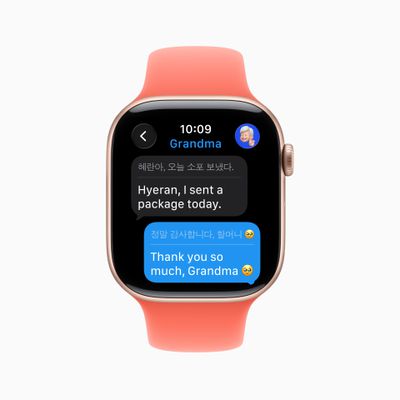
Apple WWDC25 watchOS 26 Messages Live Translation Apple Intelligence 250609
For English users, the watch suggests relevant actions in Messages, like starting Check In or using Apple Cash. Customizable backgrounds from iPhone appear on Apple Watch, and users can respond to polls from their wrist.

Elsewhere, a wrist flick gesture on newer Apple Watch models allows one-handed notification dismissal. Users turn their wrist over and back to dismiss notifications, silence timers and alarms, or return to the watch face. The feature uses accelerometer and gyroscope data with machine learning.

Apple Watch also automatically adjusts speaker volume based on ambient noise for notifications, calls, and Siri responses.

In ‌watchOS 26‌, the Notes app comes to Apple Watch with functionality including pinning, unlocking, and creating notes via ‌Siri‌ or dictation. The Phone app also adds Hold Assist and Call Screening when an iPhone is nearby.

Meanwhile, Live Listen controls arrive for users who are deaf or hard of hearing, with real-time Live Captions and remote control capabilities. The ‌Photos‌ face also shuffles images based on Featured content, and a redesigned watch face gallery organizes faces into collections.

Developers get new APIs for adopting Liquid Glass design materials, creating custom Control Center widgets, and adding third-party widgets to the Smart Stack with location-based relevance.

‌watchOS 26‌ is available now in developer beta, with a public beta coming next month and a general release this fall for Apple Watch Series 6 or later, Apple Watch SE (2nd generation), and all Ultra models paired with iPhone 11 or later running ‌iOS 26‌. ‌Apple Intelligence‌ features require supported iPhone models.

Related Roundups: watchOS 26, watchOS 27
Related Forum: Apple Watch

Popular Stories

watchos 27

Apple Releases watchOS 27.0.1 for Additional Models

Monday September 28, 2026 2:08 pm PDT by
After releasing watchOS 27.0.1 for the Apple Watch Series 12 and Apple Watch Ultra 4 last week to address a bug that was causing devices to restart unexpectedly, Apple has now released the update for all eligible watches, which includes Series 9 and later. Apple's release notes say only that the update "provides bug fixes for your Apple Watch" and the company does not list any security fixes,...
watchos 27

Apple Releases watchOS 27.0.1 With Fix for Restart Bug

Wednesday September 23, 2026 12:44 pm PDT by
Apple today released watchOS 27.0.1, a minor update to the watchOS 27 operating system that came out last week. The update is limited to the Apple Watch Series 12 and Apple Watch Ultra 4. watchOS 27.0.1 can be downloaded through the Settings app on the watch or the Apple Watch app on a connected iPhone. Software can only be installed when the Apple Watch is on the charger and has over 50...
apple watch app switcher

App Switcher Returns in watchOS 27.2 Beta With New Launch Gesture

Tuesday September 22, 2026 1:41 am PDT by
Apple has apparently listened to user feedback and brought back the App Switcher screen in the latest watchOS 27.2 beta, but accessing it is a little different than before. In watchOS 26 and earlier versions, a double press of the Digital Crown would bring up the App Switcher, where you could easily switch to the last-used app and view and open other recently used apps. You could also swipe...


Top Rated Comments

DMinTX Avatar
18 months ago
Any word on if they are going to address the O2 patent issue by settling the lawsuit or re-implementing the algorithm to avoid the issue?
Score: 1 Votes (Like | Disagree)
Latest Stories
iPhone Duo Reviewers Really Miss Face ID
2 hours ago
Does the iPhone Duo Run Hot? Here's What Reviews Found
3 hours ago
Apple Music's New Look is Now Live on Apple's Website
4 hours ago
Anthropic Launches Claude Duet, a Proactive AI Agent
4 hours ago
What 32,000 Folds Did to the iPhone Duo's Hinge
5 hours ago
iPhone Duo's Hidden FaceTime Camera Takes 'Trash' Photos
6 hours ago
iPhone Duo Has 'Edge Light' Feature That Debuted on Macs Last Year
7 hours ago
Apple Support App Updated for iPhone Duo's Larger Display
7 hours ago
Amazon Sweetens the Deal on Entry-Level 16-Inch MacBook Pro With $570 Off
7 hours ago
iPhone Duo Tips Over on MagSafe Stands When Unfolded
8 hours ago
Apple Music's New Look Officially Announced
9 hours ago
iPhone Duo Supports Apple Pencil Starting With iOS 27.2
10 hours ago
iPhone Duo Accessories Roundup: Cases and Screen Protectors From OtterBox, ZAGG, and More
11 hours ago
Apple Stores Will Have 'Limited' Availability of iPhone Duo for Walk-In Customers
11 hours ago
iPhone Duo Reviews Explain Why Device is Both 'Fun' and 'Frustrating'
11 hours ago
Apple Says 'Reachability' Feature Coming to iPhone Duo Later This Year
12 hours ago
Loop Capital Cuts Apple Rating Over iPhone Sales Outlook
16 hours ago
Apple Stores in Bordeaux and Lille Looted During French Protests
16 hours ago
Bluesound Adds Native Apple Music Support
17 hours ago
Apple CEO John Ternus Explains What Makes Good Product Design
18 hours ago
UK Proposes New Ways to Help Apple Pay Rivals
20 hours ago
WhatsApp Developing In-App Browser for All Chat Links on iPhone
21 hours ago
Apple's App Store Chief Explains Its Push for Premium Games
21 hours ago
Apple Could Owe Even More After $5.7 Billion Patent Verdict
22 hours ago
Skyrim Comes to Apple Silicon Macs With New Unofficial Installer
22 hours ago
Apple Highlights Mac and iPad Use in Paris Design Exhibition
23 hours ago
Apple Seeks 6G Modem Engineers as It Plans for Post-5G iPhones
1 day ago
First iPhone Duo Unboxing Video Appears Ahead of Friday Launch
1 day ago
Perplexity Computer Can Now Run Fully Locally on Mac
1 day ago
Apple's Touchscreen OLED MacBook Pro: Everything We Know
1 day ago