
iOS 26 Available Now With These 8 New Features - GeekWebGuides
Skip to Content

iOS 26 Available Now With These 8 New Features

Following three months of beta testing, iOS 26 was released today, September 15. The update is compatible with the iPhone 11 series and newer, and it is available to install via the Settings app, under General → Software Update.

iOS 26 Feature
Below, we have highlighted eight new features included in iOS 26. Even more new features and changes are outlined in Apple's release notes for the update.

Some of the features are only available on newer iPhone models.

Liquid Glass
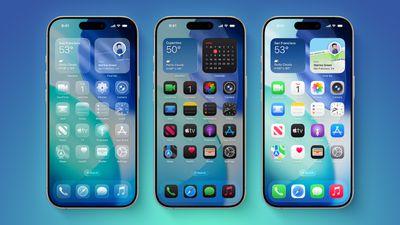
iOS 26 on Three iPhones
iOS 26 introduces an all-new Liquid Glass design with translucent menus, buttons, and icons.

Apple describes Liquid Glass as "a new translucent material that reflects and refracts its surroundings, bringing greater focus to content, and delivering a new level of vitality across controls, navigation, app icons, widgets, and more."

Lock Screen Enhancements
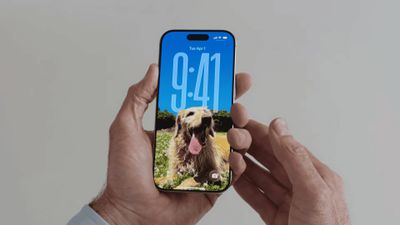
new iphone lockscreen ios 26
On iOS 26, the Lock Screen's clock automatically adapts to fill the empty space, and you can view full-screen animated album art for supported Apple Music songs.

New iMessage Features
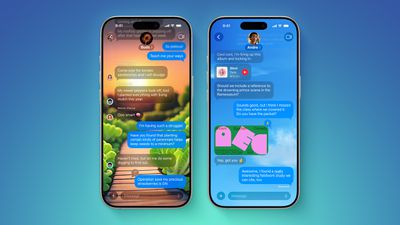
ten messages features
Here are some of the key new features and changes in the Messages app on iOS 26:

  • Backgrounds: You can now add a background to any conversation, and all participants will see it. You can choose from Apple's selection of backgrounds, or you can set any of your own photos as a background. You can turn off conversation backgrounds in the Settings app if desired.
  • Polls: You can now create polls in group chats, allowing people to vote on topics or questions, such as which restaurant to go to. Apple Intelligence can detect when a poll might come in handy and suggest one.
  • Apple Cash in group chats: You can now send and receive Apple Cash in group chats.
  • Typing indicators in group chats: You can now see who is typing in group chats.
  • "Add Contact" button in group chats: This button makes it easier to add people to the Contacts app in group chats.
  • "Select" option: When you tap and hold on a message bubble, a new "Select" option appears. Tapping on it allows you to select a portion of text in a message, whereas you could previously only copy an entire message.
  • Unknown sender screening: When turned on, this setting automatically moves messages from unknown senders to the Unknown Senders folder, and hides notifications for them until you accept them.

Call Screening and Hold Assist
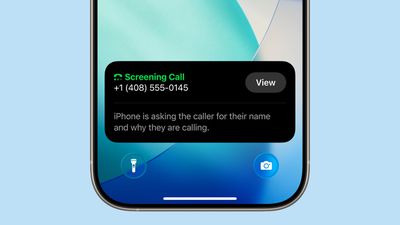
ios 26 phone app screening
iOS 26 adds a couple of useful features to the Phone app: Call Screening and Hold Assist.

Call Screening is an opt-in setting that asks unknown callers for their name, and the reason why they are calling. And with Hold Assist, your iPhone can automatically wait on hold for you during a call, and notify you when the agent on the other line is ready.

Adaptive Power Mode
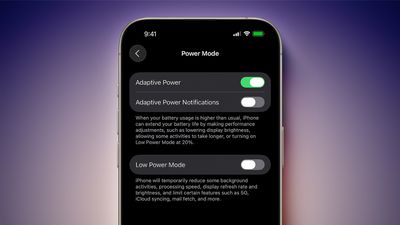
iOS 26 Adaptive Power Notifications
iOS 26 introduces an Adaptive Power Mode on the iPhone, alongside the existing Low Power Mode.

Apple says Adaptive Power Mode can make "performance adjustments" when necessary to extend an iPhone's battery life, including slightly lowering the display brightness, allowing some activities to "take longer," and automatically turning on Low Power Mode when the iPhone's remaining battery life reaches the 20% mark.

Adaptive Power Mode is only available on the iPhone 15 Pro models and newer. The setting can be turned on in the Settings app, under Battery → Power Mode.

AutoMix

apple music automix ios 26
A new AutoMix feature in the Apple Music app can seamlessly transition from one song to the next, like a DJ would. AutoMix replaces the previous Crossfade feature.

Preview App
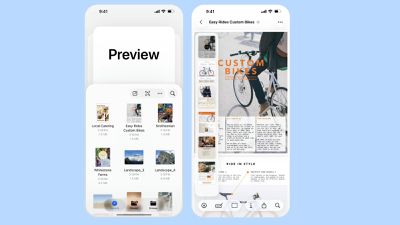
Apple Preview App iPhone
iOS 26 extends a version of the Apple's Preview app from the Mac to the iPhone, providing you with a built-in app to edit and mark up PDFs and images.

CarPlay Upgrades
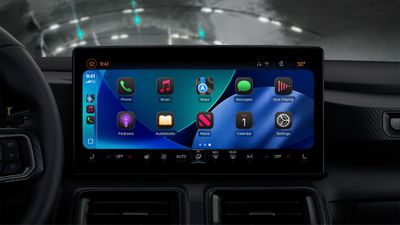
CarPlay Liquid Glass Dark
When you are using CarPlay with an iPhone running iOS 26, the new Liquid Glass design extends to the CarPlay interface. Like on the iPhone, the new look includes more shimmery app icons and translucent user interface elements.

Starting with iOS 26, you can respond to messages with standard Tapbacks like a heart, thumbs up, or exclamation marks directly through CarPlay.
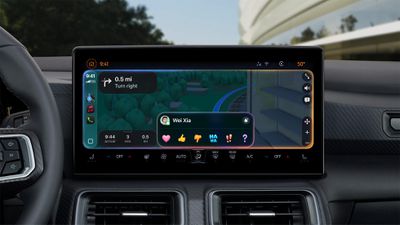
CarPlay Messages Tapbacks

You can now view your pinned conversations in the Messages app on CarPlay.
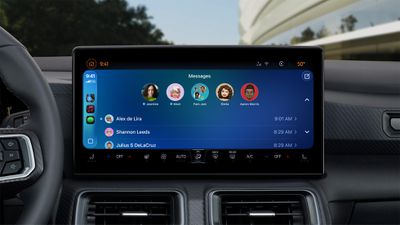
CarPlay Pinned Messages

CarPlay has a new compact view for incoming phone calls, so that you can still see other information on the screen, such as turn-by-turn directions.
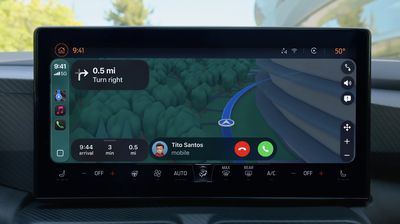
CarPlay Compact Phone Calls
CarPlay's Dashboard screen can now show Live Activities, letting you keep track of things like a flight's arrival time at a glance.
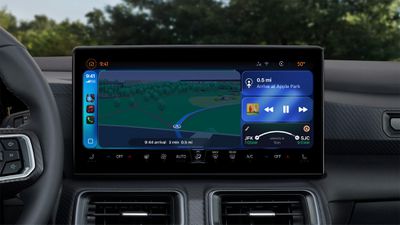
CarPlay Live Activities
The regular version of CarPlay now has a widgets screen, for things like calendar appointments and HomeKit accessory controls.

CarPlay Widgets
iPhone users will be able to wirelessly stream videos to the CarPlay screen using AirPlay, according to Apple. For safety reasons, video playback will only be available when the vehicle is parked, to prevent distracted driving. The connected iPhone will be able to detect when the vehicle is in motion and end playback.

Automakers need to add support for this feature, so it might be limited to newer vehicles and take some time to roll out.

More

Read our iOS 26 roundup linked below to learn more about the update.

Related Roundups: iOS 26, iPadOS 26
Related Forum: iOS 26

Popular Stories

iOS 27 Feature Dark

Apple Now Pushing iPhone Users Still on iOS 26 to Install iOS 27

Thursday October 8, 2026 1:17 pm PDT by
Starting today, iPhone users still running iOS 26 will see iOS 27.0.1 as the prominent software update in the Settings app under General → Software Update, with iOS 26.7.1 now relegated to a smaller "Also Available" section at the bottom. iOS 27 was released on September 14, but until now that update and later iOS 27.0.1 were shown under the "Also Available" section, with iOS 26.7 and...
apple lock security bug vulnerability fix privacy

iOS 26.7.1 Fixes Vulnerability Used in Targeted Attacks

Monday September 28, 2026 11:45 am PDT by
iOS 26.7.1, iPadOS 26.7.1, macOS Tahoe 26.7.1, and macOS Sequoia 15.8.1 address a major vulnerability that Apple believes was used against a small number of people. Apple's security support pages say there was a CoreGraphics out-of-bounds write issue that could be exploited with a maliciously crafted file, allowing for arbitrary code execution. It has been fixed with improved bounds...


M5 MacBook Pro

RIP, MacBook Ultra

Monday October 19, 2026 9:37 am PDT by
Apple today sent out invites for an experience in Los Angeles on Wednesday, October 28, and the "Pro and tell" tagline on the invitation likely means that the rumored MacBook models with touch-enabled OLED displays will stick with MacBook Pro branding instead of the once-rumored "MacBook Ultra" name. The long-rumored "iPhone Ultra" ended up being named iPhone Duo, so speculation that Apple...

Top Rated Comments

Porco Avatar
15 months ago
The public beta moves to the global beta. I’ll likely wait and see a bit longer, I don’t need surprises this week.
To all who install immediately: I thank you for your service.
Score: 32 Votes (Like | Disagree)
QuarterSwede Avatar
15 months ago

The public beta moves to the global beta. I’ll likely wait and see a bit longer, I don’t need surprises this week.
To all who install immediately: I thank you for your service.
There are some very minor bugs. Don’t listen to anyone here crying that it isn’t ready (when are updates really done anyway?). I wasn’t on the beta till the RC this year and I think its a pretty solid release in my personal as professional use over the last few days. After a day of settling down it runs smoother than 18 ever did. Icon caching took a few days to stop happening so that isn’t a long term issue. Now that could be because my 12 Pro Max has 6GB and it wouldn’t work well on the 4GB phones (12). No idea.

I personally like the fun and whimsy being brought back to a boring OS and the glass look is absolutely gorgeous in use. Much better than pictures try to convey. I’ve yet to run into any legibility problems. I’m not saying there won’t be any but don’t think actual usage is anything like it’s being portrayed as. Sad that the MR community is helping to spread this FUD.

I very much disagree with certain very vocal developers on how bad it is and how they can’t believe Apple is shipping it. That just isn’t what I’m experiencing on a 12 Pro Max (nothing new by any means). It’s fine and not even close to Apple’s worst .0 release. No, I don’t work for Apple and I never have. I also don’t own stock in them. This is just my personal experience and opinion. I like iOS 26. 🤷‍♂️
Score: 24 Votes (Like | Disagree)
Johnny907 Avatar
15 months ago
Yeah I wanted to mess with it over the weekend so already downloaded the RC.
Liquid Glass is trash. I’m 45, I don’t want all this bubbly bouncy nonsense. Spent an hour going back and forth between a couple Reddit subs and the settings/accessibility menus just turning most of it off.
While I like the rounding and softening of certain elements, it’s the transparency and goofy animations that are annoying. It’s like Apple turned iOS into a fidget spinner for the easily distracted. I’m sure there is a demo for that, but would really appreciate if Apple added a “Professional Adult” toggle to switch it all off instead of making us deep dive through pages of settings.
Score: 24 Votes (Like | Disagree)
vertsix Avatar
15 months ago
1. Bugs
Score: 20 Votes (Like | Disagree)
klasma Avatar
15 months ago
Time to update to iOS 18.
Score: 14 Votes (Like | Disagree)
jz0309 Avatar
15 months ago

Yeah I wanted to mess with it over the weekend so already downloaded the RC.
Liquid Glass is trash. I’m 45, I don’t want all this bubbly bouncy nonsense. Spent an hour going back and forth between a couple Reddit subs and the settings/accessibility menus just turning most of it off.
While I like the rounding and softening of certain elements, it’s the transparency and goofy animations that are annoying. It’s like Apple turned iOS into a fidget spinner for the easily distracted. I’m sure there is a demo for that, but would really appreciate if Apple added a “Professional Adult” toggle to switch it all off instead of making us deep dive through pages of settings.
I'm 66 and I quite like it, nothing really that bothers me ... guess we are all different
Score: 11 Votes (Like | Disagree)
Latest Stories
Apple Blocks Certificates That Could Help Attackers Fake Websites
1 hour ago
Giant iPhone Duo Installations Spotted at Apple Fifth Avenue
2 hours ago
iPhone Duo 2 Prototypes Include Under-Display Face ID
2 hours ago
Tesla App Gains iPad and iPhone Duo Support
6 hours ago
Apple Reportedly Boosts iPhone Duo Orders by 44%
6 hours ago
Fortnite Returning to Australian App Store After Court Ruling
7 hours ago
Apple Ordered to Open iPhone to Rival App Stores in Australia
7 hours ago
Apple Suppliers Face Hurdles Cutting Circuit Board Emissions
8 hours ago
Things Updated for iPhone Duo With Adaptive Layout
8 hours ago
Simplicity and Siri AI Are HomeView's Killer Features, Apple Says
8 hours ago
iPhone Duo Reviewers Really Miss Face ID
13 hours ago
Does the iPhone Duo Run Hot? Here's What Reviews Found
15 hours ago
Apple Music's New Look is Now Live on Apple's Website
15 hours ago
Anthropic Launches Claude Duet, a Proactive AI Agent
16 hours ago
What 32,000 Folds Did to the iPhone Duo's Hinge
17 hours ago
iPhone Duo's Hidden FaceTime Camera Takes 'Trash' Photos
18 hours ago
iPhone Duo Has 'Edge Light' Feature That Debuted on Macs Last Year
19 hours ago
Apple Support App Updated for iPhone Duo's Larger Display
19 hours ago
Amazon Sweetens the Deal on Entry-Level 16-Inch MacBook Pro With $570 Off
19 hours ago
iPhone Duo Tips Over on MagSafe Stands When Unfolded
19 hours ago
Apple Music's New Look Officially Announced
21 hours ago
iPhone Duo Supports Apple Pencil Starting With iOS 27.2
22 hours ago
iPhone Duo Accessories Roundup: Cases and Screen Protectors From OtterBox, ZAGG, and More
22 hours ago
Apple Stores Will Have 'Limited' Availability of iPhone Duo for Walk-In Customers
23 hours ago
iPhone Duo Reviews Explain Why Device is Both 'Fun' and 'Frustrating'
23 hours ago
Apple Says 'Reachability' Feature Coming to iPhone Duo Later This Year
1 day ago
Loop Capital Cuts Apple Rating Over iPhone Sales Outlook
1 day ago
Apple Stores in Bordeaux and Lille Looted During French Protests
1 day ago
Bluesound Adds Native Apple Music Support
1 day ago
Apple CEO John Ternus Explains What Makes Good Product Design
1 day ago








































