iOS 26: All the New iPhone Lock Screen Customizations - GeekWebGuides
Skip to Content

iOS 26: All the New iPhone Lock Screen Customizations

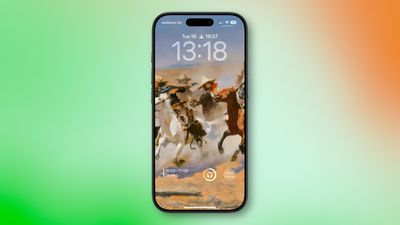
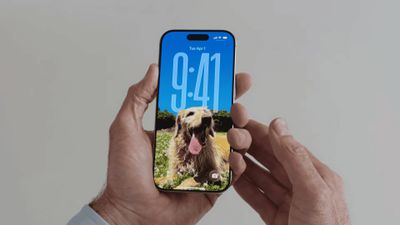
Apple has now made iOS 26 available to download on compatible iPhone models, and if you just installed the new software, Apple has made some changes and feature additions to the iPhone Lock Screen that you may want to check out.
new iphone lockscreen ios 26
To download iOS 26 on your iPhone, go to Settings ➝ General ➝ Software Update, then let your device check Apple's servers for the latest software. Wait for the update screen to appear, then hit Update Now. With that done, here are five new things you can do to customize your the Lock Screen in iOS 26.

Change iPhone Clock to Liquid Glass
ios 26 bottom widgets lock screen
In iOS 26, Liquid Glass is Apple's new translucent material that reflects and refracts its surroundings, while dynamically transforming to help bring greater focus to content across system controls, navigation elements, app icons, and widgets. The design represents the most significant visual overhaul since iOS 7, and it also brings a new clock appearance option to your iPhone Lock Screen.

  1. Wake your iPhone so the Lock Screen is showing.
  2. Long press anywhere on the Lock Screen, then tap Customize.
  3. Tap the time within the square frame.
  4. Tap the new Glass option to switch from Solid.
  5. Make any other desired changes to the clock's color and style, then tap Done to finish.
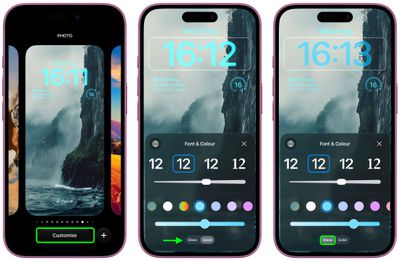
liquid glass clock ios

Move Lock Screen Widgets to Bottom

lock screen widgets bottom 2
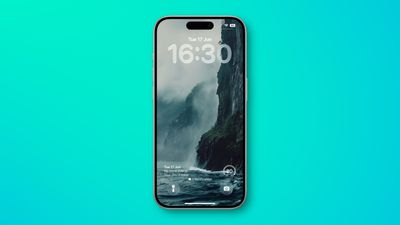
In iOS 18, the row of widgets on your Lock Screen is literally locked in place right below the clock. In iOS 26, however, Customize mode lets you drag them down to the bottom of the screen, so that they hover just above the two quick actions (assuming you have any). The new optional positioning makes tapping a widget during one-handed use a lot easier.

  1. Long press anywhere on the Lock Screen, then tap Customize.
  2. Below the clock, drag the widgets frame to the bottom of the screen.
  3. Make any other desired changes to the Lock Screen, then tap Done to finish.
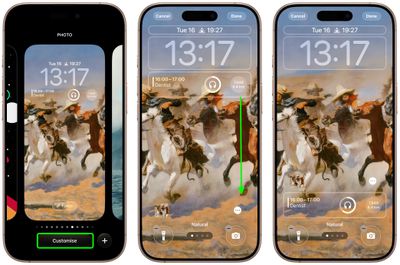
lock screen widgets bottom

Resize Lock Screen Clock

ios 26 lock screen time
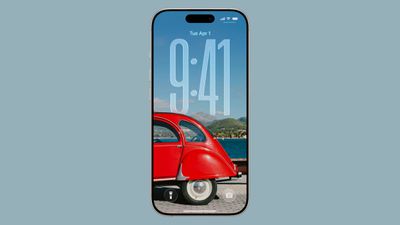
In iOS 26, Apple has made it so that the clock on the Lock Screen can be expanded to fill more of the display, making it easier to read. This can be done in Customize mode thanks to a new drag handle on the bottom-right corner of the selection frame around the time.

You can make the digits take up half of the screen, though if you have any widgets, they will slide down to the bottom of the display. In addition, if you have a depth effect applied to a photo and pinch to crop, the time will automatically adjust to accommodate the subject. Bear in mind that the ability to expand the time depends on the selected photo – if there's no space above the photo's subject, the drag handle won't appear.

  1. Long press anywhere on the Lock Screen, then tap Customize.
  2. Rest your finger on the drag handle located at the bottom-right of the clock frame.
  3. Drag down to resize the clock, then up to adjust if it's too big.
  4. Make any other desired changes to the Lock Screen, then tap Done to finish.
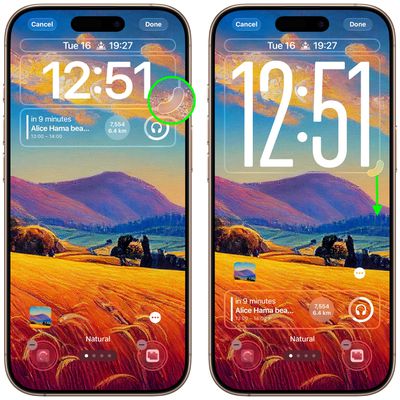
resze lock screen clock ios

Turn Lock Screen Wallpaper Into a Spatial Scene

spatial scenes lock screen
In iOS 26, your iPhone can convert 2D images into a 3D Spatial Scene that can be viewed on your Lock Screen.

When you're browsing Lock Screen wallpaper options, iOS automatically suggests photos from your library that are compatible with the feature. And if you manually select a Lock Screen photo that supports Spatial Scenes, you'll see a toggle on the customization screen that lets you enable or disable the effect.
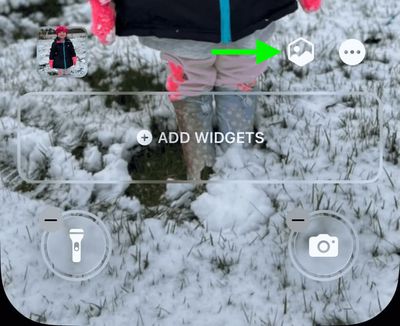
spatial scene gif 1
The feature works using generative AI that analyzes your photos to identify different elements and create depth maps. Importantly, it doesn't require Apple Intelligence to function, meaning Spatial Scenes works on iPhone 12 and newer models.

It's hard to appreciate without trying it yourself, but the results are impressive as the image animates when you move your device. Spatial Scenes use machine learning rather than Apple Intelligence, which means the feature is available on iPhone 12 and newer devices.

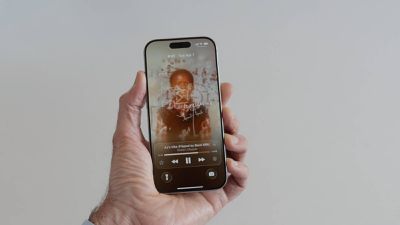
Make Music Albums Animate
liquid glass music lock screen
iOS 26 introduces full-screen animated album art on the iPhone Lock Screen for select Apple Music tracks. By tapping the album art in the Lock Screen music player, the artwork expands and animates, creating a more immersive listening experience. While animated album art has been available within the Apple Music app for some time, this marks its first appearance on the Lock Screen. Not all songs support it yet, but the number is steadily increasing. Apple is also opening the Animated Album Art feature to third‑party developers, so expect it to work with apps like Spotify and YouTube Music soon.


Popular Stories

M5 MacBook Pro

RIP, MacBook Ultra

Monday October 19, 2026 9:37 am PDT by
Apple today sent out invites for an experience in Los Angeles on Wednesday, October 28, and the "Pro and tell" tagline on the invitation likely means that the rumored MacBook models with touch-enabled OLED displays will stick with MacBook Pro branding instead of the once-rumored "MacBook Ultra" name. The long-rumored "iPhone Ultra" ended up being named iPhone Duo, so speculation that Apple...
iPhone Duo Trio

Here's What Apple's Apps Look Like on the iPhone Duo

Tuesday October 20, 2026 11:12 am PDT by
With just three days to go until the iPhone Duo is released, Apple is getting ready for the launch. Behind the scenes, the App Store now has screenshots of Apple's built-in apps running on the Duo. We've seen some apps in marketing materials, but images of the ones we haven't seen give us an idea of what it will be like using the iPhone Duo day to day. Many apps are shown in landscape...
apple pro tell logo

Apple Announcing New Products Next Week: 'Pro and Tell'

Monday October 19, 2026 9:05 am PDT by
Apple's Greg Joswiak today hinted at new product announcements coming next week, sharing a social media post that says "Can't wait to pro and tell next week." Rumors suggest Apple is planning to debut the new MacBook Pro with an OLED touchscreen display, an M6 entry-level MacBook Pro, an M6 iMac, an iPad mini with an OLED display. Can't wait to pro and tell next week....

Top Rated Comments

14 months ago
Does anyone else accidentally engage the lock-screen customizer when you grab your phone and your thumb does a long press on the screen? I wish I could lock the customizer to stop the accidental long press.
Score: 12 Votes (Like | Disagree)

Taq'aix Avatar
14 months ago
Having the widgets at the bottom is quite nice tbh.
Score: 7 Votes (Like | Disagree)
LordArchie Avatar
14 months ago
Day to day, I keep it simple. No widget and no quick access buttons.. When I travel I add a couple of travel related widgets.

Attachment Image
Score: 5 Votes (Like | Disagree)
14 months ago
Extending the clock on lock screen doesn't work for me on Iphone 13, tried multiple times and restarted my phone. I hold my finger the on sides but it doesn't do anything, am I the only one?
Score: 5 Votes (Like | Disagree)
Ntombi Avatar
14 months ago
I like an uncluttered lock screen, but I’m glad there’s more options available.

Attachment Image
Score: 5 Votes (Like | Disagree)
ItsASpider Avatar
14 months ago
Apple should add a background to the widgets, even if optionally. Especially on iPad they look like such a mess when using various formats. Having clear borders through background would be a much welcome improvement. And make them work in landscape mode, too.
Score: 4 Votes (Like | Disagree)
Latest Stories
Apple Blocks Certificates That Could Help Attackers Fake Websites
1 hour ago
Giant iPhone Duo Installations Spotted at Apple Fifth Avenue
2 hours ago
iPhone Duo 2 Prototypes Include Under-Display Face ID
2 hours ago
Tesla App Gains iPad and iPhone Duo Support
6 hours ago
Apple Reportedly Boosts iPhone Duo Orders by 44%
6 hours ago
Fortnite Returning to Australian App Store After Court Ruling
7 hours ago
Apple Ordered to Open iPhone to Rival App Stores in Australia
7 hours ago
Apple Suppliers Face Hurdles Cutting Circuit Board Emissions
8 hours ago
Things Updated for iPhone Duo With Adaptive Layout
8 hours ago
Simplicity and Siri AI Are HomeView's Killer Features, Apple Says
8 hours ago
iPhone Duo Reviewers Really Miss Face ID
13 hours ago
Does the iPhone Duo Run Hot? Here's What Reviews Found
15 hours ago
Apple Music's New Look is Now Live on Apple's Website
15 hours ago
Anthropic Launches Claude Duet, a Proactive AI Agent
16 hours ago
What 32,000 Folds Did to the iPhone Duo's Hinge
17 hours ago
iPhone Duo's Hidden FaceTime Camera Takes 'Trash' Photos
18 hours ago
iPhone Duo Has 'Edge Light' Feature That Debuted on Macs Last Year
19 hours ago
Apple Support App Updated for iPhone Duo's Larger Display
19 hours ago
Amazon Sweetens the Deal on Entry-Level 16-Inch MacBook Pro With $570 Off
19 hours ago
iPhone Duo Tips Over on MagSafe Stands When Unfolded
19 hours ago
Apple Music's New Look Officially Announced
21 hours ago
iPhone Duo Supports Apple Pencil Starting With iOS 27.2
22 hours ago
iPhone Duo Accessories Roundup: Cases and Screen Protectors From OtterBox, ZAGG, and More
22 hours ago
Apple Stores Will Have 'Limited' Availability of iPhone Duo for Walk-In Customers
23 hours ago
iPhone Duo Reviews Explain Why Device is Both 'Fun' and 'Frustrating'
23 hours ago
Apple Says 'Reachability' Feature Coming to iPhone Duo Later This Year
1 day ago
Loop Capital Cuts Apple Rating Over iPhone Sales Outlook
1 day ago
Apple Stores in Bordeaux and Lille Looted During French Protests
1 day ago
Bluesound Adds Native Apple Music Support
1 day ago
Apple CEO John Ternus Explains What Makes Good Product Design
1 day ago