Apple Releases iPadOS 26.1 With Slide Over Multitasking - GeekWebGuides
Skip to Content

Apple Releases iPadOS 26.1 With Slide Over Multitasking

Apple today released iPadOS 26.1, the first major update to the iPadOS 26 operating system released in September. iPadOS 26.1 comes six weeks after ‌iPadOS 26‌.

ipados 26 1 slide over
The new software can be downloaded on eligible iPads over-the-air by going to Settings > General > Software Update.

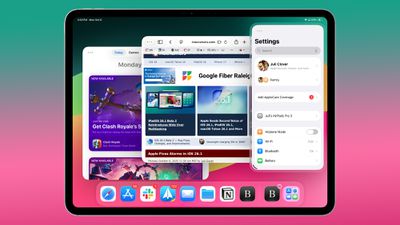
iPadOS 26.1 reintroduces Slide Over, a multitasking feature that was removed with the multitasking overhaul in ‌iPadOS 26‌.

Slide Over works alongside the window-based multitasking functionality in ‌iPadOS 26‌, so you can open up multiple app windows and still swipe over to quickly access a Slide Over app. Only one Slide Over app is supported at a time in iPadOS 26.1, and the feature is accessible by tapping on the green window resizing button and choosing Enter Slide Over.

iPadOS 26.1 also includes almost all of the new features that are in iOS 26.1, such as a toggle to reduce Liquid Glass transparency and Apple Intelligence support for new languages. Apple's release notes for the update are below.

Apple's release notes are below.

Slide Over
- Slide Over lets you keep a window on top of other windows, and easily hide off screen when not in use
- Resizable windows in Slide Over let you choose your preferred size and aspect ratio

Local capture
- Gain control is available for external USB microphones when recording with local capture
- Option to let you choose where local capture files are saved

This update includes the following features and enhancements:
- Liquid Glass setting gives you the option to choose between the default clear look or a new tinted look which increases opacity of the material in apps and notifications on the Lock Screen
- Apple Music MiniPlayer swipe gesture to go to the next or previous track
- Apple Music AutoMix support over AirPlay
- New Camera setting to turn on or off Lock Screen swipe to open Camera
- Improved FaceTime audio quality in low-bandwidth conditions
- Communication Safety and Web content filters to limit adult websites are enabled by default for existing child accounts for ages 13-17 (Age varies by country or region)
- Discover new content, spatial experiences, and quickly access information about your device using Apple Vision Pro app, now available on iPad

For information on the security content of Apple software updates, please visit:
https://support.apple.com/100100

Some features may not be available in all regions or on all iPad models. To learn more, please visit:
https://apple.com/ios/feature-availability/

Software updates, like this one, add new features and improvements that may affect performance and/or battery life. To learn more, please visit:
https://support.apple.com/125039

A list of features in iOS 26.1 can be found in our iOS 26.1 launch post, and more info on ‌iPadOS 26‌ is available in our roundup.

Related Roundups: iOS 26, iPadOS 26
Related Forum: iOS 26

Popular Stories

iOS 27 Feature Dark

Apple Now Pushing iPhone Users Still on iOS 26 to Install iOS 27

Thursday October 8, 2026 1:17 pm PDT by
Starting today, iPhone users still running iOS 26 will see iOS 27.0.1 as the prominent software update in the Settings app under General → Software Update, with iOS 26.7.1 now relegated to a smaller "Also Available" section at the bottom. iOS 27 was released on September 14, but until now that update and later iOS 27.0.1 were shown under the "Also Available" section, with iOS 26.7 and...

apple lock security bug vulnerability fix privacy

iOS 26.7.1 Fixes Vulnerability Used in Targeted Attacks

Monday September 28, 2026 11:45 am PDT by
iOS 26.7.1, iPadOS 26.7.1, macOS Tahoe 26.7.1, and macOS Sequoia 15.8.1 address a major vulnerability that Apple believes was used against a small number of people. Apple's security support pages say there was a CoreGraphics out-of-bounds write issue that could be exploited with a maliciously crafted file, allowing for arbitrary code execution. It has been fixed with improved bounds...
M5 MacBook Pro

RIP, MacBook Ultra

Monday October 19, 2026 9:37 am PDT by
Apple today sent out invites for an experience in Los Angeles on Wednesday, October 28, and the "Pro and tell" tagline on the invitation likely means that the rumored MacBook models with touch-enabled OLED displays will stick with MacBook Pro branding instead of the once-rumored "MacBook Ultra" name. The long-rumored "iPhone Ultra" ended up being named iPhone Duo, so speculation that Apple...

Top Rated Comments

ConsciousBone Avatar
13 months ago
Bring back Split View when? Yes I know you can do it with windowed mode but its a lot more faffing around compared to what Split View used to be
Score: 20 Votes (Like | Disagree)
13 months ago
It’s nothing like the old Split View, as long as you need to enter windowed mode. The iPad had a perfect multitasking system for a tablet, and it has been ruined with iPadOS 26.
Score: 18 Votes (Like | Disagree)
pdaholic Avatar
13 months ago

Chill is a good update just a bit late
I just miss the old split screen with all of my lesser used apps in slideover. It was multitasking heaven for me.
Score: 9 Votes (Like | Disagree)
13 months ago

Bring back Split View when? Yes I know you can do it with windowed mode but its a lot more faffing around compared to what Split View used to be
This is the single reason why I haven’t upgraded to os26. I use Split View daily, it’s super quick AND I can also four finger swipe between apps. In os26 you cannot do both but have to choose either.
Score: 8 Votes (Like | Disagree)
turbineseaplane Avatar
13 months ago

Why is everyone spreading false information constantly. Split View IS NOT GONE. It just requires a few extra taps to get there. Annoying? Yes. But it's still very much possible to have two apps side-by-side. Stop spreading false info!
Accomplishing having two Apps side by side, one way or another with a few more taps ≠ "Split View" the feature.

There's a difference there and the details of implementation and ease of use make up that difference.

It's sort of like PiP as a feature or ..."with just some more work you can resize a browser window and turn off the chrome and get the same effect".
Score: 6 Votes (Like | Disagree)
turbineseaplane Avatar
13 months ago
Can one turn off the pointless "glass" border around the whole thing?

Goodness gracious.
What are we doing here, Apple?

How about adding a border around the border also?
You know .. to help me "focus on my content".
Score: 6 Votes (Like | Disagree)
Latest Stories
Apple Blocks Certificates That Could Help Attackers Fake Websites
1 hour ago
Giant iPhone Duo Installations Spotted at Apple Fifth Avenue
2 hours ago
iPhone Duo 2 Prototypes Include Under-Display Face ID
2 hours ago
Tesla App Gains iPad and iPhone Duo Support
6 hours ago
Apple Reportedly Boosts iPhone Duo Orders by 44%
6 hours ago
Fortnite Returning to Australian App Store After Court Ruling
7 hours ago
Apple Ordered to Open iPhone to Rival App Stores in Australia
7 hours ago
Apple Suppliers Face Hurdles Cutting Circuit Board Emissions
7 hours ago
Things Updated for iPhone Duo With Adaptive Layout
8 hours ago
Simplicity and Siri AI Are HomeView's Killer Features, Apple Says
8 hours ago
iPhone Duo Reviewers Really Miss Face ID
13 hours ago
Does the iPhone Duo Run Hot? Here's What Reviews Found
15 hours ago
Apple Music's New Look is Now Live on Apple's Website
15 hours ago
Anthropic Launches Claude Duet, a Proactive AI Agent
16 hours ago
What 32,000 Folds Did to the iPhone Duo's Hinge
17 hours ago
iPhone Duo's Hidden FaceTime Camera Takes 'Trash' Photos
18 hours ago
iPhone Duo Has 'Edge Light' Feature That Debuted on Macs Last Year
19 hours ago
Apple Support App Updated for iPhone Duo's Larger Display
19 hours ago
Amazon Sweetens the Deal on Entry-Level 16-Inch MacBook Pro With $570 Off
19 hours ago
iPhone Duo Tips Over on MagSafe Stands When Unfolded
19 hours ago
Apple Music's New Look Officially Announced
21 hours ago
iPhone Duo Supports Apple Pencil Starting With iOS 27.2
21 hours ago
iPhone Duo Accessories Roundup: Cases and Screen Protectors From OtterBox, ZAGG, and More
22 hours ago
Apple Stores Will Have 'Limited' Availability of iPhone Duo for Walk-In Customers
23 hours ago
iPhone Duo Reviews Explain Why Device is Both 'Fun' and 'Frustrating'
23 hours ago
Apple Says 'Reachability' Feature Coming to iPhone Duo Later This Year
1 day ago
Loop Capital Cuts Apple Rating Over iPhone Sales Outlook
1 day ago
Apple Stores in Bordeaux and Lille Looted During French Protests
1 day ago
Bluesound Adds Native Apple Music Support
1 day ago
Apple CEO John Ternus Explains What Makes Good Product Design
1 day ago