macOS Tahoe 26.4 Adds Slow Charger Indicator for MacBooks - GeekWebGuides
Skip to Content

macOS Tahoe 26.4 Adds Slow Charger Indicator for MacBooks

macOS Tahoe 26.4 includes a new slow charger indicator that tells MacBook users when their charging setup isn't delivering full power.
macos slow charger warning%402x
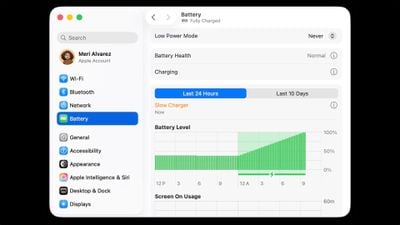
As described in an updated Apple support document, a "Slow Charger" label now appears in orange text in the battery status menu and above the Battery Level graph in Battery settings. The indicator is accompanied by an info button for more details.

Apple says that to charge more quickly, users should use a power adapter and cable that deliver at least the minimum wattage recommended for their MacBook model.

The feature is similar to one Apple added to iPhone with iOS 18, where periods of slow charging appear as an orange bar in the Battery section of the Settings app.

The slow charger indicator is one of two battery-related changes in macOS 26.4. The update also adds a Charge Limit feature that lets MacBook users set a maximum charge level anywhere from 80 to 100 percent, with the aim of preserving long-term battery health.

macOS Tahoe 26.4 is available now via System Settings ➝ General ➝ Software Update.

Related Roundup: macOS Tahoe
Related Forum: macOS Tahoe

Popular Stories

M5 MacBook Pro

RIP, MacBook Ultra

Monday October 19, 2026 9:37 am PDT by
Apple today sent out invites for an experience in Los Angeles on Wednesday, October 28, and the "Pro and tell" tagline on the invitation likely means that the rumored MacBook models with touch-enabled OLED displays will stick with MacBook Pro branding instead of the once-rumored "MacBook Ultra" name. The long-rumored "iPhone Ultra" ended up being named iPhone Duo, so speculation that Apple...
iPhone Duo Trio

Here's What Apple's Apps Look Like on the iPhone Duo

Tuesday October 20, 2026 11:12 am PDT by
With just three days to go until the iPhone Duo is released, Apple is getting ready for the launch. Behind the scenes, the App Store now has screenshots of Apple's built-in apps running on the Duo. We've seen some apps in marketing materials, but images of the ones we haven't seen give us an idea of what it will be like using the iPhone Duo day to day. Many apps are shown in landscape...
apple pro tell logo

Apple Announcing New Products Next Week: 'Pro and Tell'

Monday October 19, 2026 9:05 am PDT by
Apple's Greg Joswiak today hinted at new product announcements coming next week, sharing a social media post that says "Can't wait to pro and tell next week." Rumors suggest Apple is planning to debut the new MacBook Pro with an OLED touchscreen display, an M6 entry-level MacBook Pro, an M6 iMac, an iPad mini with an OLED display. Can't wait to pro and tell next week....

Top Rated Comments

M4irmidnight Avatar
8 months ago

macOS Tahoe 26.4 includes a new slow charger indicator that tells MacBook users when their charging setup isn't delivering full power.


As described in an updated Apple support document ('https://support.apple.com/en-us/102397'), a "Slow Charger" label now appears in orange text in the battery status menu and above the Battery Level graph in Battery settings. The indicator is accompanied by an info button for more details.

Apple says that to charge more quickly, users should use a power adapter and cable that deliver at least the minimum wattage recommended for their MacBook model ('https://support.apple.com/en-us/109509').

The feature is similar to one Apple added to iPhone with iOS 18 ('https://www.geekwebguides.com/2024/06/11/ios-18-slow-charger-battery-settings/'), where periods of slow charging appear as an orange bar in the Battery section of the Settings app.

The slow charger indicator is one of two battery-related changes in macOS 26.4. The update also adds a Charge Limit feature ('https://www.geekwebguides.com/2026/02/16/mac-charge-limit-macos-tahoe-26-4/') that lets MacBook users set a maximum charge level anywhere from 80 to 100 percent, with the aim of preserving long-term battery health.

macOS Tahoe 26.4 is available now via System Settings ➝ General ➝ Software Update.

Article Link: macOS Tahoe 26.4 Adds Slow Charger Indicator for MacBooks ('https://www.geekwebguides.com/2026/03/25/macos-tahoe-26-4-slow-charger-macbooks/')
I wish MagSafe would turn green once it’s hit the desired charge limit, rather than staying orange.
Score: 11 Votes (Like | Disagree)
needsomecoffee Avatar
8 months ago
Why did Apple hide setting the charge level action behind the information button ?? Also, setting mine to 80% was my first encounter with the "glass" slider control. Do not care so to criticize too much about Liquid Glass or 26 overall (run with transparency down and contrast up). However, the way the slider control turns to this transparent, barely visible, glass object really threw me at first. Very, very unintuitive. Hiding the battery level charger set-level action in an information dialog, though, is the worst UI decision I can recall. The slider button... sort of the cherry on top of the cake. Is this Craig's cake?? Who owns these decisions?? HTH, NSC
Score: 10 Votes (Like | Disagree)
Apple_Robert Avatar
8 months ago
Nice feature. I just wish Apple did a better job of not burying features behind menus and make it more intuitive where things are.
Score: 8 Votes (Like | Disagree)
Agent007 Avatar
8 months ago

the worst UI decision I can recall
IMO not as bad as the ENTIRE settings panel being a narrow, iOSified joke. Many UI sacrifices made for no apparent gains other than "it feels new cause it's different".
Score: 7 Votes (Like | Disagree)
turbineseaplane Avatar
8 months ago
Ironically, it also has a “garbage interface” indicator…

Known as liquid glass
Score: 5 Votes (Like | Disagree)
davidg4781 Avatar
8 months ago

*UPDATE*

I have Optimized Battery Charging - enabled. I have put charge limit to 80% (Option available thanks to the MacOS Tahoe 26.4 update)

So I shutdown my MacBook Pro and charge it. Its battery level was at 65%

After I'd say 45 minutes of charging, I boot up MacBook Pro and it's now at 100%

So it didn't respect my charge limit. UNLESS...

I suspect that Apple rather wants us to use the sleep mode function than shutdown so the charge limit can work?
I believe macOS has to be running to know to limit the charging to 80%. I noticed when I updated my iPhone last night, it was charged to 85%. I'm assuming while it was updating, iOS wasn't running to limit the charging so it just charged up.

Now I'm curious about what happens when it hits 80%. Does the macOS go into bypass mode and just power from the charger, leaving the battery to sit there? Is that better for battery life/cycle count? It will still drain but slightly.
Score: 3 Votes (Like | Disagree)
Latest Stories
Apple Blocks Certificates That Could Help Attackers Fake Websites
43 minutes ago
Giant iPhone Duo Installations Spotted at Apple Fifth Avenue
1 hour ago
iPhone Duo 2 Prototypes Include Under-Display Face ID
2 hours ago
Tesla App Gains iPad and iPhone Duo Support
6 hours ago
Apple Reportedly Boosts iPhone Duo Orders by 44%
6 hours ago
Fortnite Returning to Australian App Store After Court Ruling
7 hours ago
Apple Ordered to Open iPhone to Rival App Stores in Australia
7 hours ago
Apple Suppliers Face Hurdles Cutting Circuit Board Emissions
7 hours ago
Things Updated for iPhone Duo With Adaptive Layout
8 hours ago
Simplicity and Siri AI Are HomeView's Killer Features, Apple Says
8 hours ago
iPhone Duo Reviewers Really Miss Face ID
13 hours ago
Does the iPhone Duo Run Hot? Here's What Reviews Found
14 hours ago
Apple Music's New Look is Now Live on Apple's Website
15 hours ago
Anthropic Launches Claude Duet, a Proactive AI Agent
16 hours ago
What 32,000 Folds Did to the iPhone Duo's Hinge
16 hours ago
iPhone Duo's Hidden FaceTime Camera Takes 'Trash' Photos
18 hours ago
iPhone Duo Has 'Edge Light' Feature That Debuted on Macs Last Year
18 hours ago
Apple Support App Updated for iPhone Duo's Larger Display
19 hours ago
Amazon Sweetens the Deal on Entry-Level 16-Inch MacBook Pro With $570 Off
19 hours ago
iPhone Duo Tips Over on MagSafe Stands When Unfolded
19 hours ago
Apple Music's New Look Officially Announced
20 hours ago
iPhone Duo Supports Apple Pencil Starting With iOS 27.2
21 hours ago
iPhone Duo Accessories Roundup: Cases and Screen Protectors From OtterBox, ZAGG, and More
22 hours ago
Apple Stores Will Have 'Limited' Availability of iPhone Duo for Walk-In Customers
22 hours ago
iPhone Duo Reviews Explain Why Device is Both 'Fun' and 'Frustrating'
23 hours ago
Apple Says 'Reachability' Feature Coming to iPhone Duo Later This Year
1 day ago
Loop Capital Cuts Apple Rating Over iPhone Sales Outlook
1 day ago
Apple Stores in Bordeaux and Lille Looted During French Protests
1 day ago
Bluesound Adds Native Apple Music Support
1 day ago
Apple CEO John Ternus Explains What Makes Good Product Design
1 day ago











































