
Which iOS 27 CarPlay Features Actually Work in Your Car? - MacRumors
Skip to Content

Which iOS 27 CarPlay Features Actually Work in Your Car?

In iOS 27, available now, CarPlay gets its biggest update in years, but some features depend on what type of car you have rather than your iPhone model. Some of the biggest additions won't do anything in the vast majority of vehicles on the road today. Here's how the new features pan out.
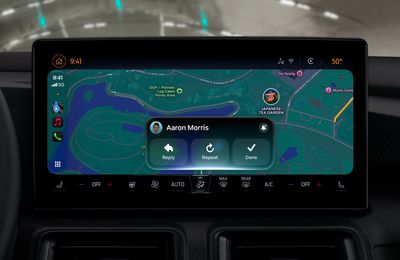
ios 27 carplay liquid glass

Works in Any CarPlay Vehicle

  • Custom widgets: In iOS 27, CarPlay is no longer limited to Apple's handful of stock widgets. Any compatible widget from your iPhone's Home Screen can now be added to the CarPlay dashboard. To do so, go to Settings ➝ General ➝ CarPlay, tap your car, then tap Widgets ➝ Add Widgets. You can drag widgets to rearrange them, tap to remove them, and toggle Smart Rotate and Widget Suggestions.
  • Audio scrubbing: The Now Playing screen now has a proper progress bar, allowing you to drag to any point in a song or podcast rather than having to tap skip repeatedly. There's also a persistent mini-player that keeps artwork and controls on screen while you browse.
  • Apple Music Filters: In Apple Music on CarPlay, you can filter your library to sort playlists, albums, artists, and songs by categories like "Favorites" or "All Playlists." Apple says third-party music apps can adopt it too.
  • New wallpapers: New wave designs found in iOS 27 and macOS 27 are now available in CarPlay in 14 color options. In previous years, most of Apple's platforms shipped with their own distinct wallpaper. This year, they all share a design called "Celosia," featuring sweeping, overlapping curves and soft shadows inspired by layered flower petals or folded paper.
  • Maps improvements: Apple extended natural language search to navigation, and that also works with Apple Maps in CarPlay. You can ask Siri for directions that avoid toll roads, highways, and more.
  • Better wireless reliability: Apple says wireless CarPlay connections are more dependable in iOS 27, with improved GPS accuracy and better navigation heading detection. These are phone-side changes, so no new hardware is required.

Needs the Right Car

  • Video apps: Apple made a song and dance about this feature, but it's the one that fewest people can use right now. Video browsing in the CarPlay interface requires automakers to certify AirPlay video integration for the vehicle. In other words, an iOS update alone can't enable it. That makes sense when you think about it – playback only works when the vehicle is parked (it switches to audio if you shift into drive) and the car needs to be able to share its drive state with iOS. As of writing, no manufacturer has announced plans to support the feature.
  • Sharing routes to your car's own screens: Navigation apps can now pass route data to a vehicle's built-in infotainment or digital instrument cluster, including EV charging stops and range. Again though, your car has to support it, so your mileage may vary (no pun intended).

Needs a Supported iPhone

  • Siri AI: The upgraded Siri now handles back-and-forth conversation in the car, while chats sync to the Siri app on your iPhone so you can pick them up later. It does however require an iPhone that supports Apple Intelligence, plus there's a Siri AI waitlist to get access, which you can join on your iPhone in Settings ➝ Siri.
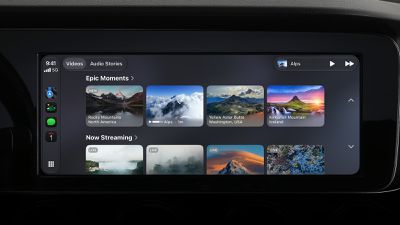
CarPlay iOS 27 Video Apps

Video apps in Carplay require dedicated vehicle support

One to Watch

Apple has given developers a voice control template that any category of CarPlay app can adopt for voice conversations. But nothing will change until individual app makers make use of it, so expect this to arrive gradually.

Bottom Line

If you have a car with CarPlay and a recent iPhone running iOS 27, you'll immediately be able to take advantage of third-party widgets, audio scrubbing, new wallpapers, and Maps improvements. For video and route sharing, you'll need to wait for your car's manufacturer to add support. iOS 27 was released on September 14 and is available to download now.

Related Roundups: CarPlay, iOS 27, iPadOS 27

Popular Stories

iOS 27 0 1

iOS 27.0.1 is Coming Soon

Wednesday September 23, 2026 1:06 pm PDT by
After releasing iOS 27 last week, Apple is already testing a follow-up iOS 27.0.1 update for iPhones, according to MacRumors logs. iOS 27.0.1 will likely be a minor update with bug fixes and/or security patches. Shortly after Apple launches new iPhone models, some software bugs are usually discovered as the devices get into the hands of millions of customers around the world. This year, so...

Face ID iPhone 18 Pro

Apple Confirms iPhone 18 Pro Bug Fix Update is Coming Next Week

Thursday September 24, 2026 6:10 am PDT by
Apple has confirmed to 9to5Mac's Benjamin Mayo that it plans to release a software update early next week with a fix for a Face ID issue affecting some iPhone 18 Pro users. Yesterday, we reported that Apple is testing iOS 27.0.1, which is likely to be the update with the...
iPhone Handoff Feature

AT&T Responds to iOS 27's New iPhone Handoff Feature

Wednesday September 23, 2026 7:06 am PDT by
Apple added a new iPhone Handoff feature to iOS 27 that allows you to switch between two iPhones while using the same phone number on each device. T-Mobile and Deutsche Telekom are the first carriers to offer iPhone Handoff, and Apple said Verizon and EE will add support later this year, but AT&T is noncommittal about the feature. A spokesperson for AT&T told CNET that the carrier sees...

Top Rated Comments

Jpcope Avatar
5 weeks ago
The scrubbing feature is HUGE. Been waiting for this forever
Score: 15 Votes (Like | Disagree)
michaeljk Avatar
5 weeks ago
This could be really great for me and many others like me. I have type 1 diabetes. I use a Continuous Glucose Monitor. I have a phone app that tells me every five minutes where my blood sugar is, and where it is headed. Up until now, when driving, I need to actually pick up my phone, hit the Dexcom app button, find the right screen in the app, and then can see my blood sugar. Now, finally, I can add the widget to CarPlay, so I get near-realtime information about my blood sugar just by looking at my dash. Huge!
Score: 11 Votes (Like | Disagree)
hortod1 Avatar
5 weeks ago
As someone that rents cars on a regular basis there needs to be a way to save CarPlay preferences, specifically apps and layout. Every time I connect to a new car it defaults to a new car setup, having to take time to fix everything, or deal with a million apps that I don’t use and completely out of any logical order
Score: 8 Votes (Like | Disagree)
5 weeks ago
I drive a 2025 BMW X2. In iOS 26, Apple Maps could display on the instrument cluster behind the steering wheel and the HUD would show turn-by-turn directions. However, the center main screen would only show a high-level overview of the entire route.

With iOS 27 CarPlay, I can still display Apple Maps behind the wheel, but the center screen now simultaneously shows the regular, real-time moving map. This is a big improvement.
Score: 4 Votes (Like | Disagree)
5 weeks ago
I've had Widgets long before iOS27, though most of what populated beyond the most obvious/popular ones were usually almost useless in CarPlay.
My huge beef is how I keep seeing "14 new Wallpapers". I see 9, two of those being solid black and gray. The rest are different permutations of the same wave pattern in different hues. I hate all of them. Most are too bright, and the variety of colors frankly sucks. (Now that I think about it, are they matching the new iPhone colors? Maybe that's why there's no green/teal or anything else I like...)
I'm just fed up with having such limited options for wallpaper when custom ones are totally feasible... and having the ones I've at least settled for then taken away at random later.
Score: 3 Votes (Like | Disagree)
4 weeks ago

It should be stated more clearly that to use CarPlay you MUST have Siri enabled on your phone. Siri off = no CarPlay. Won’t even open.
Confirmed with a search, I’ve been using CarPlay since 2018 and never knew that.
Score: 2 Votes (Like | Disagree)
Latest Stories
iPhone Duo Reviewers Really Miss Face ID
33 minutes ago
Does the iPhone Duo Run Hot? Here's What Reviews Found
2 hours ago
Apple Music's New Look is Now Live on Apple's Website
3 hours ago
Anthropic Launches Claude Duet, a Proactive AI Agent
3 hours ago
What 32,000 Folds Did to the iPhone Duo's Hinge
4 hours ago
iPhone Duo's Hidden FaceTime Camera Takes 'Trash' Photos
5 hours ago
iPhone Duo Has 'Edge Light' Feature That Debuted on Macs Last Year
6 hours ago
Apple Support App Updated for iPhone Duo's Larger Display
6 hours ago
Amazon Sweetens the Deal on Entry-Level 16-Inch MacBook Pro With $570 Off
6 hours ago
iPhone Duo Tips Over on MagSafe Stands When Unfolded
7 hours ago
Apple Music's New Look Officially Announced
8 hours ago
iPhone Duo Supports Apple Pencil Starting With iOS 27.2
9 hours ago
iPhone Duo Accessories Roundup: Cases and Screen Protectors From OtterBox, ZAGG, and More
10 hours ago
Apple Stores Will Have 'Limited' Availability of iPhone Duo for Walk-In Customers
10 hours ago
iPhone Duo Reviews Explain Why Device is Both 'Fun' and 'Frustrating'
10 hours ago
Apple Says 'Reachability' Feature Coming to iPhone Duo Later This Year
11 hours ago
Loop Capital Cuts Apple Rating Over iPhone Sales Outlook
15 hours ago
Apple Stores in Bordeaux and Lille Looted During French Protests
15 hours ago
Bluesound Adds Native Apple Music Support
16 hours ago
Apple CEO John Ternus Explains What Makes Good Product Design
17 hours ago
UK Proposes New Ways to Help Apple Pay Rivals
19 hours ago
WhatsApp Developing In-App Browser for All Chat Links on iPhone
20 hours ago
Apple's App Store Chief Explains Its Push for Premium Games
20 hours ago
Apple Could Owe Even More After $5.7 Billion Patent Verdict
21 hours ago
Skyrim Comes to Apple Silicon Macs With New Unofficial Installer
21 hours ago
Apple Highlights Mac and iPad Use in Paris Design Exhibition
22 hours ago
Apple Seeks 6G Modem Engineers as It Plans for Post-5G iPhones
1 day ago
First iPhone Duo Unboxing Video Appears Ahead of Friday Launch
1 day ago
Perplexity Computer Can Now Run Fully Locally on Mac
1 day ago
Apple's Touchscreen OLED MacBook Pro: Everything We Know
1 day ago









































