

The iOS 16 Safari update builds on the Tab Groups feature introduced in iOS 16, plus it adds some much-needed quality of life improvements and security enhancements.
This guide covers all of the new features in Safari in iOS 16, which is available now, and iPadOS 16, coming in October.
Tab Group Updates
Introduced in iOS 15, Tab Groups let you organize and save your tabs into different segments that you can swap between. So, for example, if you're planning a trip, you can save all your tabs into a "Trip" group. In iOS 16, Apple takes Tab Groups even further with new features.
Pinned Tabs
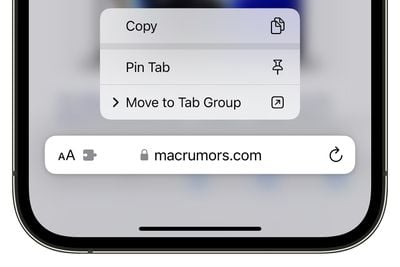
Pinned tabs are now available in iOS 16 and iPadOS 16, and they can be used in Tab Groups. If you have tabs in your Tab Group that you want to have open all the time, pinning is an option. To pin a tab to a Tab Group in iOS 16, open up the Tab Group then long press on the URL bar in Safari and choose the "Pin Tab" option.
Tab Group Start Pages
Every Tab Group has its own separate Start Page in iOS 16, so you can have different favorites, frequently visited sites, and other options that are exclusive to each group of tabs.
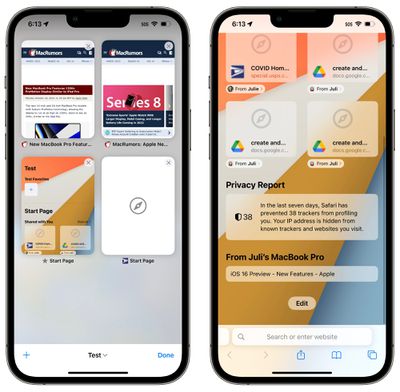
Accessing the start page can be done by going to the Tab View and then pressing the "+" button to open an empty page. If you scroll down to the bottom, you can tap on "Edit" to customize your Tab Group start page. You'll need to have the Tab Group you want to customize active, as this is a process that needs to be done separately for each Tab Group.
Shared Tab Groups
Any Tab Group you've created can now be shared with friends and family, allowing multiple people to contribute links and work together. Everyone can add tabs and see the Tab Group update instantly.
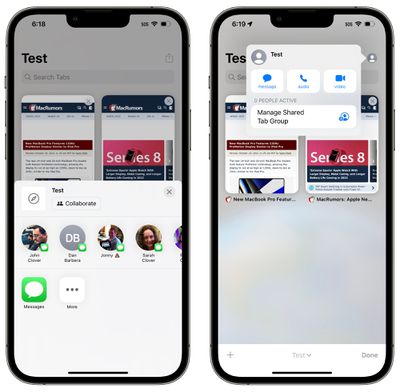
A Tab Group can be shared by tapping on the share sheet icon at the top of the Tab View and then selecting a person to share with. You can send an invite using Messages, and then see who's participating in the Tab Group interface.
Passkeys
Passkeys are meant to replace traditional passwords when signing into websites or apps, and Apple is aiming to roll out Passkeys starting in iOS 16, iPadOS 16, and macOS Ventura.
Passkeys are next-generation credentials that are safer and easier to use than passwords, using a dual authentication key system. One key is public and stored on the website server, while the second key is private and kept on-device. On the iPhone and other devices with biometric authentication, Face ID or Touch ID is used to authorize the passkey to authenticate the user to the website. The keys must match to allow for a log-in, and because the second key is private and available only to the user, it cannot be stolen, leaked, or phished.
Passkeys rely on iCloud Keychain, which in turn requires two-factor authentication for further protection. Passkeys sync across all of a user's devices through iCloud Keychain, which is end-to-end encrypted with its own cryptographic keys.
Passkeys will work on all Apple devices, but Apple is also working with companies like Microsoft and Google to ensure that Passkeys can also be used with non-Apple devices.
Extension Syncing
If you've downloaded an extension on another device, you can see it in the Safari preferences on your iPhone thanks to Extensions syncing, a new iOS 16 feature.
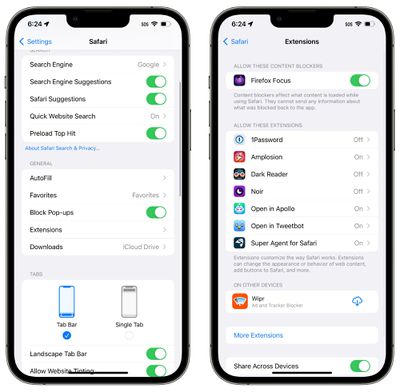
After it's installed, the extension will sync across devices so you only need to turn it on once. Extensions are listed in the Settings app under Safari > Extensions. Extensions not on your device are listed in the "On Other Devices" section so you can easily download them.
If you don't want to share extensions across devices, you can toggle off the option in the same Settings section.
Web Push Notifications
Website push notifications have been available through Safari on the Mac for some time now, but in iOS 16, these push notifications are also going to be available on the iPhone and iPad.
Support for web push notifications won't be available when iOS 16 launches, with the feature coming in an update later this year.
As on the Mac, web notifications will be available on an opt-in basis, and you will be able to choose websites to receive notifications for.
Website Settings Sync
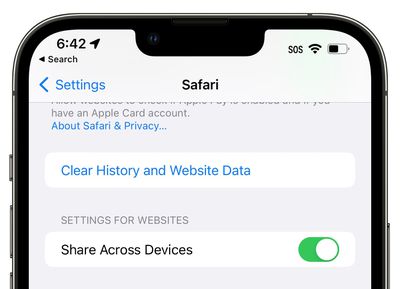
Your website settings like page zoom, automatic Reader view, and more, will now sync across devices so you only need to set your preferences once. If you don't want to share settings for websites across devices, you can toggle it off in the Safari section of the Settings app.
Strong Password Editing
When you're creating a website account using Safari, Safari will suggest a strong password for you to use, which syncs with iCloud Keychain. Unfortunately, some websites have specific requirements like a certain number of symbols or capital letters that strong passwords don't always fulfill.
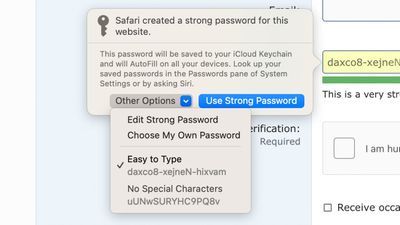
With iOS 16, there is an option to edit strong passwords so you can adjust them as needed to meet site requirements.
Focus Filters
Apple in iOS 16 added a new Focus option called Filters. Filters are designed to allow users to filter out content within apps, displaying a specific Safari Tab Group or Mail account. When you use a Focus with a filter set, the app with the filter will only show what you've selected, hiding everything else.
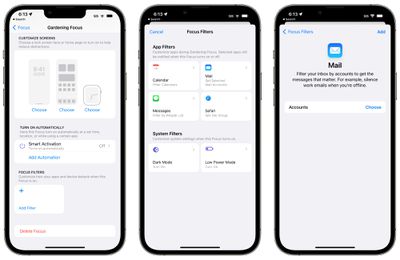
For Safari, you can choose any Tab Group account to associate with a Focus. With a filter set, when you're in that Focus, Safari will only show the Tab Group you've selected.
Lift Subject From Background
iOS 16 has a fun feature that lets you drag subjects right out of images, and it works in the Safari app. Open up a webpage with any image, long press on the image, and then choose the "Copy Subject" option.
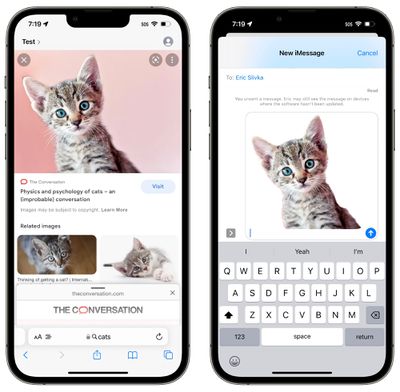
Your iPhone will automatically copy the main subject of the image and then you can paste it elsewhere, into the Messages app, for example.
Guide Feedback
Have questions about Safari in iOS 16, know of a feature we left out, or want to offer feedback on this guide? Send us an email here.






















