Everything New With Siri and Dictation in iOS 16 - GeekWebGuides
Skip to Content

Everything New With Siri and Dictation in iOS 16

With every iteration of iOS, Apple makes improvements to the built-in Siri voice assistant, and iOS 16 is no exception. Offline support has been expanded, ‌Siri‌ can finally hang up calls, and there's improved guidance on when and where you can access ‌Siri‌.

iOS 16 Siri Guide Feature
This guide outlines everything that's new with ‌Siri‌ in iOS 16, which is available now for all eligible devices, plus it includes details on the updates to Dictation.

Siri

Simpler Shortcuts

Shortcuts activated by ‌Siri‌ no longer require a setup process to use them. When you download and install an app, shortcuts can be activated by ‌Siri‌ right away.

Emoji in Texts

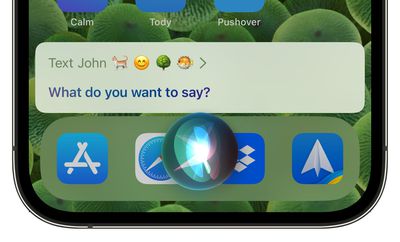
When you're sending a message using ‌Siri‌, you can ask ‌Siri‌ to insert an emoji into your message. You'll need to be specific about the character that you're requesting, and it's also helpful to say "emoji" after each request so ‌Siri‌ doesn't get confused.

emoji siri messages ios 16

Hanging Up Calls

If you're having a hands-free conversation with someone and it ends, you can ask ‌Siri‌ to hang up the call.

Automatic Message Sending

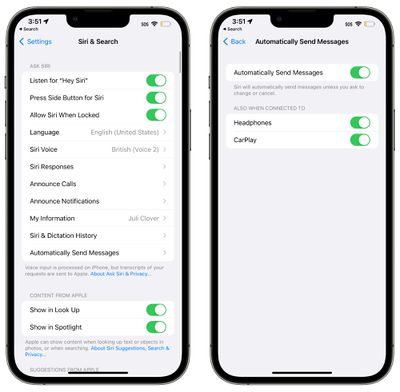
In the Settings app, the ‌Siri‌ and Search section has a new option for automatically sending a message with ‌Siri‌, which removes the confirmation step that you have to go through when sending text through ‌Siri‌.

siri automatically send messages ios 16
Having to approve each message can be a frustration if you're having a long conversation with someone and you don't have access to your phone to type, so this streamlines the process, plus it works with CarPlay. It is an opt-in feature and it can be toggled off for the car and headphones if desired.

Siri Command Guidance

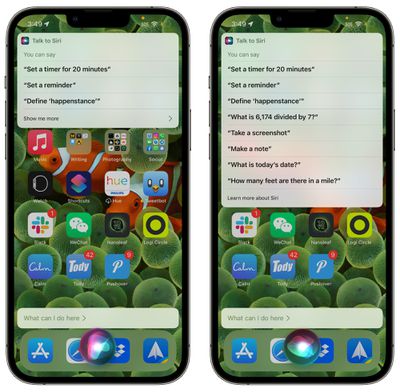
If you want to know more about how you can take advantage of ‌Siri‌, just ask. When you're in an app or doing something on your iPhone, say "Hey ‌Siri‌, what can I do here?" to get details on what ‌Siri‌ is capable of.

siri ios 16 capabilities
You can also ask ‌Siri‌ about a specific app with a command like "Hey ‌Siri‌, what can I do with [insert app name]?"

More Offline Functionality

‌Siri‌ is able to do more on device in iOS 16 without having to contact an Apple server, which means there are a wider array of functions that are available when you don't have an internet connection.

‌Siri‌ can process HomeKit, Intercom, and Voicemail requests when you are offline.

Accessibility Features

In the Accessibility section of the Settings app under the "‌Siri‌" heading, there are new options to change ‌Siri‌'s pause time, which causes the voice assistant to wait for you to finish speaking for a longer period of time. ‌Siri‌ Pause Time can be set to Default, Longer, and Longest.
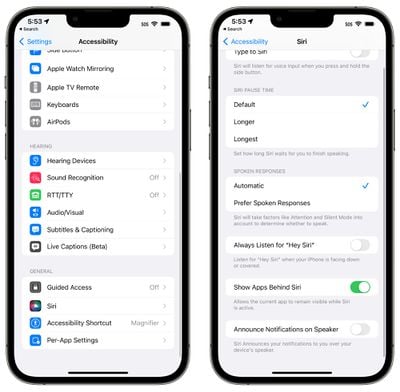
ios 16 siri accessibility
There's also an option to "Announce Notifications on Speaker" to have ‌Siri‌ speak notifications aloud, and a "Prefer Spoken Responses" option can be toggled on to cause ‌Siri‌ to speak aloud in situations such as the phone being silenced.

Dictation

Apple with iOS 16 entirely overhauled the dictation experience, making it easier to swap between voice and touch. When you're dictating text on the iPhone or iPad, you can tap into the text field and type with the keyboard to make edits and insert QuickType suggestions without having to stop the dictation process.

There's also a new cursor popover that's available when you're dictating text, and if you tap it, you can stop the dictation more quickly.

Automatic Punctuation

While you dictate text, your device will intelligently add punctuation, putting in commas, periods, and question marks where appropriate.

The iPhone or ‌iPad‌ will listen to what you're saying, wait for you to finish, and then add commas and periods based on the structure of your words. It's not always perfect, but it's better than having to speak punctation as is required in iOS 15 and earlier.

Emoji Support

As with ‌Siri‌, the built-in dictation feature also supports inserting emoji by voice command.

Dictation in Messages

In the iOS 16 Messages app, the Dictation icon is right in the messages text box, making it much easier to get to. If Dictation is enabled, you'll see a tappable microphone icon that starts a dictation setting.

The Dictation icon replaces the voice message icon that was at the right side of the Messages text entry box in iOS 15. If Dictation is not enabled, there is no icon in the text box.

Guide Feedback

Have questions about Dictation and ‌Siri‌ in iOS 16 , know of a feature we left out, or want to offer feedback on this guide? Send us an email here.


Popular Stories

Apple TV 4K 4th Generation Top View5

New Apple TV 4K Announced With A19 Chip, Updated Siri Remote, More

Tuesday October 13, 2026 6:08 am PDT by
Apple today announced the fourth-generation Apple TV 4K, with key features including an A19 chip, Siri AI support, an updated Siri Remote that has Find My support with Precision Finding, built in far-field microphones, support for surround sound with four HomePods in front and rear pairs, and more. The A19 chip in the new Apple TV 4K delivers up to 50% faster CPU performance and up to twice...
homepod mini 2 feature6

Apple Announces $149 HomePod Mini 2 With Siri AI, 'Sound Glow', and Four-Speaker Surround Sound

Tuesday October 13, 2026 6:11 am PDT by
Apple today announced a new HomePod mini equipped with Siri AI, new colors, and improved audio experiences. The new HomePod mini has an S10 chip that supports advanced computational audio, and Apple says it optimizes dynamic range, loudness, and acoustic performance in real-time. A Sound Glow feature turns the HomePod mini's top into a "visual canvas" that glows and animates in sync with...
New Apple TV 4K and Siri Remote Have These 14 New Features Feature

New Apple TV 4K and Siri Remote Have These 14 New Features

Tuesday October 13, 2026 10:26 am PDT by
The new Apple TV 4K and updated Siri Remote unveiled today have quite a few new features, as outlined in our all-in-one summary below. Here are 11 changes coming with the new Apple TV: A19 chip, for up to 50% faster CPU performance and up to twice as fast graphics performance compared to the previous model with the A15 chip. 8GB of RAM is very likely, up from 4GB of RAM in the previous ...

Top Rated Comments

56 months ago
Siri is awful. You know it’s bad when Rene Ritchie trashes it. I expected Siri to be so much better by now but it’s as if Siri has stood still all these years since Steve Jobs introduced it.
Score: 26 Votes (Like | Disagree)
DogHouseDub Avatar
56 months ago
Me: Hey Siri, open garage door 2

Siri: OK, which garage door would you like to open; garage door 1 or garage door 2?

Me: Garage door 2

Siri: OK, which garage door would you like to open; garage door 1 or garage door 2?

Me: two

Siri: I’m sorry, I don’t recognize that.
Score: 21 Votes (Like | Disagree)
kenni417 Avatar
56 months ago
imagine hearing someone on the other end of the call saying “hey siri hang up the call”
Score: 19 Votes (Like | Disagree)
gaximus Avatar
56 months ago

She is even worse now. She won't recognize the message now if I say, "Hey Siri, message <soandso> <message>" I will rattle the whole thing off, and she will ask me what I want to message <soandso> I already told you!!
The worst one I've ever had was, I said "Hey Siri, tell my wife I'm headed home" and Siri responded "I don't know who <my wife's actual name> is, its not in the contacts" then how do you know her name?
Score: 14 Votes (Like | Disagree)
compwiz1202 Avatar
56 months ago

Siri is awful. You know it’s bad when Rene Ritchie trashes it. I expected Siri to be so much better by now but it’s as if Siri has stood still all these years since Steve Jobs introduced it.
She is even worse now. She won't recognize the message now if I say, "Hey Siri, message <soandso> <message>" I will rattle the whole thing off, and she will ask me what I want to message <soandso> I already told you!!
Score: 12 Votes (Like | Disagree)
56 months ago

imagine hearing someone on the other end of the call saying “hey siri hang up the call”
Even funnier is the next ten seconds of “on it…” “just a sec…” “something went wrong.”

And then the sounds of cursing and a finger angrily jabbing at the screen. Then the call ends.
Score: 11 Votes (Like | Disagree)
Latest Stories
Apple's iWork Apps Get 'Intelligent Assistant' and iPhone Duo Support
22 minutes ago
Apple is Apparently Considering a Slightly Larger iPhone Duo
26 minutes ago
Giant iPhone Duo Displays Coming to Four Apple Stores
2 hours ago
Apple Pulls Keynote, Pages and Numbers From App Store [Update: Back]
2 hours ago
Apple Updates More Apps With iPhone Duo Support
3 hours ago
Apple Will Label Apps 'Made for iPhone Duo' in App Store
6 hours ago
Amazon Takes $49 Off iPad With Prices Starting at $399.99
6 hours ago
F1 on Apple TV Now Available in Dolby Atmos
7 hours ago
Apple Reveals More Than 50 Apps That Will Be Updated for iPhone Duo
7 hours ago
Apple Blocks Certificates That Could Help Attackers Fake Websites
9 hours ago
Giant iPhone Duo Installations Spotted at Apple Fifth Avenue
9 hours ago
iPhone Duo 2 Prototypes Include Under-Display Face ID
10 hours ago
Tesla App Gains iPad and iPhone Duo Support
14 hours ago
Apple Reportedly Boosts iPhone Duo Orders by 44%
14 hours ago
Fortnite Returning to Australian App Store After Court Ruling
14 hours ago
Apple Ordered to Open iPhone to Rival App Stores in Australia
15 hours ago
Apple Suppliers Face Hurdles Cutting Circuit Board Emissions
15 hours ago
Things Updated for iPhone Duo With Adaptive Layout
16 hours ago
Simplicity and Siri AI Are HomeView's Killer Features, Apple Says
16 hours ago
iPhone Duo Reviewers Really Miss Face ID
21 hours ago
Does the iPhone Duo Run Hot? Here's What Reviews Found
22 hours ago
Apple Music's New Look is Now Live on Apple's Website
23 hours ago
Anthropic Launches Claude Duet, a Proactive AI Agent
1 day ago
What 32,000 Folds Did to the iPhone Duo's Hinge
1 day ago
iPhone Duo's Hidden FaceTime Camera Takes 'Trash' Photos
1 day ago
iPhone Duo Has 'Edge Light' Feature That Debuted on Macs Last Year
1 day ago
Apple Support App Updated for iPhone Duo's Larger Display
1 day ago
Amazon Sweetens the Deal on Entry-Level 16-Inch MacBook Pro With $570 Off
1 day ago
iPhone Duo Tips Over on MagSafe Stands When Unfolded
1 day ago
Apple Music's New Look Officially Announced
1 day ago