

With iOS 18, the Notes app is set to gain several new features. There aren't many updates to the overall design, but Notes has deeper integrations with other apps that add all kinds of new functionality. There are also a few nifty iPad-only Notes features that involve the Apple Pencil.

Math Notes
Notes integrates with the Calculator app in iOS 18 for a new feature called Math Notes. Math Notes is designed to let you solve equations, so you can do things like add up your monthly budget, calculate what people owe for a group trip, or split a restaurant bill.
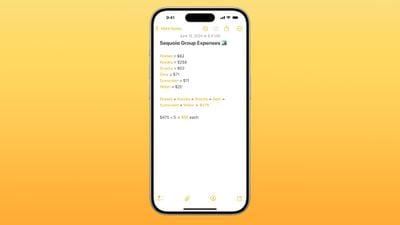
Math Notes works directly in the Notes app or in the Math Notes section of the Calculator app. Any equation that you type in is automatically solved when you add an equals sign, and there is support for variables.
If you define several variables, you can then use those definitions in your calculations. If you write dinner = $42, movies = $24, and dessert = $18 in the Notes app, you can then type in dinner + movies + dessert and add an equals sign to get the total. Variables can be used in equations and graphs (with a relevant equation) and adjusted later to change the results.

You can even do unit conversions with Math Notes. Just type in what you want to convert, and you'll get the result. If you type in 10 euros to pounds in a note and then add an equals sign, the Notes app will give you the answer.
Apple says that Math Notes is able to solve all of the same functions as a scientific calculator.
Math Notes is available for math written using Western Arabic numerals and common mathematical symbols, or typed using Arabic (Eastern & Western) and Devanagari numerals and common mathematical symbols.
Math Notes in iPadOS 18
On the iPad, you can use Math Notes with the Apple Pencil. Just write out equations by hand and add an equals sign to have the Notes app solve them.
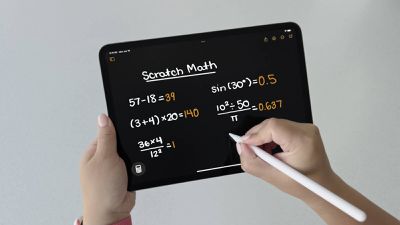
All of the Math Notes features work with handwriting, including unit conversions.
Audio Recording and Transcription
The Notes app can be used to record any audio, taking advantage of the microphones in the iPhone. To record audio, tap on the paperclip icon in the toolbar and then tap on the "Record Audio" button.
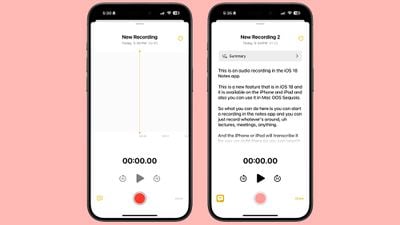
From there, tap on the red record button to start a recording, and the stop button to end it. The option to record audio right in the Notes app is useful for lectures, meetings, and more.
All recordings that you capture with the Notes app are automatically transcribed in real-time so you can read through what was recorded and even search for key phrases.
Audio recording and transcribing is available on the iPhone 12 and later, but the feature only works in English.
Phone App Recording
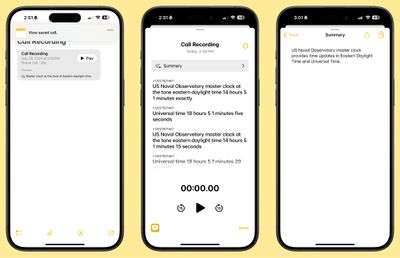
iOS 18 supports recording phone calls, and when you initiate a recording of a phone call, that recording is stored in the Notes app. Phone app recordings have all of the same functionality as audio recordings made in the Notes app, with transcriptions provided.
Transcription Summaries (Apple Intelligence)
Apple Intelligence can be used to summarize a transcript of an audio recording or a recorded phone call in the Notes app.
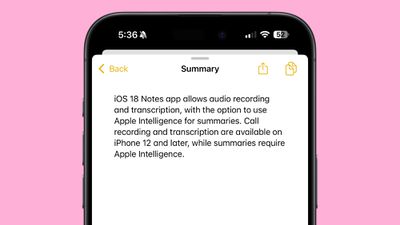
A device that supports Apple Intelligence is required for this feature, and that includes the iPhone 15 Pro/Pro Max and later as well as Macs and iPads with an M-series chip.
Collapsible Sections
If you have long notes with multiple headings, you can now collapse those headings down to create a more compact note.
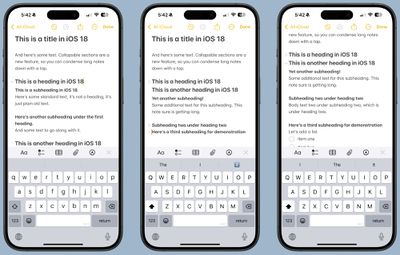
Any section header can be collapsed, including headings, subheadings, and titles. Just tap on a heading and then tap on the down arrow to collapse it. Tap the arrow again to open it up.
Highlight Colors
The Notes app supports colors for typed text for the first time, allowing for highlighting. Apple added five colors, including pink, purple, orange, mint, and blue, with the colors able to be added through the formatting interface. Just tap on the Aa button to get to the color options when a word or phrase is selected.
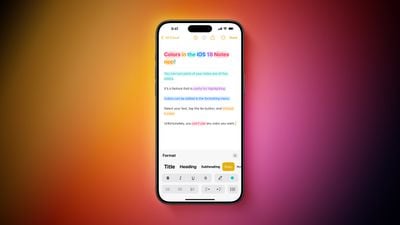
Multiple colors can be used for the same sentence, and the colors can be used for titles and headings, as well as combined with text formatting like bold and italics.
Attach Files
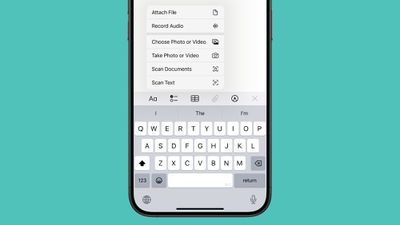
The toolbar icon that lets you add images or scanned documents to a note has been updated to do more in iOS 18. Tapping on it allows you to attach a file from the Files app, which makes it much easier to add documents to a note. You can also use it to record audio, which is another new feature.
Before now, you had to copy and paste a file into notes to add it, a process that required several steps.
The prior Choose Photo or Video, Scan Documents, Take Photo or Video, and Scan Text options remain. To denote the new functionality, the icon for the tool is now a paperclip instead of a camera.
As an alternative to using the toolbar, you can long press on a note to attach a file, an option that wasn't previously available.
Notes Settings
If you tap on the icon that has three dots at the top right of a note, you can get to the Notes settings, where there are a number of new options.
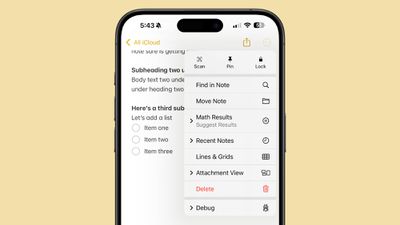
You can see Recent Notes from this interface, with the Notes app displaying several of your prior notes for quick access. There's also a toggle for Math Notes for choosing between suggested results and results that are automatically inserted when an equals sign is typed, or turning the feature off.
Prior features for searching through the note, moving the note, adding lines and grids, and changing the attachment view are all still available.
Lock Screen Notes
In iOS 18, you can add Control Center controls to the Lock Screen. With this feature, you can add the option to open the Notes app into one of the slots that was previously taken up by the Flashlight and Camera, giving you an option for quickly jotting down your thoughts.
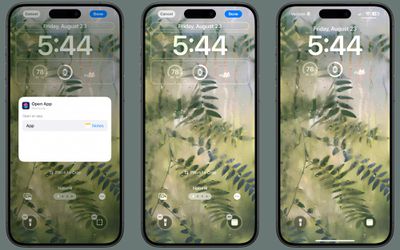
You could get to the Notes app from the Lock Screen previously, but it required going through Control Center.
Smart Script (iPadOS 18)
On the iPad, there's a new feature called Smart Script that's designed to improve your handwriting with the Apple Pencil. The feature uses machine learning to recreate your own handwriting style to refine what you've written, making messy writing look neater.
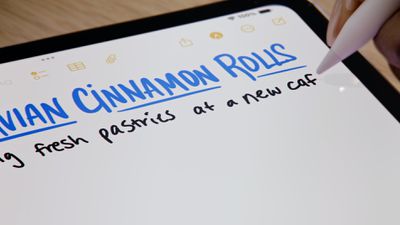
Smart Script doesn't change your handwriting, but it makes it smoother, straighter, and easier to read.
With Smart Script, you can also paste typed text into your own handwriting, correct handwritten spelling, touch and drag words to move them or change the spacing, and scribble out what you've written to erase it.
Writing Tools (Apple Intelligence)
Writing Tools is an Apple Intelligence feature that can improve your writing. It won't generate text from scratch for you, but it can proofread, help you rewrite to match a specific tone, and create summaries.
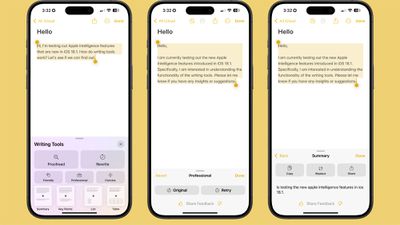
- Proofread text for spelling and grammar errors, including word choice and sentence structure. You can accept all suggestions with a tap or go through them one by one with explanations.
- Rewrite for cleaning up what you've written and shifting the tone without impacting your content. Options include Friendly, Professional, and Concise.
- Options for selecting text and summarizing it. You can choose to create a paragraph, pull out key points, make a list, or create a table. Summaries are available in Mail, Messages, and more.
To use Writing Tools in the Notes app, all you need to do is write something, select your text, and then tap on the quick access Writing Tools options at the top of the keyboard or select Writing Tools by tapping on your selected text.
Writing Tools won't be available when iOS 18 and iPadOS 18 launch, but the feature will be coming in iOS 18.1 and iPadOS 18.1 updates that we expect to see in October.
Image Wand (Apple Intelligence)
The Notes app is designed to integrate with Image Playground, Apple's upcoming AI-powered image generation app. You will be able to have the Notes app create an image that goes along with what you've typed up, and on the iPad, you can make a rough sketch of what you want to include and then have Apple Intelligence generate a more polished version.
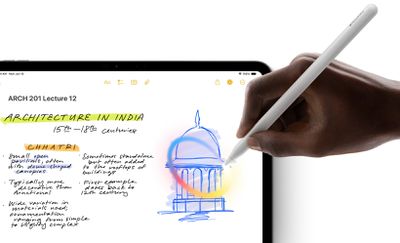
The feature that adds images into the Notes app is called Image Wand, and it's not yet clear when it will be implemented.
Read More
Additional information on new features that Apple has added in iOS 18 can be found in our iOS 18 roundup.

























![Apple Pulls Keynote, Pages and Numbers From App Store [Update: Back]](https://images.macrumors.com/t/Okb7kitB_gNr6qe5Pex9nQIysD8=/112x112/article-new/2026/01/Apple-Creator-Studio-iWork-suite.jpg)






















