
iPhone Handoff in iOS 27: How It Works, Pricing, and Carrier Support - MacRumors
Skip to Content

iPhone Handoff in iOS 27: How It Works, Pricing, and Carrier Support

Apple in iOS 27 introduced iPhone Handoff, a new eSIM feature that allows you to use the same number on two iPhones and seamlessly swap between them. The number is only active on one iPhone at a time, so it's not like having two independently active lines.
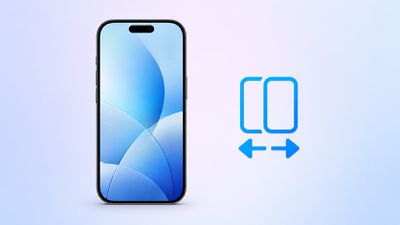
iPhone Handoff Feature
It's also different from Apple's existing Handoff feature for continuing an app task on another Apple device. Here's what you need to know about the new iPhone Handoff feature.

What Moves Between the Two iPhones?

When you switch phones with iPhone Handoff, your calls, voicemail, messages (including iMessage, RCS, SMS, and MMS) and Find My location move to the active iPhone. You'll see a "Switched to this iPhone" message on the screen to confirm the change.

Other data synced with iCloud will automatically update across your devices, and third-party apps work across both devices, though some third-party apps may require a separate sign-in or take time to sync. Any banking apps you use may also ask you to approve access on the other device.

What Do You Need for iPhone Handoff?

Both iPhones must be running iOS 27 or later. They'll also need to be:

  • Connected to Wi-Fi
  • Sharing the same Apple Account
  • Using Messages in iCloud for messages sync
  • Signed into FaceTime and iMessage with the same Apple Account

iPhone Handoff works with Dual SIM as long as both eSIMs are from carriers that support iPhone Handoff. Both eSIMs must be set up for iPhone Handoff separately, one at a time. Once set up, both eSIMs switch together simultaneously when you unlock your iPhone.

Which Carriers Support iPhone Handoff?

iPhone Handoff is available through T-Mobile in the United States and Telekom in Germany. Verizon (U.S.) and EE (U.K.) will support iPhone Handoff later this year.

AT&T has so far not committed to supporting iPhone Handoff, with a company spokesperson recently pointing to the carrier's existing eSIM activation and transfer options instead.

How Much Does iPhone Handoff Cost?

T-Mobile is charging customers $5 per month to use iPhone Handoff.

In Germany, Deutsche Telekom is charging €6.95 per month for iPhone Handoff, but only on plans that do not already include multi-SIM functionality. An added multi-SIM costs €6.95 per month (one is included with the current MagentaMobil L plan and two with XL).

No other carriers have announced pricing yet.

How Do You Set It Up?

iPhone Handoff can be enabled when setting up a new iPhone. At the "Set Up Cellular" screen, choose "Use Number on This iPhone and Another," then follow the prompts on both phones.

If both iPhones are already set up, open Settings ➝ Cellular on the phone you want to add. Tap Set Up Cellular or Add eSIM, choose Use Number on This iPhone and Another, and follow the prompts. You then get to choose which device is your main iPhone (ideally, the one you use most often) and which is your secondary iPhone.
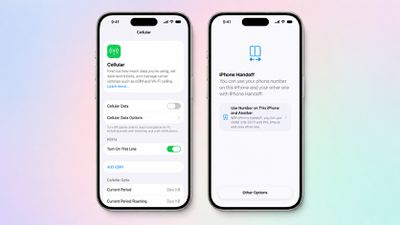
iPhone Handoff iOS 27 Feature
After setup, unlock either phone to make your number active on it.

What Should You Know Before Switching?

If you have an Apple Watch, it won't switch its pairing to the other device when your phone number moves, so make sure you pair it with the iPhone you expect to use most. Also, some Wallet items, including certain transit passes and IDs, may only work on one device at a time.

Carrier account management and some services like Call Forwarding and Caller ID will remain tied to your main iPhone.

Can I Replace an iPhone That Uses iPhone Handoff?

Yes, but you need to transfer the eSIM from either iPhone to the replacement device. The below steps should be followed while your new iPhone is placed next to your existing devices that use iPhone Handoff.

  1. On your new iPhone (replacement), open the Settings app.
  2. Tap Cellular and then tap Set up Cellular or Add eSIM.
  3. Select an iPhone and tap Continue.
  4. Tap Transfer. (If your carrier doesn't support eSIM transfer from a companion iPhone, you must enroll in iPhone Handoff again: On your iPhone that you are transferring the eSIM from, tap Continue, and follow the onscreen prompts.)
  5. Tap Continue.
  6. Follow the onscreen prompts on both devices.

The eSIM will deactivate on the old iPhone you transferred from.

What If I Want to Stop Using iPhone Handoff?

If you want to stop using iPhone Handoff at any time, you need to contact your carrier. Simply deleting an eSIM from your iPhone may not stop the carrier from charging you for the service.

Related Roundups: iOS 27, iPadOS 27
Related Forum: iOS 27

Popular Stories

iOS 27 0 1

iOS 27.0.1 is Coming Soon

Wednesday September 23, 2026 1:06 pm PDT by
After releasing iOS 27 last week, Apple is already testing a follow-up iOS 27.0.1 update for iPhones, according to MacRumors logs. iOS 27.0.1 will likely be a minor update with bug fixes and/or security patches. Shortly after Apple launches new iPhone models, some software bugs are usually discovered as the devices get into the hands of millions of customers around the world. This year, so...
Face ID iPhone 18 Pro

Apple Confirms iPhone 18 Pro Bug Fix Update is Coming Next Week

Thursday September 24, 2026 6:10 am PDT by
Apple has confirmed to 9to5Mac's Benjamin Mayo that it plans to release a software update early next week with a fix for a Face ID issue affecting some iPhone 18 Pro users. Yesterday, we reported that Apple is testing iOS 27.0.1, which is likely to be the update with the...
iPhone Handoff Feature

AT&T Responds to iOS 27's New iPhone Handoff Feature

Wednesday September 23, 2026 7:06 am PDT by
Apple added a new iPhone Handoff feature to iOS 27 that allows you to switch between two iPhones while using the same phone number on each device. T-Mobile and Deutsche Telekom are the first carriers to offer iPhone Handoff, and Apple said Verizon and EE will add support later this year, but AT&T is noncommittal about the feature. A spokesperson for AT&T told CNET that the carrier sees...

Top Rated Comments

4 weeks ago
I setup my primary personal iPhone 18 Pro Max and secondary iPhone Air on iPhone Handoff via T-Mobile just days ago.

It’s absolutely fantastic and to be honest the best money saving feature I’ve experienced from Apple in ages.

Saving money because I was able to cancel the separate line and service that was keeping the Air activated.

Now when I feel like switching phones, all my calls and messages continue to arrive and be returned on my same main personal number.

Fast, easy, automatic. Nothing to do, just pickup whatever phone I want and go on with my day.
Score: 19 Votes (Like | Disagree)
4 weeks ago

can you help me explain a use case please? Maybe if I use dual SIM for work and private phone during the day and want to switch devices to only private SIM for the evening and weekends? But why not just deactivate / focus mode on the phone with dual SIM?
I have an iPhone Duo, I also have an older iPhone 15. I’m planning a beach day. Which phone do you really think id rather take with me?

Likewise.. I’m going to a music festival.
Score: 15 Votes (Like | Disagree)
turbineseaplane Avatar
4 weeks ago
I don't understand the rationale for making this a monthly ongoing fee from the carrier side.

Only one device would ever be active on their network at a time, unlike adding an Apple Watch plan for instance.

A one time fee I could understand here, but not an ongoing one.

This feels like gouging.

Score: 6 Votes (Like | Disagree)
4 weeks ago
can you help me explain a use case please? Maybe if I use dual SIM for work and private phone during the day and want to switch devices to only private SIM for the evening and weekends? But why not just deactivate / focus mode on the phone with dual SIM?
Score: 5 Votes (Like | Disagree)
Big_D Avatar
4 weeks ago

That is an interesting thought. I have a personal Pro and a work 17e. My employer (300,000 people worldwide) would never allow any of us to move the sim from my work phone to my personal phone. That is an absolute no-no.
The same here, 500 employees. Company devices for company data, private devices for private data. Having company data on a private phone is a disciplinary offence and we are not allowed to put personal apps or data on company devices.

The nice thing is, when I leave the office, I can leave the company phone and company number in the office and I just have my private number.
Score: 4 Votes (Like | Disagree)
tennisproha Avatar
4 weeks ago
Why is T-Mobile charging for iPhone Handoff when it requires no legwork from them? Physical SIM swapping is free.
Score: 3 Votes (Like | Disagree)
Latest Stories
Tesla App Gains iPad and iPhone Duo Support
4 hours ago
Apple Reportedly Boosts iPhone Duo Orders by 44%
4 hours ago
Fortnite Returning to Australian App Store After Court Ruling
5 hours ago
Apple Ordered to Open iPhone to Rival App Stores in Australia
5 hours ago
Apple Suppliers Face Hurdles Cutting Circuit Board Emissions
5 hours ago
Things Updated for iPhone Duo With Adaptive Layout
6 hours ago
Simplicity and Siri AI Are HomeView's Killer Features, Apple Says
6 hours ago
iPhone Duo Reviewers Really Miss Face ID
11 hours ago
Does the iPhone Duo Run Hot? Here's What Reviews Found
13 hours ago
Apple Music's New Look is Now Live on Apple's Website
13 hours ago
Anthropic Launches Claude Duet, a Proactive AI Agent
14 hours ago
What 32,000 Folds Did to the iPhone Duo's Hinge
15 hours ago
iPhone Duo's Hidden FaceTime Camera Takes 'Trash' Photos
16 hours ago
iPhone Duo Has 'Edge Light' Feature That Debuted on Macs Last Year
17 hours ago
Apple Support App Updated for iPhone Duo's Larger Display
17 hours ago
Amazon Sweetens the Deal on Entry-Level 16-Inch MacBook Pro With $570 Off
17 hours ago
iPhone Duo Tips Over on MagSafe Stands When Unfolded
17 hours ago
Apple Music's New Look Officially Announced
19 hours ago
iPhone Duo Supports Apple Pencil Starting With iOS 27.2
19 hours ago
iPhone Duo Accessories Roundup: Cases and Screen Protectors From OtterBox, ZAGG, and More
20 hours ago
Apple Stores Will Have 'Limited' Availability of iPhone Duo for Walk-In Customers
21 hours ago
iPhone Duo Reviews Explain Why Device is Both 'Fun' and 'Frustrating'
21 hours ago
Apple Says 'Reachability' Feature Coming to iPhone Duo Later This Year
22 hours ago
Loop Capital Cuts Apple Rating Over iPhone Sales Outlook
1 day ago
Apple Stores in Bordeaux and Lille Looted During French Protests
1 day ago
Bluesound Adds Native Apple Music Support
1 day ago
Apple CEO John Ternus Explains What Makes Good Product Design
1 day ago
UK Proposes New Ways to Help Apple Pay Rivals
1 day ago
WhatsApp Developing In-App Browser for All Chat Links on iPhone
1 day ago
Apple's App Store Chief Explains Its Push for Premium Games
1 day ago






































