
Universal Control Not Working? Here’s How to Fix It - MacRumors
Skip to Content

Universal Control Not Working? Here’s How to Fix It

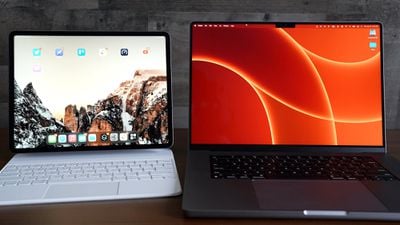
In iOS 15.4 and macOS Monterey 12.3, Apple introduced Universal Control, a feature designed to allow you to control multiple Macs and iPads with a single trackpad/mouse and keyboard. This article offers solutions to the most common problems encountered when getting Universal Control to work.
universal control
With Universal Control, you can use your main Mac's trackpad and keyboard to control additional Macs and/or iPads nearby, which means you don't need a desk cluttered up with more than one set of input devices. But getting it to work can sometimes present issues, especially the first time you come to try it.

Many of the solutions listed below are requirements that need to be fulfilled in order for Universal Control to work. Check each one to ensure you have everything set up correctly.

Mac and iPad Compatibility

First up, Universal Control requires iPadOS 15.4 on an iPad and macOS Monterey 12.3 on a Mac. It is compatible with the following devices:

  • MacBook Pro (2016 and later)
  • MacBook (2016 and later)
  • MacBook Air (2018 and later)
  • iMac (2017 and later)
  • iMac (5K Retina 27-inch, Late 2015)
  • iMac Pro, Mac mini (2018 and later)
  • Mac Pro (2019)
  • All iPad Pro models
  • iPad Air (3rd generation and later)
  • iPad (6th generation and later)
  • iPad mini (5th generation and later)

Are All Devices Signed into Your iCloud Account?

All devices must be signed into the same iCloud account in order for Universal Control to work across them. It will not work across devices signed into separate ‌Apple ID‌ accounts. You can make sure your Mac is signed into iCloud by going to System Preferences -> Apple ID. On iPad, open Settings and tap the Apple ID banner at the top of the main menu.
Universal Control Colored Feature

How Far Away Are the Devices?

Universal Control is designed to be used with Macs and iPads that are nearby, usually on the same desk, so that you can visually see the cursor move from a display to an adjacent device. For this reason, Macs and iPads need to be within 30 feet (10 meters) of one another for Universal Control to work.

Are Bluetooth and Wi-Fi Enabled?

Universal Control uses Bluetooth and Wi-Fi to communicate between devices for a seamless experience, so both of these wireless protocols need to be enabled on Macs and iPads. In addition, all devices must be connected to the same Wi-Fi network.

Is Handoff Enabled?

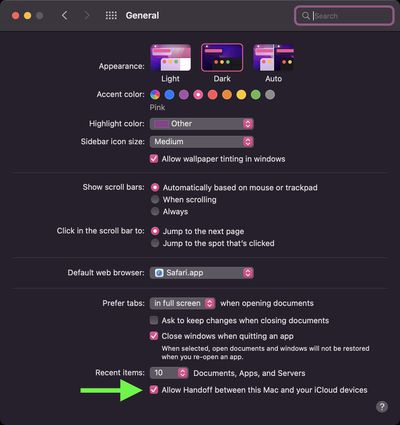
Universal Control requires Handoff to be enabled on all devices. On Mac, go to System Preferences -> General and make sure the box is checked at the bottom, next to Allow Handoff between this Mac and your iCloud devices.
sys-prefs
On iPad, open Settings -> AirPlay & Handoff and toggle on the switch next to Handoff. On the same screen, check that the switch is also in the green position next to Cursor and Keyboard (Beta).

Is the iPad Sharing a Cellular Connection?

For Universal Control to work, any ‌iPads‌ and Macs cannot be sharing a cellular and internet connection, so the Mac can't be tethered to the ‌iPad over Wi-Fi, Bluetooth, or USB‌. Make sure to disable any tethering using the options in Settings -> Personal Hotspot.

Are You Using Sidecar?

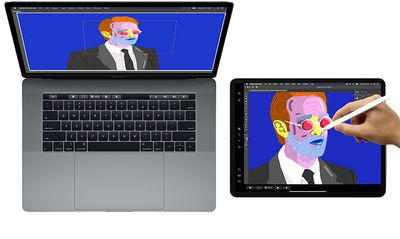
Sidecar‌ and Universal Control are separate features and some users have had trouble getting them to work in tandem. It is possible to use both features at the same time, but keep in mind that Universal Control in macOS 12.3 is still technically in beta, and some setups may throw up lingering bugs.
sidecarmacoscatalina
If you're using ‌Sidecar‌ to mirror or extend your Mac's display to an ‌iPad‌, Universal Control won't work on that iPad and may not work on an additional iPad to Mac, as there are some issues with the way the two features interact during the beta. Turn off Sidecar using the Display panel in your Mac's Control Center to prevent potential issues.

Are You Using At Least One Mac?

Though Universal Control can be used with two or more Macs and no ‌iPad‌s, at least one Mac is required to use it with iPads‌. In other words, two iPads without a Mac cannot take advantage of Universal Control, but if at least one Mac is in the mix, you can use the feature with multiple iPads.

Problems Automatically Reconnecting to a Nearby Device

The first time you use Universal Control, you can connect to a nearby Mac or ‌iPad‌ by pushing the trackpad or mouse cursor to the edge of the display toward the other device. After that, you can automatically reconnect to any nearby Mac or iPad in another session, but only if the setting is enabled (it isn't by default).

To enable automatic reconnections on Mac, go to System Preferences -> Displays -> Display Settings- > Advanced, and check the box next to Automatically reconnect to any nearby Mac or iPad, then click Done.

Problems With Drag and Drop

You can drag and drop files between two devices using Universal Control, but note that if you're using an ‌iPad‌ and a Mac, you need to have an app open that's compatible with the file type.

If you want to drag a photo from the Mac to the ‌iPad‌, for example, make sure you open up the Photos app on the ‌iPad‌ first. Or if you have a document you want to move, open up the Files app on the ‌iPad‌.

Dragging something from the ‌iPad‌ to the Mac is simpler because the Mac's desktop supports different file types, unlike the ‌iPad‌'s Home Screen.

Problems Using Multitouch Gestures

Some multitouch gestures like Mission Control are not available on an ‌iPad‌, and some are a little bit different. If you open up an app on the ‌iPad‌ and then want to exit out using the Mac's trackpad, you can use a three-finger swipe to do so. Alternately, with a mouse, you can mouse down over the dock to bring it up to swap apps.


Problems Using Copy and Paste

You can copy and paste text from one device to another using the one keyboard as long as it's an app that supports text input, but this feature does not yet appear to be working properly with apps like Safari. Features like copy/paste will likely see some refinement during the beta testing process.

Problems With Display Arrangement

If the cursor exits one display and appears on another display in a position that doesn't align with the physical arrangement of both displays, use the Displays section of the Mac's System Preferences to rearrange how your devices are laid out.

If your ‌iPad‌ is to the left of your Mac, for example, you'll want to make sure the Displays section shows that arrangement so your Mac's cursor can pop over to the ‌iPad‌'s display when you pop it off of the left edge of the Mac's screen.

Problems Using Apple Pencil

Universal Control does not work with the Apple Pencil. Input and control are limited to connected trackpads, mice, and keyboards. A single mouse/trackpad and a single keyboard can be used to control multiple iPads and Macs.

Problems Using iPhone

Universal Control is a feature that is designed only for the Mac and the ‌iPad‌. There is no option for controlling an iPhone with a Mac or ‌iPad‌'s mouse/trackpad and keyboard.

Read More

If you want to know more about the ins and outs of how Universal Control works, we have a dedicated Universal Control guide that explains everything.

Guide Feedback

Have questions an issue with Universal Control not discussed or want to offer feedback on this guide? Send us an email here.


Popular Stories

M5 MacBook Pro

RIP, MacBook Ultra

Monday October 19, 2026 9:37 am PDT by
Apple today sent out invites for an experience in Los Angeles on Wednesday, October 28, and the "Pro and tell" tagline on the invitation likely means that the rumored MacBook models with touch-enabled OLED displays will stick with MacBook Pro branding instead of the once-rumored "MacBook Ultra" name. The long-rumored "iPhone Ultra" ended up being named iPhone Duo, so speculation that Apple...
iPhone Duo Trio

Here's What Apple's Apps Look Like on the iPhone Duo

Tuesday October 20, 2026 11:12 am PDT by
With just three days to go until the iPhone Duo is released, Apple is getting ready for the launch. Behind the scenes, the App Store now has screenshots of Apple's built-in apps running on the Duo. We've seen some apps in marketing materials, but images of the ones we haven't seen give us an idea of what it will be like using the iPhone Duo day to day. Many apps are shown in landscape...
apple pro tell logo

Apple Announcing New Products Next Week: 'Pro and Tell'

Monday October 19, 2026 9:05 am PDT by
Apple's Greg Joswiak today hinted at new product announcements coming next week, sharing a social media post that says "Can't wait to pro and tell next week." Rumors suggest Apple is planning to debut the new MacBook Pro with an OLED touchscreen display, an M6 entry-level MacBook Pro, an M6 iMac, an iPad mini with an OLED display. Can't wait to pro and tell next week....

Top Rated Comments

TheYayAreaLiving 🎗️ Avatar
61 months ago
Good tips! Universal Control works just like MAGIC. It's just a magical feature.

Score: 4 Votes (Like | Disagree)
ThunderSkunk Avatar
61 months ago

Any features that require babysitting or troubleshooting I usually just don’t use.

I find myself having less and less patience as I get older, for things that do something amazing on paper, but irl only on 3 specific devices and only while standing on your head and arm wrestling a kangaroo, on tuesdays.

Tried this, & it was just another thing that started to work, and then just didn't. It would be about the most useful feature of Mac OS in my home and office, if it worked. Oh well.
Score: 3 Votes (Like | Disagree)
szw-mapple fan Avatar
61 months ago

Buuuuuuuu, we know how to fix the un-working Universal control
We are macrumors users, we are not stupiid :)
Speak for yourself. My stupidity knows no bounds :cool:
Score: 3 Votes (Like | Disagree)
61 months ago
Nice article on troubleshooting.
Score: 2 Votes (Like | Disagree)
contacos Avatar
61 months ago
I know it is still in beta but a general observation with Apple in the last few years is that they barely introduce new features to the public like they are just hidden somewhere in the settings panel (that the average user isn't even looking at) and you have to discover them yourself. Why is there no pop up after installing a new OS version introducing to "what's new" properly with some nice on-boarding screens? I know people that did not even know you could add widgets to your iPhone Home Screen let alone stack them on top of each other. I also wonder how many people actually use the hide your email feature, hidden in the iCloud controls (again, who actually checks those?). I personally had to tell people about it. I also still do not understand how the new multi tasking actually works on the iPad or why they changed it in the first place and I do not care enough to invest my time in finding out
Score: 2 Votes (Like | Disagree)
melgross Avatar
61 months ago
Keep in mind folks, that we’re in early days yet, even just a beta. Possibly some will work when it’s finalized, and more features will come as time goes on. Look at how iPad cursor support evolved, and quickly. As long as it’s possible, and not technically incompatible in a way that can’t be overcome, Apple may implement it. I can see a number of those problems going away over the next year.
Score: 2 Votes (Like | Disagree)
Latest Stories
Apple Will Label Apps 'Made for iPhone Duo' in App Store
2 hours ago
Amazon Takes $49 Off iPad With Prices Starting at $399.99
3 hours ago
F1 on Apple TV Now Available in Dolby Atmos
3 hours ago
Apple Reveals More Than 50 Apps That Will Be Updated for iPhone Duo
4 hours ago
Apple Blocks Certificates That Could Help Attackers Fake Websites
5 hours ago
Giant iPhone Duo Installations Spotted at Apple Fifth Avenue
6 hours ago
iPhone Duo 2 Prototypes Include Under-Display Face ID
6 hours ago
Tesla App Gains iPad and iPhone Duo Support
10 hours ago
Apple Reportedly Boosts iPhone Duo Orders by 44%
11 hours ago
Fortnite Returning to Australian App Store After Court Ruling
11 hours ago
Apple Ordered to Open iPhone to Rival App Stores in Australia
11 hours ago
Apple Suppliers Face Hurdles Cutting Circuit Board Emissions
12 hours ago
Things Updated for iPhone Duo With Adaptive Layout
12 hours ago
Simplicity and Siri AI Are HomeView's Killer Features, Apple Says
12 hours ago
iPhone Duo Reviewers Really Miss Face ID
17 hours ago
Does the iPhone Duo Run Hot? Here's What Reviews Found
19 hours ago
Apple Music's New Look is Now Live on Apple's Website
19 hours ago
Anthropic Launches Claude Duet, a Proactive AI Agent
20 hours ago
What 32,000 Folds Did to the iPhone Duo's Hinge
21 hours ago
iPhone Duo's Hidden FaceTime Camera Takes 'Trash' Photos
22 hours ago
iPhone Duo Has 'Edge Light' Feature That Debuted on Macs Last Year
23 hours ago
Apple Support App Updated for iPhone Duo's Larger Display
23 hours ago
Amazon Sweetens the Deal on Entry-Level 16-Inch MacBook Pro With $570 Off
23 hours ago
iPhone Duo Tips Over on MagSafe Stands When Unfolded
23 hours ago
Apple Music's New Look Officially Announced
1 day ago
iPhone Duo Supports Apple Pencil Starting With iOS 27.2
1 day ago
iPhone Duo Accessories Roundup: Cases and Screen Protectors From OtterBox, ZAGG, and More
1 day ago
Apple Stores Will Have 'Limited' Availability of iPhone Duo for Walk-In Customers
1 day ago
iPhone Duo Reviews Explain Why Device is Both 'Fun' and 'Frustrating'
1 day ago
Apple Says 'Reachability' Feature Coming to iPhone Duo Later This Year
1 day ago







































