How to Use Apple's New Intercom Feature - GeekWebGuides
Skip to Content

How to Use Apple's New Intercom Feature

Alongside the HomePod mini, Apple introduced a new Intercom feature that's designed to let Apple device owners communicate with one another throughout the home, sending messages to specific rooms, areas, or people.
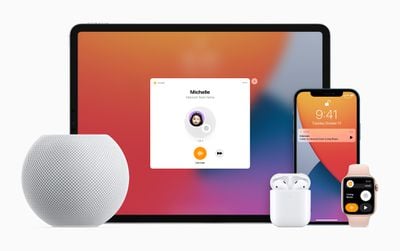
Apple HomePod mini iPad iPhone applewatch airpods intercom
Intercom works with the ‌HomePod‌, ‌HomePod‌ mini, iPhone, iPad, Apple Watch, AirPods, and even CarPlay, so you can dictate a voice message on any of your devices that you can have delivered to a single person in the family or all family members. Intercom is primarily designed as a feature for the ‌HomePod‌ and ‌HomePod‌ mini.

We have a demo and walkthrough video on the new feature:

How to Set Up Intercom

After updating to ‌HomePod‌ software 14.2 and iOS 14.2, Intercom can be set up in the Home app. Intercom works if you have a ‌HomePod‌ or another compatible device, and there is no dedicated interface on the iPhone for using Intercom outside of the Home app.

  1. Install HomePod 14.2 software.
  2. Open up the Home app.
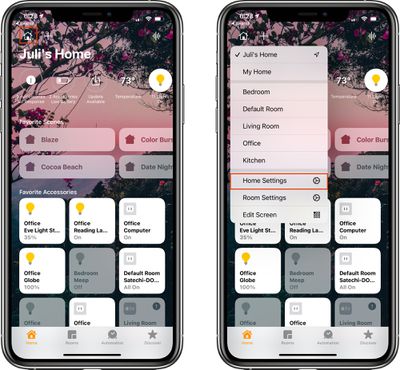
  3. Tap on the little house icon in the upper left corner. intercomsetup1
  4. Tap on "Home Settings."
  5. Scroll down to "Intercom" and tap it. intercomsetup2
  6. Adjust your notification settings and select the people in the home who are able to use the Intercom feature.
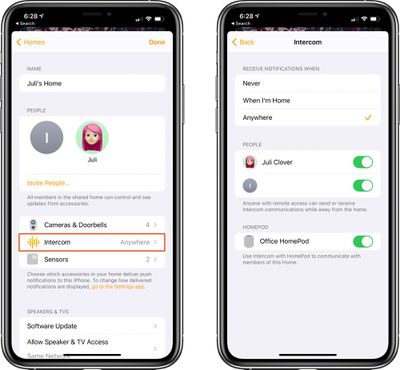
Those who have remote access to your Home app can send or receive Intercom messages even when away from home, with those messages displaying as audio notifications on iPhone and Apple Watch.

Note that anyone who wants to be able to use Intercom will need to be added as a person with access to the home. This can be done by entering the Home Settings screen and tapping on "Invite People."

Intercom Requirements

Using the Intercom feature on ‌HomePod‌, iOS devices, ‌CarPlay‌, and AirPods requires the HomePod 14.2 software update or later and iOS and iPadOS 14.2 or later. On Apple Watch, it appears to work with watchOS 7.1 and later.

How to Use Intercom to Send a Message to a HomePod

Intercom messages can be sent to the HomePods throughout a home using Siri on iPhone, ‌iPad‌, Apple Watch, another ‌HomePod‌, and more. To send an Intercom message, just activate ‌Siri‌ on your iPhone, ‌iPad‌, Apple Watch, ‌CarPlay‌, or AirPods and then say "Intercom" and your message.
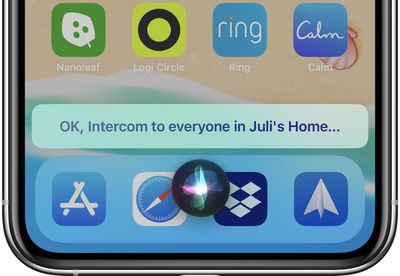
intercommessagesiri
So if you wanted to tell everyone that dinner is ready, just say "Intercom, dinner is ready" and the message "Dinner is ready" will be relayed to all of the HomePods in the Home.

Other commands like "Hey ‌Siri‌, tell everyone dinner is ready" also work as an alternative phrase for communicating through Intercom.
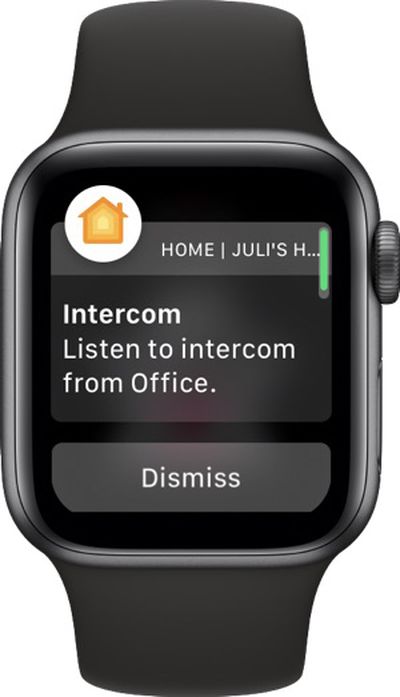
intercomapplewatch
In the Home app on iPhone and ‌iPad‌, there's also an option to tap on the small waveform in the upper right corner to record a message that's then sent to Intercom devices in the home.
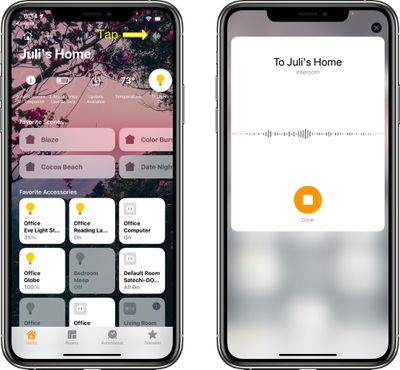
intercomwaveform

How to Use Intercom to Send a Message From a HomePod to Another Device

You can use the ‌HomePod‌ to send a message to other HomePods in the home or to the devices that belong to members of the family.

It's as simple as activating ‌Siri‌, saying "Intercom" and then the message, with the message able to be sent to every person in the family regardless of who's at home. It will play on ‌HomePod‌ speakers in the house as well as on individual iPhones, iPads, and Apple Watches.

How to Send a Message to a Specific Room

If you have HomePods in separate rooms, you can direct a message to that room by activating ‌Siri‌ and then saying "Intercom [room name] [message]."
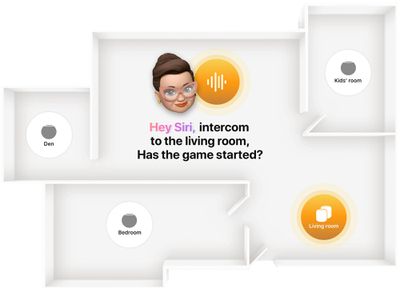
homepodminiintercom2
So for example if you wanted to tell everyone in the living room that dinner is ready, you would say "Hey ‌Siri‌, intercom living room dinner is ready."

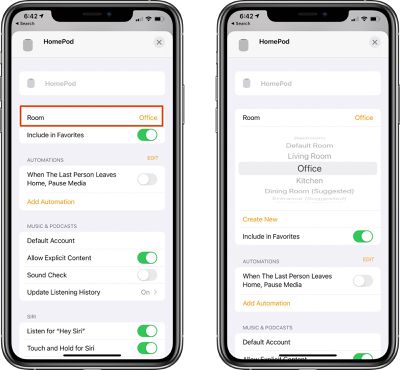
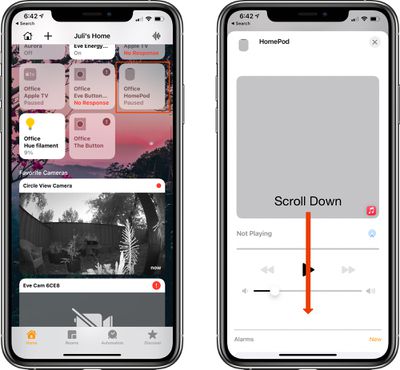
Note that to use the room command, HomePods need to be correctly assigned to a room in the Home app. Assigning or changing a room can be done by following these steps:

  1. Open the Home app.
  2. Select the ‌HomePod‌ or ‌HomePod‌ mini from the device list.
  3. Long press on the ‌HomePod‌ icon. homekitroom1
  4. Tap on the gear icon at the bottom of the interface that pops up or scroll down forcefully.
  5. Tap on "Room." homekitroom2fixed
  6. Select a room from the list of available rooms or tap "Create New."
  7. When done, close the interface by tapping the "X" at the top of the window.
How to Reply to an Intercom Message

If you receive an Intercom message in one room of the house and want to send a message back, you can activate ‌Siri‌ and then say "reply" along with your message.

So if you received an Intercom message that said "Dinner's ready," you can say "Hey ‌Siri‌ reply I'm on my way" to send a message right back.

Devices Compatible With Intercom

You can use iPhones, iPads, Apple Watches, and AirPods to send Intercom messages to the members of your household, and you can even send messages through ‌CarPlay‌ if you're driving.

Note that if your devices are using different languages, such as Spanish for the ‌HomePod‌ and English for the iPhone, Intercom may not function properly.

Guide Feedback

Have questions about Intercom or want to offer feedback on this guide? Send us an email here.

Related Roundups: HomePod, HomePod mini 2

Popular Stories

Apple TV 4K HomeView HomePod Mini tweaked

New Apple TV 4K, HomeView, and HomePod Mini: 16 Details Just Leaked

Sunday October 11, 2026 12:56 pm PDT by
Just two days before Apple's "Welcome home" experience in New York, Bloomberg's Mark Gurman has leaked several details about the new products set to be unveiled, including an all-new smart home hub, a HomePod mini 2, and a new Apple TV 4K. Here is an all-in-one summary of the details shared by Gurman:Apple's home hub with a touch-enabled display will be named HomeView, seemingly confirming a ...
HomePod minis Apple TV and iPad mini Leak Feature

iPad Mini With A20 Pro, New HomePod Mini Colors, and New Apple TV 4K All Just Leaked

Friday September 25, 2026 8:18 am PDT by
The next iPad mini, HomePod mini, and Apple TV 4K models have all leaked, just a few weeks before the devices are expected to be announced. Specifically, GeekWebGuides contributor Aaron Perris discovered a few of Apple's official images of the devices, confirming their existence and some new features that are planned. The most notable iPad mini details revealed in today's leak include an A20 Pro ...
HomePod minis on gradient feature 1 1

Exclusive: First Look at HomePod Mini 2 in Three New Colors

Friday September 25, 2026 8:17 am PDT by
Apple's new HomePod mini will share the same design as the original model and come in five colors, GeekWebGuides has found. The information originates from Apple's own code (spotted by GeekWebGuides contributor Aaron Perris) and shows clear product images of the new models in all of their colors. The above image contains Apple's own icons, which specifically refer to a "HomePod mini 2." The new...

Top Rated Comments

mr.steevo Avatar
78 months ago
I’m not activating this.

I foresee my children gleefully sending fart sounds throughout the house.

At least that’s what I’d have to tell my wife.

Score: 26 Votes (Like | Disagree)
78 months ago

Or just walk a few steps closer to the person and tell them
Or...some of us have multi story homes where not everybody is in the same room or on same level. It’s weird you would say that, given the obvious of how this feature is intended for separation and convenience where not everyone is a ‘few steps away‘. (But then Again, you wouldn’t say that if you were actually purchasing this product, which you’re obviously not.)
Score: 13 Votes (Like | Disagree)
Apple_Robert Avatar
78 months ago
As a prospective buyer of the mini, this excellent article is very helpful. Thanks, Juli
Score: 12 Votes (Like | Disagree)
Vjosullivan Avatar
78 months ago

It can be surprisingly hard sometimes to find a clear guide to using things like this.
It really shouldn’t need such a detailed walk through to use something that should be so simple.
Score: 9 Votes (Like | Disagree)
LeadingHeat Avatar
78 months ago
This is a great walkthrough! Thanks. I’m definitely looking forward to scaring the heck out of my dog when I see on the camera that she’s jumping off the couch when I’m gone.
Score: 9 Votes (Like | Disagree)
macduke Avatar
78 months ago

Or just walk a few steps closer to the person and tell them
I’ll be sure to do that as I’m driving home to tell the kids to get washed up for the dinner I’m bringing home, to tell them to go to the bathroom and put their shoes on to hop in the car because I’m almost home, or to come help me carry in groceries. Not to mention that my house is big enough that I can’t even yell at the top of my lungs from one end to the other. Or you could use it between different buildings on your property like an external garage or workshop. Not everybody lives in a $3000/mo 400sqft studio apartment in some huge city.
Score: 5 Votes (Like | Disagree)
Latest Stories
Giant iPhone Duo Installations Spotted at Apple Fifth Avenue
24 minutes ago
iPhone Duo 2 Prototypes Include Under-Display Face ID
40 minutes ago
Tesla App Gains iPad and iPhone Duo Support
5 hours ago
Apple Reportedly Boosts iPhone Duo Orders by 44%
5 hours ago
Fortnite Returning to Australian App Store After Court Ruling
6 hours ago
Apple Ordered to Open iPhone to Rival App Stores in Australia
6 hours ago
Apple Suppliers Face Hurdles Cutting Circuit Board Emissions
6 hours ago
Things Updated for iPhone Duo With Adaptive Layout
7 hours ago
Simplicity and Siri AI Are HomeView's Killer Features, Apple Says
7 hours ago
iPhone Duo Reviewers Really Miss Face ID
12 hours ago
Does the iPhone Duo Run Hot? Here's What Reviews Found
13 hours ago
Apple Music's New Look is Now Live on Apple's Website
14 hours ago
Anthropic Launches Claude Duet, a Proactive AI Agent
15 hours ago
What 32,000 Folds Did to the iPhone Duo's Hinge
15 hours ago
iPhone Duo's Hidden FaceTime Camera Takes 'Trash' Photos
17 hours ago
iPhone Duo Has 'Edge Light' Feature That Debuted on Macs Last Year
17 hours ago
Apple Support App Updated for iPhone Duo's Larger Display
18 hours ago
Amazon Sweetens the Deal on Entry-Level 16-Inch MacBook Pro With $570 Off
18 hours ago
iPhone Duo Tips Over on MagSafe Stands When Unfolded
18 hours ago
Apple Music's New Look Officially Announced
19 hours ago
iPhone Duo Supports Apple Pencil Starting With iOS 27.2
20 hours ago
iPhone Duo Accessories Roundup: Cases and Screen Protectors From OtterBox, ZAGG, and More
21 hours ago
Apple Stores Will Have 'Limited' Availability of iPhone Duo for Walk-In Customers
21 hours ago
iPhone Duo Reviews Explain Why Device is Both 'Fun' and 'Frustrating'
22 hours ago
Apple Says 'Reachability' Feature Coming to iPhone Duo Later This Year
23 hours ago
Loop Capital Cuts Apple Rating Over iPhone Sales Outlook
1 day ago
Apple Stores in Bordeaux and Lille Looted During French Protests
1 day ago
Bluesound Adds Native Apple Music Support
1 day ago
Apple CEO John Ternus Explains What Makes Good Product Design
1 day ago
UK Proposes New Ways to Help Apple Pay Rivals
1 day ago