

macOS Sonoma, Apple's next major software update for Macs, is due to be publicly released on Tuesday, September 26. Keep reading to learn what's new and if Apple's latest operating system will run on your Mac.
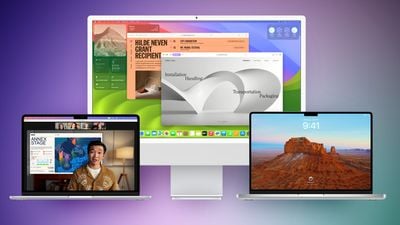
macOS Sonoma includes several new features, including desktop widgets, Apple TV-like aerial screensavers, enhancements to apps like Messages and Safari, a new Game mode that prioritizes CPU and GPU performance for gaming, and more.
Interactive widgets can now be placed right on your desktop and blend into your wallpaper so as not to be obtrusive when you're working, and thanks to Continuity, you can use iPhone widgets on your Mac.
There are also new enhanced video conferencing features, including Presenter Overlay to allow users to display themselves in front of the content they are sharing. Reactions let users express how they feel within a video session, and Screen Sharing has been improved with a simplified process.
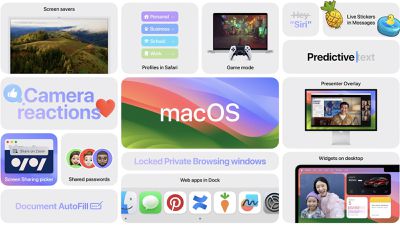
In Safari, an update to Private Browsing provides greater protection from trackers and from people who might have access to the user's device, and Profiles offer a way to separate browsing between topics, like having one for work and one for personal browsing. There's also a new way to create web apps that work like normal apps and let you get to your favorite website faster.
Meanwhile, for gamers, there's a new Game Mode that delivers an optimized gaming experience with smoother and more consistent frame rates. It dramatically lowers audio latency with AirPods and reduces input latency with game controllers, and it works with any game on Mac.
macOS Sonoma Compatibility
macOS Sonoma drops support for the following Macs:
- 2017 MacBook Pro
- 2017 iMac
- 2017 MacBook (12-Inch)
macOS Sonoma remains compatible with the following Macs:
- MacBook Pro: 2018 and later
- MacBook Air: 2018 and later
- Mac mini: 2018 and later
- iMac: 2019 and later
- iMac Pro: 2017
- Mac Studio: 2022 and later
- Mac Pro: 2019 and later
How to Identify Your Mac's Model
If you're unsure which Mac model you have, you can find out easily. Switch on your Mac, log in, and from the Apple menu () in the corner of your screen, choose About This Mac. In the window that appears you'll see the Mac model listed as well as the year it was made.
Just Want to Try Safari 17?
If you don't want to install macOS Sonoma, you can always download Safari 17 for macOS Monterey and Ventura. Safari is now in its ninth beta, and Apple will likely release the final version as a separate download alongside macOS Sonoma. If you want to try the latest Safari 17 beta now, check out our dedicated guide to learn how it's done.




















