
How to Download Safari 17 Beta for macOS Ventura and Monterey - GeekWebGuides
Skip to Content

How to Download Safari 17 Beta for macOS Ventura and Monterey

by

Apple is now allowing Mac users running macOS Ventura and macOS Monterey to try out its latest Safari 17 browser before it officially launches alongside macOS Sonoma in the fall. Keep reading to learn what's new and how to download it.
safari icon blue banner
Last month, Apple quietly began making beta versions of Safari 17 available to download as a standalone package. Prior to this, the only way to try out the revamped version of Safari was to install the macOS Sonoma Beta, but now anyone running macOS Ventura or macOS Monterey can try out Safari 17 without having to install Apple's latest beta operating system on their Mac.

What's New in Safari 17 for macOS

As of writing, Safari 17 for macOS Ventura and Monterey has reached its fourth beta. Not only is it snappier with faster search responsiveness, it also has more relevant search suggestions – and easier-to-read suggestions. Here's what else is new:

  • Locked Private Browsing: Private browsing windows in Safari can now be locked when not in use, and require secondary authentication via Touch ID or your Mac's password to unlock and access for added privacy.
  • One-Time Code AutoFill from Mail: One-time verification codes you receive in Apple Mail now autofill in Safari, making it easy to log in without leaving the browser.
  • Advanced Tracking and Fingerprinting Protection: URLs in ‌Safari 17‌ can be stripped of all tracking information appended to the end of the URL so that websites cannot track your browsing using URL identifiers.
  • Multi-Tab Selection: You can now select multiple open tabs at once to move them around the tab bar or create a Tab Group for them.
  • Favicons in the Favorites Bar: You can now identify sites in the Favorites bar more easily with favicons.
  • Hide IP Address From Websites: There's a new option to hide IP address from both trackers and websites or only trackers when using the iCloud Private Relay feature.

  • Reading List Widget: You can now add your Safari Reading List to your Mac's Notification Center for quick access.

  • Privacy Protections for App Extensions: You can now set per-site privacy settings for app extensions in addition to web extensions.
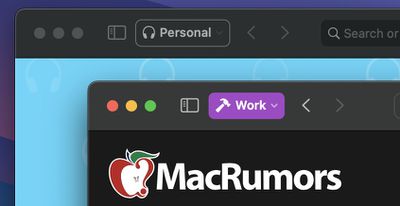
  • Safari Profiles: Safari has gained a new feature called Profiles, which is designed to help keep your browsing separate for topics like Work, School, or Personal. Each profile gets its own icon and silos your history, Tab Groups, favorites, and cookies. You can even assign specific extensions to profiles to optimize your browsing experience based on the task at hand.
macos sonoma tidbits3

How to Install Safari 17 on macOS Ventura/Monterey

In an unexpected change for 2023, anyone who signs in to Apple's developer account website with their Apple ID gets access to developer beta releases as well, even if they are not a paying member of Apple's Developer Program. So if you're still interested in trying out Safari 17, simply follow the steps below.

Note that Safari 17 Beta 4 requires macOS Ventura 13.4 or macOS Monterey 12.5 to run, and that installing it will overwrite your current Safari version. Also, bear in mind that this is beta software, so you may potentially experience bugs and issues that negatively impact your browsing. Having said that, beta 4 is very stable in our experience.

  1. Open Safari on your Mac and go to Apple's developer website.
  2. Under "Sign in to Apple Developer," enter and submit your Apple ID and password using the arrow buttons, then if required, enter the two-factor authentication code sent to your Apple devices.
  3. Now click through to the Safari Beta Downloads page.
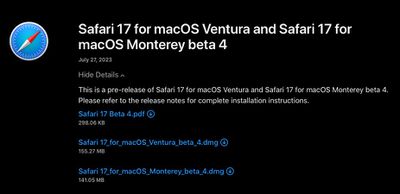
  4. Under Safari 17, click View Details, then click the Safari 17 Beta DMG link to download the installation package applicable to your macOS version.
  5. Once the package is downloaded to your Mac, double-click it and follow the onscreen instructions to complete installation.
safari 17 dowload links

Wrapping Up

When Safari 17 is officially released to the public as part of macOS Sonoma, users can expect some additional features, including the ability to save your favorite websites to the Dock as streamlined Web Apps, as well as the ability to share website passwords and passkeys with trusted contacts.


Tag: Safari

Top Rated Comments

42 months ago

I've long gone elsewhere too.
There are quite a few websites that don't work on Safari. In fact I see a lot of organisations actively suggesting Chrome. Having said that the vast majority of web work for me is Chrome and FIrefox. Safari is probably 5%.
Name a website that doesn’t work with Safari. I use Safari all day long and have yet to run into a website that doesn’t work. Even government websites work these days.

Score: 8 Votes (Like | Disagree)
SkimPappa Avatar
42 months ago

Last night, at 2AM in the night, I was on the bed and my phone made a sound, and that was the invitation for the beta of Safari 17 for my Mac on Monterey.

However, I no longer install betas anymore, past are those days I tested every new beta with excitement while suffering the bugs and annoyances of using beta software. Nowadays I stay with the stable releases as much as I can. Thankfully, Safari keeps getting updates on older systems such as Monterey.
I encourage you to use focus modes to prevent those notifications at 2 AM.
Score: 7 Votes (Like | Disagree)
MasterControlProgram Avatar
42 months ago

Name a website that doesn’t work with Safari. I use Safari all day long and have yet to run into a website that doesn’t work. Even government websites work these days.
It's been years since I've come across a site that doesn't work in Safari too. I think you'd have to be doing something really whacky and non-standard to make a site not work in Safari these days. I work in web dev and I've not come across a Safari issue with any of our systems for years (although admittedly we don't develop anything too complicated rendering-wise).
Score: 5 Votes (Like | Disagree)
42 months ago

It is a start, but 80% (at least) of my Mac browsing happens on FIREFOX.

It’s the quality of the extensions that keeps me with the fox 🤓
I've long gone elsewhere too.
There are quite a few websites that don't work on Safari. In fact I see a lot of organisations actively suggesting Chrome. Having said that the vast majority of web work for me is Chrome and FIrefox. Safari is probably 5%.
Score: 5 Votes (Like | Disagree)
genexx Avatar
42 months ago
For a parallel installation i would prefer and do install always the Safari Technology Preview:


This Version also gets automatic Updates but uses the same saved Bookmarks etc. so better do not delete anything.

Attachment Image
Score: 5 Votes (Like | Disagree)
Populus Avatar
42 months ago
Last night, at 2AM in the night, I was on the bed and my phone made a sound, and that was the invitation for the beta of Safari 17 for my Mac on Monterey.

However, I no longer install betas anymore, past are those days I tested every new beta with excitement while suffering the bugs and annoyances of using beta software. Nowadays I stay with the stable releases as much as I can. Thankfully, Safari keeps getting updates on older systems such as Monterey.
Score: 4 Votes (Like | Disagree)

Popular Stories

Switch to Safari

Apple Explains Why Chrome Users Should 'Switch to Safari'

Tuesday October 13, 2026 5:29 am PDT by
Apple has launched a new "Switch to Safari" marketing campaign that encourages Chrome users to switch to Safari as their web browser of choice on the Mac. "Safari is a more powerful and private browser than Chrome," says Apple. Apple has a new "Switch to Safari" page on its website that outlines more than 10 reasons that Chrome users should switch to Safari, including faster performance...
M5 MacBook Pro

RIP, MacBook Ultra

Monday October 19, 2026 9:37 am PDT by
Apple today sent out invites for an experience in Los Angeles on Wednesday, October 28, and the "Pro and tell" tagline on the invitation likely means that the rumored MacBook models with touch-enabled OLED displays will stick with MacBook Pro branding instead of the once-rumored "MacBook Ultra" name. The long-rumored "iPhone Ultra" ended up being named iPhone Duo, so speculation that Apple...
iPhone Duo Trio

Here's What Apple's Apps Look Like on the iPhone Duo

Tuesday October 20, 2026 11:12 am PDT by
With just three days to go until the iPhone Duo is released, Apple is getting ready for the launch. Behind the scenes, the App Store now has screenshots of Apple's built-in apps running on the Duo. We've seen some apps in marketing materials, but images of the ones we haven't seen give us an idea of what it will be like using the iPhone Duo day to day. Many apps are shown in landscape...
Latest Stories
Apple Blocks Certificates That Could Help Attackers Fake Websites
1 hour ago
Giant iPhone Duo Installations Spotted at Apple Fifth Avenue
2 hours ago
iPhone Duo 2 Prototypes Include Under-Display Face ID
2 hours ago
Tesla App Gains iPad and iPhone Duo Support
6 hours ago
Apple Reportedly Boosts iPhone Duo Orders by 44%
7 hours ago
Fortnite Returning to Australian App Store After Court Ruling
7 hours ago
Apple Ordered to Open iPhone to Rival App Stores in Australia
7 hours ago
Apple Suppliers Face Hurdles Cutting Circuit Board Emissions
8 hours ago
Things Updated for iPhone Duo With Adaptive Layout
8 hours ago
Simplicity and Siri AI Are HomeView's Killer Features, Apple Says
8 hours ago
iPhone Duo Reviewers Really Miss Face ID
13 hours ago
Does the iPhone Duo Run Hot? Here's What Reviews Found
15 hours ago
Apple Music's New Look is Now Live on Apple's Website
16 hours ago
Anthropic Launches Claude Duet, a Proactive AI Agent
16 hours ago
What 32,000 Folds Did to the iPhone Duo's Hinge
17 hours ago
iPhone Duo's Hidden FaceTime Camera Takes 'Trash' Photos
18 hours ago
iPhone Duo Has 'Edge Light' Feature That Debuted on Macs Last Year
19 hours ago
Apple Support App Updated for iPhone Duo's Larger Display
19 hours ago
Amazon Sweetens the Deal on Entry-Level 16-Inch MacBook Pro With $570 Off
19 hours ago
iPhone Duo Tips Over on MagSafe Stands When Unfolded
20 hours ago
Apple Music's New Look Officially Announced
21 hours ago
iPhone Duo Supports Apple Pencil Starting With iOS 27.2
22 hours ago
iPhone Duo Accessories Roundup: Cases and Screen Protectors From OtterBox, ZAGG, and More
23 hours ago
Apple Stores Will Have 'Limited' Availability of iPhone Duo for Walk-In Customers
23 hours ago
iPhone Duo Reviews Explain Why Device is Both 'Fun' and 'Frustrating'
23 hours ago
Apple Says 'Reachability' Feature Coming to iPhone Duo Later This Year
1 day ago
Loop Capital Cuts Apple Rating Over iPhone Sales Outlook
1 day ago
Apple Stores in Bordeaux and Lille Looted During French Protests
1 day ago
Bluesound Adds Native Apple Music Support
1 day ago
Apple CEO John Ternus Explains What Makes Good Product Design
1 day ago







































