

iCloud is Apple's cloud platform that serves and secures all Apple devices. It can save and synchronize all your photos, contacts, files, reminders, and notes, and you can also use it to store device backups. You can access and manage your iCloud data on iPhone, iPad, Mac, Windows, and the web. Keep reading to learn how.
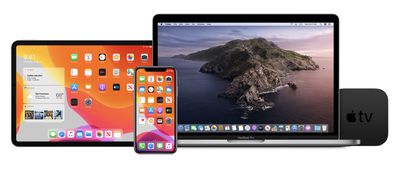
iCloud stores your content securely and keeps your apps up to date across all your devices. That means all your data is safe and accessible wherever you are where there's an active internet connection available.
iCloud Backups are another indispensable service from iCloud. With an iCloud Backup of your iPhone or iPad, you can restore it on a new device, or use it if you need to erase or restore a device.
iCloud comes with 5GB of free storage and you can add more storage at any time. The 50GB plan costs $0.99 per month, while the 200GB and 2TB plans cost $2.99 and $9.99 per month, respectively.
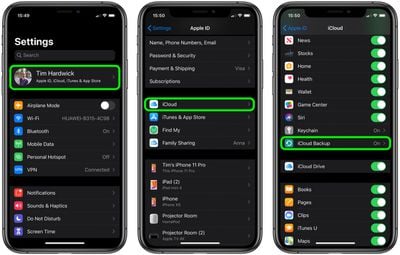
How to Access iCloud on iPhone and iPad
- Launch the Settings app on your iPhone or iPad.
- Tap your name in the banner at the top.
- Tap iCloud.
- Use the toggles next to the apps and data for syncing or unsyncing them to iCloud.

- Scroll down and tap iCloud Backup to automatically make backups of your iOS device to the cloud.
- Keep scrolling down to manage any third-party apps you have installed that can sync with iCloud.
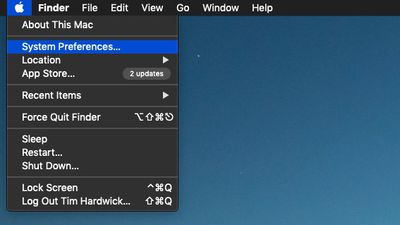
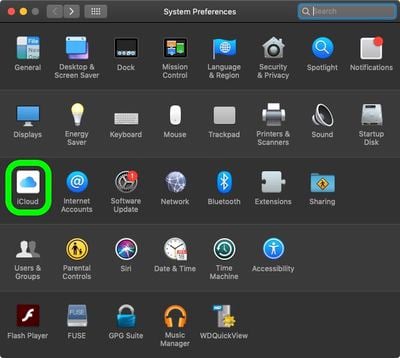
How to Access iCloud on Mac
- Click the Apple symbol in the top-left corner of your screen.
- Click System Preferences....
- Click iCloud.
- Use the checkboxes next to the apps and data for syncing or unsyncing them to iCloud.
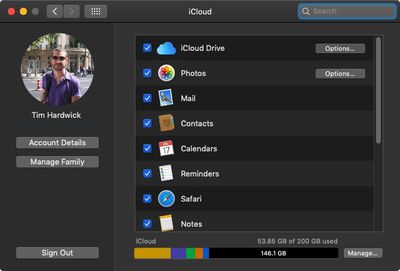
There's no option to back up your entire Mac to iCloud, but you can do so locally by using an external drive and Time Machine.
How to Access iCloud in Windows
With iCloud for Windows, the photos, documents, and bookmarks on your PC are updated automatically on your Apple devices.
- Download iCloud for Windows.
- Restart Your Computer.
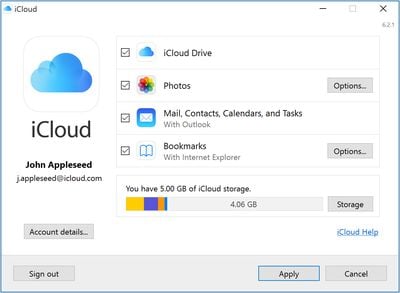
- Make sure iCloud for Windows is open. If it doesn't open automatically, go to Start, open Apps or Programs, and open iCloud for Windows.
- Enter your Apple ID to sign in to iCloud.
- Use the checkboxes to select the features and data that you want to keep up to date across your devices.
- Click Apply.
How to Access iCloud From a Web Browser
- Visit the iCloud.com website on your web browser of choice.
- Enter your Apple ID, password, and two-factor authentication code if the feature is enabled.
- Once logged in, you can use the iCloud web apps to access your data, documents, and photos. You can also use tools in Settings -> Advanced to recover files that have been deleted from iCloud, as well as recover Contacts, Calendars, and Reminders that have been lost.
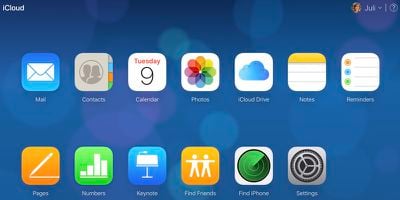
Note that accessing iCloud via the web is also handy for immediately signing out of all browsers that are signed into iCloud should you suspect someone has gained unauthorized access to your account and for managing apps that let people look you up using your Apple ID. It also displays all devices you're signed into, offers up a look at available storage, and displays the members of your Family Sharing group.
















