

As of iPadOS 15.4 and macOS Monterey 12.3, Apple has introduced support for Universal Control, the long-awaited feature that's designed to allow multiple Macs and iPads to be controlled with a single mouse and keyboard.
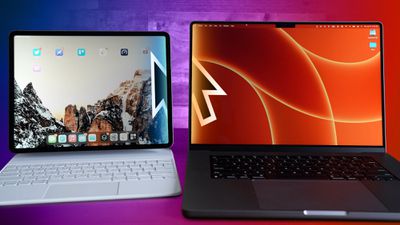
Thanks to Universal Control, you can use the same cursor and keyboard on any nearby Mac or iPad that's signed into your iCloud account. So, for example, if you have a MacBook Pro and an iPad next to it, your Mac's trackpad and keyboard can be used to navigate the iPad. The same is true of the iPad if you have a keyboard attached.
Universal Control should work automatically once you've installed macOS Monterey 12.3 and iPadOS 15.4 because the feature is enabled by default, but there are settings that you might want to adjust or if you're not a fan, you might want to turn it off completely. Here's how.
How to Adjust or Disable Universal Control on Mac
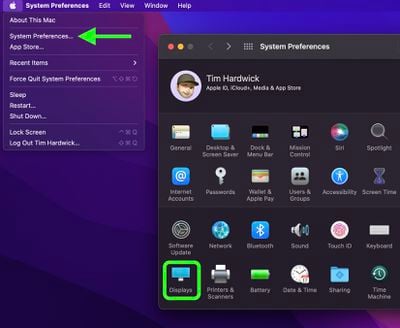
- Launch System Preferences from your Mac's Dock, from the Applications folder, or from the Apple menu bar ( -> System Preferences...).
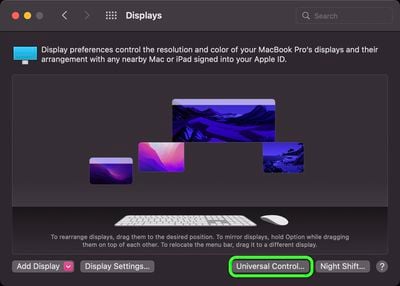
- Select Displays in the preferences panel.

- Click Universal Control....
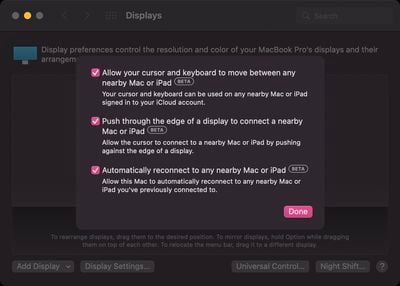
- Uncheck the boxes next to the following settings you want to disable: Allow your cursor and keyboard to move between any nearby Mac or iPad, Push through the edge of a display to connect a nearby Mac or iPad, and Automatically reconnect to any nearby Mac or iPad.
- Click Done.
Note that Universal Control is still in beta as of writing, so there may be some hiccups when using it. In our testing it proved very stable, although we did run into an issue where we needed to restart the Mac to get it to work. If you have an issue getting Universal Control up and running after updating, restarting the Mac and the iPad might help. See our troubleshooting guide for more help.




















