

Although Apple has fumbled with social network features within its music apps in the past, the company is trying again with an all-new social sharing ability in iOS 11. There's no exact name for the feature, but Apple describes it as a way for you to discover music that your friends are listening to through sharing playlists, artists, and albums on your own personal Apple Music profile.
If you already have an Apple Music account with a paid subscription, or if you're taking advantage of the service's free three-month trial period, follow these steps to enable the social sharing features within Apple's streaming music service. Note that this guide is specifically tailored for iOS devices, but the process is similar on macOS.
Creating a Profile on Apple Music
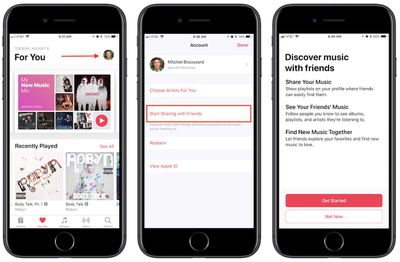
- Open Apple Music. (Note: opening Apple Music for the first time after installing iOS 11 should also give you a direct link to "Get Started" with friend sharing, so jump to Step 5 if you tap this button.)
- Tap the "For You" tab.
- Tap your profile picture in the top right corner.
- Choose "Start Sharing with Friends" and then "Get Started."
- Upload a profile photo, type in your name, and pick a username so other Apple Music users can find you. Tap "Next" when done.
- Choose "Everyone" or "People You Choose" to determine who can see your listening history.
- Choose the playlists to share on your profile, or "Hide all" to show none.
- Pick contacts to share music with.
- Toggle on/off "Friends" and "Artists and Shows" to choose what kind of push notifications you want. Tap "Done."
If you can't find the friend you're looking for in the recommended contacts section, navigate to Apple Music's "Search" tab. With iOS 11, this area now functions as a profile and user playlist search tool as well. Start typing in their name and you might see an "in people" recommendation, or simply tap the "Search" button and you'll see results for Songs, Albums, Playlists, Music Videos, Connect, Artists, and now People and Shared Playlists at the bottom.
With your own Apple Music profile set up, you can begin listening to music as normal, and the more you do the more your favorite albums, artists, and songs will show up in the "Friends Are Listening To" section of your followers' "For You" tabs. On your own "For You" tab, you can tap "See All" and browse a list of recent albums and playlists listened to by your friends, and then tap to add them to your own library.
If your friends allow it, this will even include their own personally created playlists. To discover and save the playlists of a specific person, follow these steps. Note that this guide assumes the friend in question has their activity shared to "Everyone," or that they have chosen you to share with.
Finding Friends' Shared Playlists on Apple Music
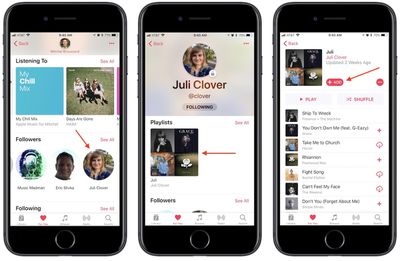
- Navigate to your Apple Music profile.
- Scroll down to "Following," then tap the friend you're looking for, or tap "See All" for a vertical list.
- Scroll through their "Playlists" and "Listening To" to find a collection you want to save.
- Tap the collection you want, then "+Add" to place it in your library.
From then on, you'll find friends' playlists taking precedence atop the playlists section of your library, alongside any Apple curated collections. The name of the playlist will be there, along with the name of your friend. Once added, it'll function in much the same way as Apple's own playlists, updating in your library when changes are made by your friend.
You can revisit your profile any time by tapping your profile picture in the top right of "For You," and here you'll see your shared playlists, content you've listened to recently, followers, and following. Tap the "Edit" button to customize items like your profile picture, name, username, follower permissions, and reorganize shared playlists.
If you ever change your mind about sharing a playlist (which also makes it searchable to anyone using Apple Music), tap on the playlist in your library, tap "Edit" in the top right corner, then toggle off "Show on My Profile and in Search." You can follow these same steps for adding a new playlist onto your profile whenever you create a new collection of songs.



















Top Rated Comments
iMessage is their most social app and it’s implementing more and more of what we find on platforms like Snapchat. Photos has album sharing and friends can even like photos. Now, Apple Music has a social feature I think many people can get behind. I’d love to know what my friends are listening to. Odds are that because we’re friends, we have similar tastes and that’ll help me discover music I wouldn’t have otherwise found on my own.
Eventually, Apple can build an app that brings all of this together into a sort of feed where you’d be able to see what shared albums you’re a part of, what your friends are listening to, and articles they’ve favorited in Safari.
This is social media, done right.
[doublepost=1505992390][/doublepost]You guys might be facing the same problem I was. Did you previously turn off the Connect features of Apple Music on earlier versions of iOS? I did, and because of that the new social profiles were hidden. Try checking: go to Settings app > General > Restrictions > make sure "Music Profiles and Posts" are toggled on.
Also worth noting is that Apple doesn't allow the music profiles on child iCloud accounts (13 years or younger).