

When you subscribe to an Apple Music individual, student or family plan, or take advantage of Apple's free Apple Music trial, your subscription automatically renews every month or every year using the payment information you used when your first signed up to the service.
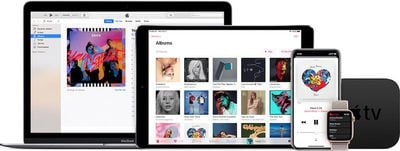
If you want, you can turn off this auto-renewal charge by following the steps below. Note that when you do this, you are effectively canceling your subscription to Apple Music, although you will still be able to access the service until either your trial ends or the month or year that you paid for the service comes to an end.
How to Cancel Apple Music
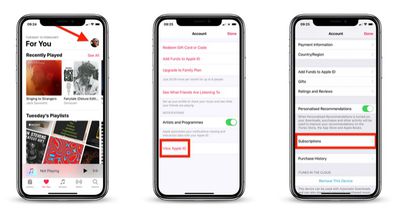
- Launch the Music app on iPhone or iPad, or open iTunes on a Mac or PC.

- Tap the For You tab and then tap the account icon in the top right of the screen, or select Account -> View My Account... in iTunes.
- On iPhone or iPad, tap View Apple ID and then tap Subscriptions, or click Manage next to Subscriptions in the iTunes Account window.
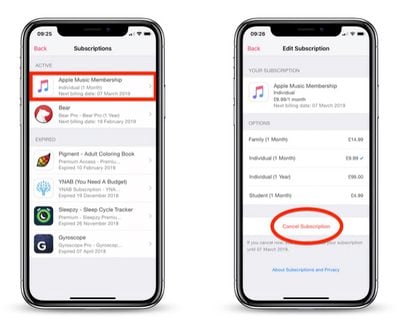
- On the Subscriptions screen, select your Apple Music Membership .
- Select Cancel Subscription on the next screen.
That's all there is to it. With your subscription cancelled, you won't be charged again when it runs out. If you want to continue your Apple Music subscription after it runs out, however, you will need to reenable payments.






















![Apple Pulls Keynote, Pages and Numbers From App Store [Update: Back]](https://images.macrumors.com/t/Okb7kitB_gNr6qe5Pex9nQIysD8=/112x112/article-new/2026/01/Apple-Creator-Studio-iWork-suite.jpg)



















