

Apple Music isn't limited to owners of Apple devices – you can also subscribe to the streaming service on Android phones and tablets, and enjoy the same access to millions of songs, curated radio stations and playlists.
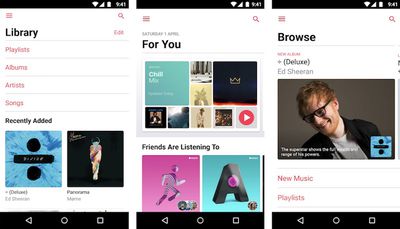
You can get the Apple Music app for Android from the Google Play store or download it directly from Apple. Just make sure that your device has Android 4.3 (Jelly Bean) or later – you can check which version it has by going to Settings -> System -> About phone.
How to Sign Up for Apple Music on Android
You'll need an Apple ID account to use Apple Music. If you don't have one then you'll be asked to create one when you join. The following steps guide you through the process in the Apple Music app for Android.
- Launch the Apple Music app on your Android device. You should see a message that says "Welcome to Apple Music." If it doesn't appear, tap For You.
- Tap the free trial offer.
- Select a subscription type – Individual, Student or Family are your options.
- Tap Use Existing Apple ID and enter your Apple ID and password. If you don't have an account, tap Create New Apple ID, then follow the steps.
- Add a valid payment method if prompted, then tap Join.
- Accept the terms and conditions.
Once you've completed the initial subscription process you'll be invited to tailor the service to your interests and likes. Check out our separate article on How to Set Up Apple Music to learn more about how it works.
Managing Your Apple Music Subscription on Android
If you want to change or cancel your Apple Music subscription on your Android device, follow these steps.
- Launch the Apple Music app.
- Tap the button that looks like three dots arranged in a vertical line.
- Tap Account Settings.
- Tap Manage Membership.
- Choose an option depending on what you want to do. Change lets you change to an Individual subscription billed monthly or annually, a Family subscription, or a Student subscription. Cancel lets you turn off Automatic Renewal, which effectively cancels your subscription at the end of the current billing cycle.


























![Apple Pulls Keynote, Pages and Numbers From App Store [Update: Back]](https://images.macrumors.com/t/Okb7kitB_gNr6qe5Pex9nQIysD8=/112x112/article-new/2026/01/Apple-Creator-Studio-iWork-suite.jpg)


















