

Apple Cash (formerly Apple Pay Cash) is Apple's peer-to-peer payments service. Once you've set up an Apple Cash card on your iPhone or iPad, it can be used to make and receive payments in Messages, or you can get Siri to send money to a friend or family member. This article shows you how.
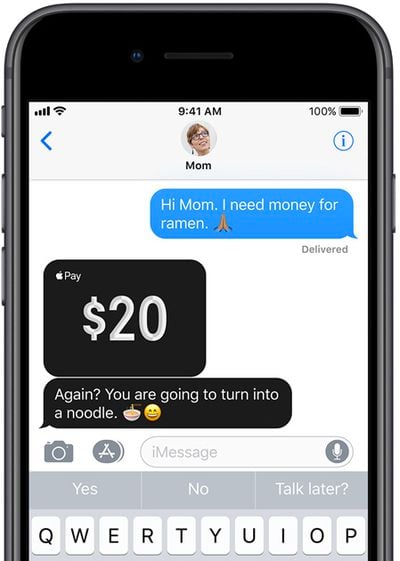
When someone sends you money via Apple Cash, it goes on your virtual Apple Cash card, which is stored securely in the Wallet app on your iPhone or iPad. You can use the money on it to send to someone, make purchases using Apple Pay in stores, within apps, and on the web. Alternatively, you can transfer the money on your Apple Cash card directly to your bank account.
Furthermore, if you've applied for Apple's own-branded credit card – called simply Apple Card – you can use Apple Cash to help pay off your Apple Card balance. You can also take advantage of Apple Card's "Daily Cash" rewards system, where Apple pays out cash back bonuses on a daily basis.
Sending and Requesting a Payment via Apple Cash
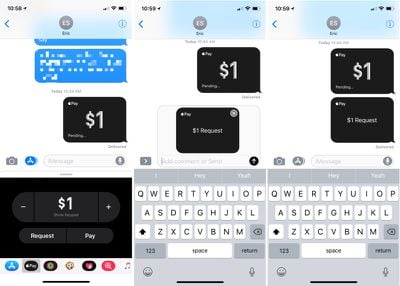
- Open a conversation in Messages.
- Tap the Messages App Store icon.
- Choose the "Apple Pay" icon.
- Tap the "+" or "-" buttons to enter an amount, or use the keyboard.
- Tap "Request" or "Pay."
- You'll have an option to preview your payment or request for payment.

- Press the blue arrow button to send.
When sending a payment, the money you've sent will be listed as "pending" in the Wallet app until the person on the receiving end accepts. Once accepted, the payment will be listed in "Last Transaction" under the Apple Cash card in Wallet. While still pending, a payment can be cancelled.
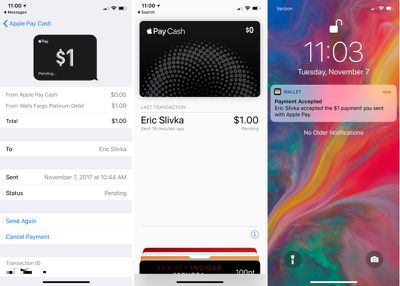
Money that you're sending will be pulled from a linked debit/credit card or from the Apple Cash card itself if you've added funds to that card or received funds from other people. If you send money using the Apple Cash card or a debit card, there's no charge. For a credit card, there's a 3% fee.
When accepting a payment, the cash will be added to your Apple Cash card in the Wallet app. From there, it can be used to make purchases where Apple Pay is accepted like any other card or it can be transferred to a connected bank account.
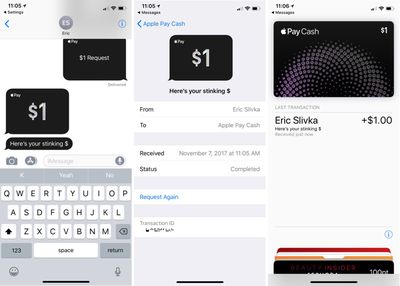
Apple Cash works in any conversation with a single person. The option won't be available for group messages.
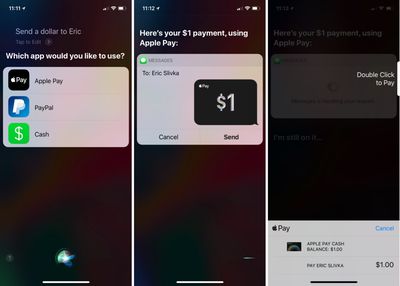
Sending Money via Siri
- Activate Siri.
- Tell Siri to send a payment. Example: "Send $1 to Eric."
- If multiple payment apps are installed, you'll need to confirm that you want to use Apple Pay.
- Unlock your iPhone using Face ID or Touch ID.
- Tap "Send."
- Double click the side button to pay on iPhone X or put a finger on the Touch ID Home button to confirm payment on other devices.
Changing Apple Cash Settings
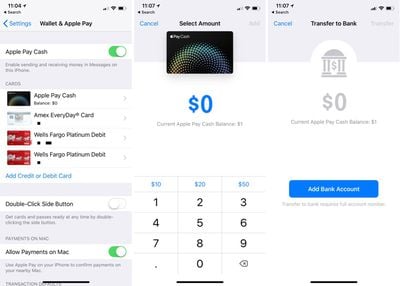
You can access your Apple Pay settings in the Settings app or through the Wallet app.
- Open Settings.
- Go to Wallet and Apple Pay.
- Tap on the "Apple Cash" card.
From this interface, you can add money to your Apple Cash card, transfer your cash to the bank (which requires adding a bank account) and choose to automatically or manually accept payments.
Verify Identity
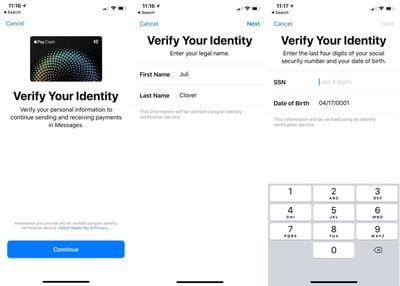
Once you've sent or received a combined $500 with Apple Cash, you will need to verify your identity. Identity Verification is available in the Settings app, but it may not be fully functional at this time.
- Open Settings.
- Go to Wallet and Apple Pay.
- Tap on the "Apple Cash" card.
- Choose "Verify Identity."
You will be asked to confirm your legal name and address, along with the last four digits of your social security number and date of birth. Apple will also ask questions related to your personal history and request a photo of a driver's license or state ID card.
Once your identity has been verified, you can have up to $20,000 on your Apple Cash card.
Apple Cash Limits
There are limits on the amount of money that you can send per day and per transaction, and the amount of money you can add to your Apple Cash card.
When adding cash, you must add a minimum of $10 per transaction, but you're not able to add more than $3,000. Over a 7-day period, you can add a maximum of $10,000 to your Apple Cash card.
When sending or receiving money, you can send/receive a minimum of $1 and a maximum of $3,000. Over the course of a 7-day period, you can send/receive up to $10,000.
Transferring money to your bank can be done at any time. A minimum of $1 can be transferred at a time, or less than a $1 if your total balance is under $1. Up to $3,000 can be transferred in a single transfer, and over 7 days, you can transfer up to $20,000 to your bank account from Apple Cash.
Apple Cash Requirements
To use Apple Cash, the following requirements must be met:
- Both parties must be running iOS 11.2 or later.
- An iPhone 6 or later must be used.
- Two-factor authentication must be turned on.
- You must be at least 18 years old.
- You must be in the United States with a U.S. credit/debit card and social security number if verification is required.
- An eligible credit or debit card must be available in Wallet.
Along with iPhones and iPads running iOS 11.2 or later, Apple Cash can also be used on the Apple Watch on devices that are running watchOS 4.2 or later. Sending money from an Apple Watch follows the same general process as the iPhone, with payments made and received through the Messages app.





















Top Rated Comments
Mom: Im sending over your resume, get a job.