
Apple Watch features a heart rate monitor to help guide you through your workout sessions, tracking your heart rate while you exercise to better determine the amount of calories you burn during your activities.

The monitor also automatically tries to measure your heart rate every 10 minutes, but doesn’t record the data if your arm is moving. That is why your Health app doesn't reflect a reading at every 10 minutes on the dot, but shows varying intervals of readings.
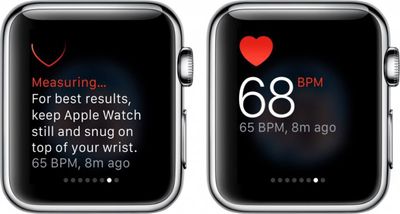
Apple Watch Heart Rate Monitor 1
If you want to get a quick, accurate measurement of your heart rate manually you can do so in Glances.

The heart rate sensor is on the backside of the Apple Watch case and is made up of two different sets of special lights that monitor the blood flow through your wrist. Because the sensors absorb light through your skin, there are a few factors that affect the accuracy of a heart rate reading.
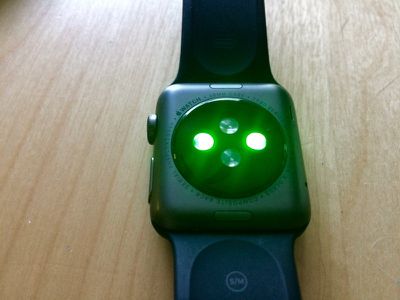
Apple Watch Heart Rate Sensor 2
By following a few tips, as well as calibrating Apple Watch for workouts, you will get a better heart rate reading, thus improving the device's ability to more determine how many calories you burn.

A Proper Fit

As simple as it sounds, a good fit is key to getting an accurate heart rate reading. Some people don't like the way it feels to have their watch snug on their wrist, but for the purposes of a proper reading, you'll need to keep it tight. When you hold your wrist out, there should be no gap between Apple Watch and your skin.
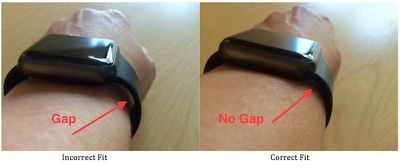
Apple Watch Correct Fit
If the feeling is just too uncomfortable for you to wear the device snug to your wrist, it might be a good idea to adjust the band differently for different activities. If you are working out, tighten it up one notch until you are done.

Avoid Cold Weather Workouts

The heart rate sensor is affected by how much blood flows through your skin. In cold weather, we tend to produce less blood flow near the surface of the skin as the blood is rerouted to warm more important parts of our bodies (it is why our fingers and noses get so cold). Some people enjoy jogging in the snow, but keep in mind that this may have an affect on an accurate heart rate reading from your Apple Watch.

Avoid Irregular Motion

Apple Watch gets a better reading when you've calibrated it by walking or running for 20 minutes. It tracks the rhythm of your movement and adjusts its data accordingly.

However, irregular movement, like playing tennis or boxing, will confuse the sensor and reduce its accuracy. So, for such workouts that have you swinging your arms wildly, be aware that your heart rate reading may not be as accurate as you would like.

Troubleshooting

If, for some reason, the heart rate monitor on your Apple Watch stops working, you may need to restart or reset the device.
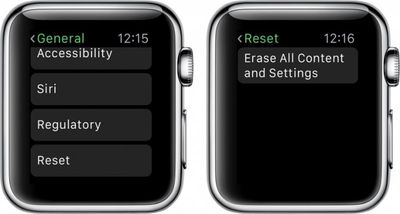
Apple Watch Erase All Settings

  1. Press and hold the Side button until the power off slider bar appears and slide it to turn off Apple Watch.
  2. Press and hold the Side button again until the Apple Watch logo appears.

If that does not work, try resetting your Apple Watch.

  1. On Apple Watch, open the Settings app and tap General.
  2. Tap Reset. Then tap "Erase All Content and Settings."
  3. Re-pair Apple Watch with your iPhone.

Although it is not an exact science, the heart rate monitor on Apple Watch is a useful way of tracking your activities and getting a better estimate on how many calories you burn. Following the tips above will improve accuracy of the light-absorbing sensors.


Related Roundup: Apple Watch 11
Buyer's Guide: Apple Watch (Neutral)

Top Rated Comments

Iconoclysm Avatar
139 months ago
That gap/no gap method is incorrect as this differs greatly depending on the shape of your wrist. If the watch is snug, it's snug, if it can't move around...it can't move around. For some people, that will mean there is a gap in the band. The watch itself is raised up, if you have a slimmer wrist, it is absolutely impossible to remove that gap.
Score: 6 Votes (Like | Disagree)
0098386 Avatar
139 months ago
Step 1) don't have a sleeve tattoo.
Score: 4 Votes (Like | Disagree)
Zakkates Avatar
139 months ago
The heart rate monitor is pretty much useless when I'm lifting weights (especially HIIT).

When I'm on the treadmill at a steady pace, the Apple Watch most often is spot on with what the machine says my heart rate is.

However, when I'm lifting weights w/ a lot of movement, I can feel my heart rate is at least over 150bpm, but the Apple Watch freaks out and says I have "37bpm" or "87bpm" or can't read. It's very frustrating.

Does hair on the wrist effect it at all?
Score: 1 Votes (Like | Disagree)
nick42983 Avatar
136 months ago
The heart rate monitor is pretty much useless when I'm lifting weights (especially HIIT).

When I'm on the treadmill at a steady pace, the Apple Watch most often is spot on with what the machine says my heart rate is.

However, when I'm lifting weights w/ a lot of movement, I can feel my heart rate is at least over 150bpm, but the Apple Watch freaks out and says I have "37bpm" or "87bpm" or can't read. It's very frustrating.

Does hair on the wrist effect it at all?
I've had the same problems with weightlifing. Sometimes I'll simply exit out of the workout app and go to the HR monitor in glances until it gets the right reading and then go back to the workout app and it will update with the proper measurement. When it's accurate it's great, but I feel that 30%+ of my gym calories burned aren't being measured.
Score: 1 Votes (Like | Disagree)

Popular Stories

wwdc sans text feature

Apple Rumored to Announce New Product on February 19

Thursday February 5, 2026 12:22 pm PST by
Apple plans to announce the iPhone 17e on Thursday, February 19, according to Macwelt, the German equivalent of Macworld. The report, citing industry sources, is available in English on Macworld. Apple announced the iPhone 16e on Wednesday, February 19 last year, so the iPhone 17e would be unveiled exactly one year later if this rumor is accurate. It is quite uncommon for Apple to unveil...
Apple Logo Zoomed

Tim Cook Teases Plans for Apple's Upcoming 50th Anniversary

Thursday February 5, 2026 12:54 pm PST by
Apple turns 50 this year, and its CEO Tim Cook has promised to celebrate the milestone. The big day falls on April 1, 2026. "I've been unusually reflective lately about Apple because we have been working on what do we do to mark this moment," Cook told employees today, according to Bloomberg's Mark Gurman. "When you really stop and pause and think about the last 50 years, it makes your heart ...
Finder Siri Feature

Why Apple's iOS 26.4 Siri Upgrade Will Be Bigger Than Originally Promised

Friday February 6, 2026 3:06 pm PST by
In the iOS 26.4 update that's coming this spring, Apple will introduce a new version of Siri that's going to overhaul how we interact with the personal assistant and what it's able to do. The iOS 26.4 version of Siri won't work like ChatGPT or Claude, but it will rely on large language models (LLMs) and has been updated from the ground up. Upgraded Architecture The next-generation...
maxresdefault

Apple Shows Off a Key Reason to Upgrade to the iPhone 17

Saturday February 7, 2026 9:26 am PST by
Apple today shared an ad that shows how the upgraded Center Stage front camera on the latest iPhones improves the process of taking a group selfie. "Watch how the new front facing camera on iPhone 17 Pro takes group selfies that automatically expand and rotate as more people come into frame," says Apple. While the ad is focused on the iPhone 17 Pro and iPhone 17 Pro Max, the regular iPhone...
iOS 26

iOS 26.3 and iOS 26.4 Will Add These New Features to Your iPhone

Tuesday February 3, 2026 7:47 am PST by
While the iOS 26.3 Release Candidate is now available ahead of a public release, the first iOS 26.4 beta is likely still at least a week away. Following beta testing, iOS 26.4 will likely be released to the general public in March or April. Below, we have recapped known or rumored iOS 26.3 and iOS 26.4 features so far. iOS 26.3 iPhone to Android Transfer Tool iOS 26.3 makes it easier...















