
Using the Timer, Alarm, and Stopwatch Apps on Apple Watch - MacRumors
Skip to Content

Using the Timer, Alarm, and Stopwatch Apps on Apple Watch

by

Apple has separated its three time-based categories into separate apps on Apple Watch. This allows you to quickly access the specific feature of the timer, alarm, and stopwatch you want with just a few taps.
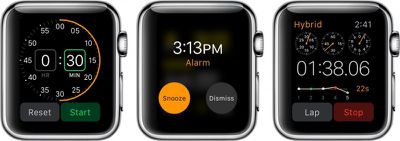
Apple Watch Timer_Alarm_Stopwatch
While most of it is self-explanatory, we've got some tips for how to get the most out of each of these apps so they work the way you want, when you want.

Timer

The Timer app on Apple watch makes it possible for you to set a timer right from your wrist so you don't have to search out your iPhone to activate or even turn off the alert when time is up.
Apple Watch Timer
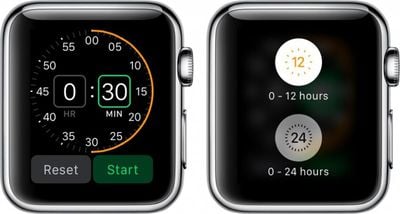
Tap the Timer app icon on Apple Watch to open it. Then rotate the Digital Crown to adjust the time. When ready, tap the Start button.

You can switch between a timer that goes from zero to 12 hours and a timer that goes from zero to 24 hours by firmly pressing the display screen.

Alarm

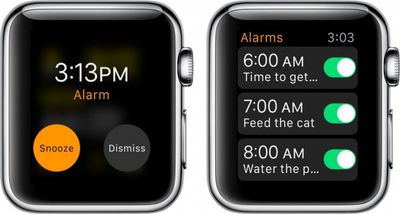
The Alarm app on Apple Watch is completely separate from the iPhone, but the two are not mutually exclusive. Alarms will not sync between devices. However, if you are wearing Apple Watch when an alarm goes off on your iPhone, you will receive an alert and be able to dismiss or snooze it.
Apple Watch Alarm

To set an alarm on Apple Watch:

  1. Open the Alarm app on Apple Watch.
  2. Firmly press the screen to call up the add (+) symbol.
  3. Change the time and repetition. Name the alarm using Dictation. Turn on or off the snooze feature.
  4. Toggle the alarm on or off when you want to activate it.

To delete an alarm, tap it. Then, scroll to the bottom and tap Delete.

Stopwatch

The Stopwatch app on Apple Watch is robust with multiple options for tracking your fitness routine and other activities you might want to use a stopwatch with.
Apple Watch Stopwatch
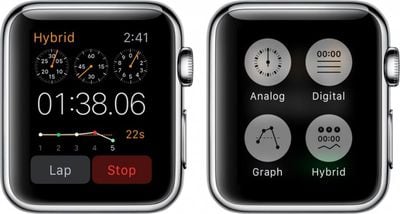
There are four different types of stopwatches. To access the different types, firmly press on the screen to call up the four stopwatch icons.

Analog:
The Analog display shows the seconds on a minute clock face. Tap the green button to start the stopwatch. Tap the white button to set a new lap or reset the data. Tap the red button to stop the stopwatch.

Digital:
The Digital display shows the minutes, seconds, and milliseconds as digital data. Tap the Start button to start the stopwatch. Tap the Lap button to set a new lap. Tap the Stop button to stop the stopwatch. Tap Reset to clear the data.

Graph:
The Graph display shows the information on a graph based on how much more or less time each lap uses. Follow the instructions for the Digital display to control the Graph display.

Hybrid:
The Hybrid display shows the most important features of all three. The analog clock face shows the minutes, seconds, and milliseconds, as does the digital data. The graph shows your progress as it pertains to the previous lap. Follow the instructions for the digital display to control the Hybrid display.

With the Timer, Alarm, and Stopwatch apps on Apple Watch, you can quickly and easily access the same features available within the iPhone's Clock app, but without having to navigate through so many sections. Each app is specially designed to optimize its most important features.


Related Roundup: Apple Watch 12
Buyer's Guide: Apple Watch (Buy Now)
Related Forum: Apple Watch

Top Rated Comments

keysofanxiety Avatar
148 months ago
Next week's article: "How to use the home button on the iPhone"
Score: 13 Votes (Like | Disagree)
Arran Avatar
148 months ago
Next week's article: "How to use the home button on the iPhone"
It does a lot more than many people realize.

Score: 6 Votes (Like | Disagree)
148 months ago
If you hate MR so much, why don't you just go elsewhere to complain?
Maybe he did not see the previous article on how to do that.
Score: 5 Votes (Like | Disagree)
148 months ago
Next week's article: "How to use the home button on the iPhone"
I found this to be a useful article. If you hate MR so much, why don't you just go elsewhere to complain?
Score: 4 Votes (Like | Disagree)
Arran Avatar
148 months ago
Well, I didn't know you could force-touch on the timer.

Good article.
Score: 3 Votes (Like | Disagree)
Benjamin Frost Avatar
147 months ago
Well, I didn't know you could force-touch on the timer.

Good article.
It suggests that force touch is fundamentally not a good idea, as you can't ever know what it is used for; the very opposite of a transparent user-interface, ironically, given the invisibility of its appearance.
Score: 2 Votes (Like | Disagree)

Popular Stories

apple watch s12 ultra 4

Apple Watch Series 12, Ultra 4 Owners Report Skin Irritation

Wednesday October 7, 2026 12:02 pm PDT by
Some Apple Watch Series 12 and Ultra 4 owners have experienced unexpected skin irritation with the new models, according to reports on the MacRumors forums and Reddit. Affected users complain of a burning sensation and redness under the sensor area. The Apple Watch Series 12 and Ultra 4 measure heart rate every five seconds, and some people have wondered if that's the cause of the skin...
southern straps 3 1

MacRumors Giveaway: Win an Apple Watch Series 12 and a Nylon Band From Southern Straps

Friday October 9, 2026 10:20 am PDT by
For this week's giveaway, we've teamed up with Southern Straps to offer MacRumors readers a chance to win an Apple Watch Series 12 and a nylon band from Southern Straps to go along with it. Southern Straps is a California-based company that has been making high-quality bands for the Apple Watch since the device first launched in 2015, and the company's selection of bands offer a an...
apple watch series 6 blood oxygen monitoring 1

Apple's $634 Million Apple Watch Patent Bill Just Got Even Bigger

Tuesday October 6, 2026 6:09 am PDT by
Apple's $634 million patent loss to medical technology company Masimo has just gotten even bigger, after a federal judge ordered Apple to pay an additional $184 million in interest on what it owes (via Bloomberg Law). The ruling takes Apple's bill to around $818 million, but that doesn't include any post-judgment interest continuing to accrue until the judgment is paid. Judge James Selna ...
Latest Stories
Tesla App Gains iPad and iPhone Duo Support
44 minutes ago
Apple Reportedly Boosts iPhone Duo Orders by 44%
1 hour ago
Fortnite Returning to Australian App Store After Court Ruling
2 hours ago
Apple Ordered to Open iPhone to Rival App Stores in Australia
2 hours ago
Apple Suppliers Face Hurdles Cutting Circuit Board Emissions
2 hours ago
Things Updated for iPhone Duo With Adaptive Layout
3 hours ago
Simplicity and Siri AI Are HomeView's Killer Features, Apple Says
3 hours ago
iPhone Duo Reviewers Really Miss Face ID
8 hours ago
Does the iPhone Duo Run Hot? Here's What Reviews Found
9 hours ago
Apple Music's New Look is Now Live on Apple's Website
10 hours ago
Anthropic Launches Claude Duet, a Proactive AI Agent
11 hours ago
What 32,000 Folds Did to the iPhone Duo's Hinge
11 hours ago
iPhone Duo's Hidden FaceTime Camera Takes 'Trash' Photos
13 hours ago
iPhone Duo Has 'Edge Light' Feature That Debuted on Macs Last Year
14 hours ago
Apple Support App Updated for iPhone Duo's Larger Display
14 hours ago
Amazon Sweetens the Deal on Entry-Level 16-Inch MacBook Pro With $570 Off
14 hours ago
iPhone Duo Tips Over on MagSafe Stands When Unfolded
14 hours ago
Apple Music's New Look Officially Announced
15 hours ago
iPhone Duo Supports Apple Pencil Starting With iOS 27.2
16 hours ago
iPhone Duo Accessories Roundup: Cases and Screen Protectors From OtterBox, ZAGG, and More
17 hours ago
Apple Stores Will Have 'Limited' Availability of iPhone Duo for Walk-In Customers
17 hours ago
iPhone Duo Reviews Explain Why Device is Both 'Fun' and 'Frustrating'
18 hours ago
Apple Says 'Reachability' Feature Coming to iPhone Duo Later This Year
19 hours ago
Loop Capital Cuts Apple Rating Over iPhone Sales Outlook
23 hours ago
Apple Stores in Bordeaux and Lille Looted During French Protests
23 hours ago
Bluesound Adds Native Apple Music Support
23 hours ago
Apple CEO John Ternus Explains What Makes Good Product Design
1 day ago
UK Proposes New Ways to Help Apple Pay Rivals
1 day ago
WhatsApp Developing In-App Browser for All Chat Links on iPhone
1 day ago
Apple's App Store Chief Explains Its Push for Premium Games
1 day ago









































