Apple Watch Ultra: How to Use the New Optimized Charge Limit Feature - MacRumors
Skip to Content

Apple Watch Ultra: How to Use the New Optimized Charge Limit Feature

by

All Apple Watch models running watchOS 7 or later include a Battery Health feature called Optimized Battery Charging that extends the total battery life of your Apple Watch by learning from your habits and waiting to finish charging all the way up until you need your ‌Apple Watch.

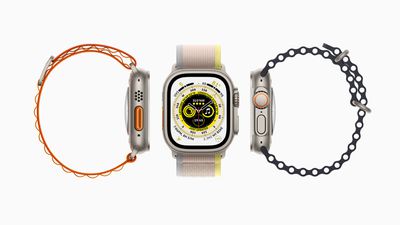
Apple Watch Ultra 3up hero 220907 Full Bleed Image
Apple Watch Ultra can last up to 36 hours on a single charge – the longest battery life of any Apple Watch – and to extend battery life even further, Apple Watch Ultra offers even more intelligent battery charge optimization with something called Optimized Charge Limit.

On by default when you set up your Apple Watch, Optimized Charge Limit use on-device machine learning to analyze your daily usage and determine when to charge to an optimized limit and when to allow a full charge. The feature changes dynamically depending on how you use your Apple Watch Ultra. For example, based on usage patterns, your watch might charge to 100% on some days, and less on others.

When Optimized Charge Limit is active, an open charge ring is displayed when you connect your Apple Watch Ultra to its charger. It's possible to charge your watch beyond the optimized limit by following the steps below.
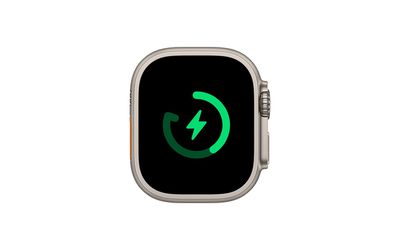
watch

How to Charge Apple Watch Ultra Beyond the Optimized Charge Limit

  1. Make sure that your Apple Watch Ultra is connected to its charger.
  2. Tap the watch display to wake the charging screen, then tap the circle with the green or yellow charging icon.
  3. Tap Charge to Full Now.

How to Disable Optimized Charge Limit

If you want your Apple Watch Ultra to fully charge every time its placed on the charge, disable Optimized Battery Charging by following these simple steps.

  1. Open the Settings app on your Apple Watch Ultra.
  2. Scroll down and tap Battery.
  3. Tap Battery Health.
  4. Toggle off the switch next to Optimized Charge Limit.
  5. Choose Turn Off Until Tomorrow or Turn Off.

Help Optimized Charging Identify Locations

Optimized charging is designed to activate only in locations where you spend the most time, such as your home and place of work. The feature doesn't turn on when your usage habits are more variable, such as when you travel.

To help your Apple Watch Ultra identify situations where Optimized Charge Limit shouldn't be used, turn on the following location settings in the Settings app on your Apple Watch Ultra:

  • Privacy -> Location Services -> Location Services
  • Privacy > Location Services > System Services > System Customization
  • Privacy > Location Services > System Services > Significant Locations > Significant Locations

The location information for this feature remains on your watch and none of it is sent to Apple.

Related Roundup: Apple Watch Ultra 4
Related Forum: Apple Watch

Top Rated Comments

AMagicianNamedJOBs Avatar
53 months ago
It would be great if Apple could just give us an option “don’t charge above 80%” and leave it there. I use Al Dente on the Mac but “optimized” charging has never worked consistently for me on Watch or iOS.


Score: 10 Votes (Like | Disagree)
jclardy Avatar
53 months ago

My experience with this feature on iPhone and Mac is that, at least for me, it does nothing. I always find my devices charge to 100% as soon as I plug-in and stay fully charged all night. I have left my MacBook plugged-in for a month straight and charge was limited to 80% after week at fully charged but it only lasted a night and next morning the laptop was at 100% for another week.
I now use Aldente on MacBook, have setup automations on iPhone to manage this and disabled optimised charging on both devices.
This is a different feature (on the Ultra.) Optimized battery charging should never give you 80% battery in the morning...it just changes charging time so that it charges straight to 80%, then waits until an hour or so before it thinks you will need the device, then charges the last 20%. It'll only work if you have a semi-fast charger (Otherwise on a 5w charger you need all night to charge.) It also needs a decent amount of time to figure out your schedule (For example, my new iPhone isn't doing it yet as I've only had it for a week) because the primary objective is for you to have a full battery in the morning, the secondary objective is to improve battery performance in the long run.

On the Ultra, this new feature will only charge to 80%, since the battery life already lasts 2 days. Basically, Apple Watch users are already accustomed to charging every night, so this feature should greatly increase the longevity of the Ultra battery since those users may never need the full 100% charge.
Score: 5 Votes (Like | Disagree)
53 months ago
If the vanilla optimised charging is any indication of what to expect from this, it will break the second you dare deviate from any routine. A welcome addition but I don’t know why they can’t also give users the option to rigidly cap their maximum charge in the sprit of AlDente. We don’t all need ‘machine learning’ to babysit our decision making.
Score: 3 Votes (Like | Disagree)
richie510 Avatar
53 months ago
I welcome this new feature, and hope that Apple extends it to other products, the first targets should be the high battery capacity iPhones. These "machine learning" battery features a great for a large number of users who really don't pay that much attention to these kinds of things.

Still, there should be a power setting to not charge past 80% on all Apple devices, and a setting to not charge past 80% at "this" location. Typically, I think "this" location should be my home, but let me choose.
Score: 1 Votes (Like | Disagree)
M33-1 Avatar
53 months ago
Another feature by a company in a blackout state trying to control your power charging that best fits their viewpoint. Turn it off asap if it’s on.
Score: 1 Votes (Like | Disagree)
53 months ago
My experience with this feature on iPhone and Mac is that, at least for me, it does nothing. I always find my devices charge to 100% as soon as I plug-in and stay fully charged all night. I have left my MacBook plugged-in for a month straight and charge was limited to 80% after week at fully charged but it only lasted a night and next morning the laptop was at 100% for another week.
I now use Aldente on MacBook, have setup automations on iPhone to manage this and disabled optimised charging on both devices.
Score: 1 Votes (Like | Disagree)

Popular Stories

apple watch s12 ultra 4

Apple Watch Series 12, Ultra 4 Owners Report Skin Irritation

Wednesday October 7, 2026 12:02 pm PDT by
Some Apple Watch Series 12 and Ultra 4 owners have experienced unexpected skin irritation with the new models, according to reports on the MacRumors forums and Reddit. Affected users complain of a burning sensation and redness under the sensor area. The Apple Watch Series 12 and Ultra 4 measure heart rate every five seconds, and some people have wondered if that's the cause of the skin...
lululook apple watch titanium

MacRumors Giveaway: Win an Apple Watch Ultra 4 From Lululook

Friday September 25, 2026 10:56 am PDT by
For this week's giveaway, we've teamed up with Lululook to offer MacRumors readers a chance to win a new Apple Watch Ultra 4. Lululook makes all kinds of accessories for Apple devices, including the Apple Watch. The company has a selection of Apple Watch bands that work well with the new Series 12 and the Ultra 4 models. Lululook's $129.99 Strata Milanese Band matches the Apple Watch Ultra...
ifixit apple watch series 12 teardown

Apple Watch Series 12 and Ultra 4 Score 4/10 for Repairability

Wednesday October 7, 2026 2:44 pm PDT by
Repair site iFixit this week continued taking apart the latest Apple devices, this time tearing down the Apple Watch Series 12 and the Apple Watch Ultra 4. The Apple Watch Ultra 4 has no repairability changes. There are copious amounts of glue between the casing and the display for waterproofing, and getting to the battery has to be done through the screen. It's easy to slice through the...
Latest Stories
Tesla App Gains iPad and iPhone Duo Support
1 hour ago
Apple Reportedly Boosts iPhone Duo Orders by 44%
2 hours ago
Fortnite Returning to Australian App Store After Court Ruling
2 hours ago
Apple Ordered to Open iPhone to Rival App Stores in Australia
2 hours ago
Apple Suppliers Face Hurdles Cutting Circuit Board Emissions
3 hours ago
Things Updated for iPhone Duo With Adaptive Layout
3 hours ago
Simplicity and Siri AI Are HomeView's Killer Features, Apple Says
4 hours ago
iPhone Duo Reviewers Really Miss Face ID
9 hours ago
Does the iPhone Duo Run Hot? Here's What Reviews Found
10 hours ago
Apple Music's New Look is Now Live on Apple's Website
11 hours ago
Anthropic Launches Claude Duet, a Proactive AI Agent
11 hours ago
What 32,000 Folds Did to the iPhone Duo's Hinge
12 hours ago
iPhone Duo's Hidden FaceTime Camera Takes 'Trash' Photos
13 hours ago
iPhone Duo Has 'Edge Light' Feature That Debuted on Macs Last Year
14 hours ago
Apple Support App Updated for iPhone Duo's Larger Display
14 hours ago
Amazon Sweetens the Deal on Entry-Level 16-Inch MacBook Pro With $570 Off
15 hours ago
iPhone Duo Tips Over on MagSafe Stands When Unfolded
15 hours ago
Apple Music's New Look Officially Announced
16 hours ago
iPhone Duo Supports Apple Pencil Starting With iOS 27.2
17 hours ago
iPhone Duo Accessories Roundup: Cases and Screen Protectors From OtterBox, ZAGG, and More
18 hours ago
Apple Stores Will Have 'Limited' Availability of iPhone Duo for Walk-In Customers
18 hours ago
iPhone Duo Reviews Explain Why Device is Both 'Fun' and 'Frustrating'
18 hours ago
Apple Says 'Reachability' Feature Coming to iPhone Duo Later This Year
19 hours ago
Loop Capital Cuts Apple Rating Over iPhone Sales Outlook
23 hours ago
Apple Stores in Bordeaux and Lille Looted During French Protests
1 day ago
Bluesound Adds Native Apple Music Support
1 day ago
Apple CEO John Ternus Explains What Makes Good Product Design
1 day ago
UK Proposes New Ways to Help Apple Pay Rivals
1 day ago
WhatsApp Developing In-App Browser for All Chat Links on iPhone
1 day ago
Apple's App Store Chief Explains Its Push for Premium Games
1 day ago