
How to Receive Unique Alerts for VIP Emails on iPhone and iPad - MacRumors
Skip to Content

How to Receive Unique Alerts for VIP Emails on iPhone and iPad

by

ios 11 mail icon pn e1543485132148If you use the VIP feature in the iOS Mail app then you'll already know how they can help you keep track of important messages from your key contacts amid the daily torrent of incoming emails.

Keeping on top of VIP emails can be made even easier by ensuring you receive a specific sound or vibration alert whenever one comes through on your iPhone or iPad. That way you'll know if a new message justifies your immediate attention before you've even looked at your iOS device. Here's how to set them up.

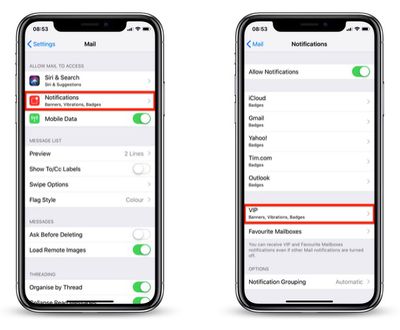
  1. Launch the Settings app on your iPhone or iPad.
  2. Tap Mail in the list.
    how to assign a sound alert to VIP emails01

  3. Tap Notifications.
  4. Tap VIP.
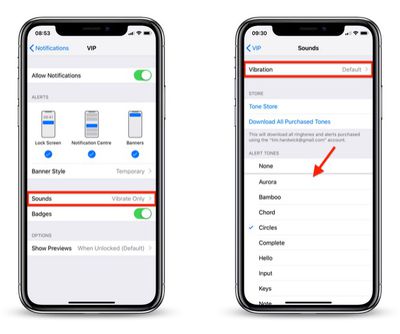
  5. Tap Sounds.
    how to assign a sound alert to VIP emails02

  6. Choose a unique sound from the list or tap Vibration to select a special vibration. The default sound alert is Ding (Classic), so be sure to choose something different.
With that done, the next time you receive an email from one of your VIPs, you'll get the unique notification alert and immediately know it's an important message.


Top Rated Comments

chino-rican Avatar
96 months ago
This assumes the following is activated: Settings > Passwords & Accounts > Fetch New Data > Push > ON; Change the desired email account to Fetch.

Otherwise, you will only get the alert if you open the Mail app and download new emails.
Score: 1 Votes (Like | Disagree)
johnnyturbouk Avatar
96 months ago
This is all very well but I tend to have my phone on silent a lot, as I work with patients. What would be an elegant and really useful feature would be if apple adopted a filter system like sanebox. Using smart machine learning to recognise the difference btwn random crap from group-on and amazon reporting offers, to say receipts. I currently have my gmail as my professional email account, me.com for family and yahoo for signing up with companies that I know willl then spam my email.
Score: 1 Votes (Like | Disagree)

Popular Stories

iOS 26

iOS 26.4 Adds Two New Features to CarPlay

Tuesday March 24, 2026 1:55 pm PDT by
iOS 26.4 was released today, and it includes a couple of new features for CarPlay: an Ambient Music widget and support for voice-based chatbot apps. To update your iPhone 11 or newer to iOS 26.4, open the Settings app and tap on General → Software Update. CarPlay will automatically offer the new features so long as the iPhone connected to your vehicle is running iOS 26.4 or later....
Apple Business hero

Apple Unveils 'Apple Business' All-in-One Platform

Tuesday March 24, 2026 8:53 am PDT by
Apple today announced Apple Business, a new all-in-one platform that unifies device management, productivity tools, and customer outreach features. The service is designed to be a consolidated replacement for several of Apple's existing business-focused offerings, including Apple Business Essentials, Apple Business Manager, and Apple Business Connect. It provides organizations with a single...
AirPods Pro Firmware Feature

Apple Releases New Firmware for AirPods Pro 3, AirPods Pro 2 and AirPods 4

Tuesday March 24, 2026 12:31 pm PDT by
Apple today released new firmware for the AirPods Pro 2, AirPods Pro 3, and the AirPods 4. The firmware has a version number of 8B39, up from 8B34 on the AirPods Pro 3, 8B28 on the AirPods Pro 2, and 8B21 on the AirPods 4. There is no word on what's included in the firmware, but Apple has a support document with limited notes. Most updates are limited to bug fixes and performance...















